
Quick Start Guide
The goal of this guide is to get you up to speed quickly on the basic operation of HydroGeoSphere (HGS). The topics covered include:
HGS installation.
A brief overview of the key executable files.
Running a model.
HGS Installation
HydroGeoSphere consists of a suite of 64-bit applications that
target either the Windows (Windows 7 and newer) or Linux operating
systems. In order to run HGS, a valid HGS license file hgs.lic must
be present in the installation directory. To obtain a valid HGS license
file, please email the hostid.txt file located in the installation
directory to info@aquanty.com.
Windows
By default, HGS is installed in the directory:
C:\Program_Files\HydroGeoSphere
The installation folder contains the key executable files (grok.exe,
phgs.exe, hsplot.exe, hsbatch.exe) required for simulation
and results post-processing, the hostid.txt file, and a number of
DLL files. Folders within the installation directory include:
docs: This folder contains the theory, reference, and verification manuals which are important references for model setup.
illustration and verification: These folders contain example problems, many of which are discussed in the verification manual.
Note that the installer will attempt to add the installation directory to your system path. Should it fail to do so, for example, if it does not have write access, then you will need to update your system path manually. We recommend that you always run the installer with administrator privileges if possible.
Linux
In Linux, HGS is installed under the current folder in the directory:
HydroGeoSphere-RevNum-Linux
where “RevNum” is the revision number of the installation. The
installation folder contains the key binary files (grok, hgs,
hsplot, hsbatch), the hostid.txt file, and the EULA. Folders
within the installation directory include:
docs: This folder contains the theory, reference, and verification manuals which are important references for model setup.
lib: This folder contains the external dependency library files.
verification: This folder contains example problems, many of which are discussed in the verification manual.
The installer modifies the ~/.bashrc file by adding the new
environment variable HGSDIR that points to the HGS installation
directory, the HGS installation directory to PATH, and the lib
directory to LD_LIBRARY_PATH. Users are required to either start a
new shell or run source ~/.bashrc for these changes to be added to
their environment.
Some notes to keep in mind:
Users are encouraged to check the contents of their
~/.bashrcfile to ensure their bash environment is set up appropriately for their own computing purposes and for running HydroGeoSphere.Users on other Linux terminal shells (e.g., zsh, csh, ksh, etc.) should maintain their own shell profiles to appropriately set their
HGSDIR,PATH, andLD_LIBRARY_PATHenvironment variables, if necessary. Please consult with your local system administrator if you are unsure about how to do this for your HPC computing environment.
Key Executable Overview
There are three steps required to setup, simulate, and view the results of a simulation.
A data file is prepared for the pre-processor (called grok) which is then run to generate the input data files for HGS.
HGS is run to solve the problem and generate output data files.
Depending on the problem, post-processing of the data is completed using HSPLOT, to convert the data into a Tecplot compatible format for visualization and analysis.
Grok (grok.exe)
The grok input file contains all of the information and instructions
required for the HGS simulation. This file name consists of a meaningful
prefix (up to 40 characters) to which the extension .grok is
appended. For example, if the problem prefix created by the user is
test, then the general input file created by the user will be
test.grok. Grok will attempt to read the problem prefix from the
batch.pfx file, which contains a single line with the prefix name.
If grok is unable to find this file, then the user will be prompted
to enter the prefix name at the console. Information contained within
the grok file includes mesh definition, model parameterization,
initial conditions, boundary conditions, convergence criteria, and
simulation output criteria. The pre-processor, grok, performs its
task in the following order:
Read and allocated default array sizes.
Read the problem identification information.
Read instructions for generating the grid.
Perform grid modifications if necessary.
Generate default properties for all parameters.
Read optional instructions for modifying the default parameters.
Write the HGS-compatible data types.
.grok file has been built by the user it is
compiled by running grok.exe. A more detailed description of
grok and its associated commands are contained in Chapter :ref:.grok files in the illustration
and verification folders are an excellent resource for reviewing
grok structure and the use of grok commands.HGS (phgs.exe)
After the execution of grok.exe, which writes all the HGS-compatible
data files, phgs.exe is executed to perform the model simulation.
There is little user involvement at this stage other than the
configuration of the parallel execution details in the file
parallelindx.dat.
The file parallelindx.dat does not exist, phgs.exe will create
it when it is launched. This file tells phgs.exe how many processors
to use the simulation. By default parallelindx.dat is created
assuming the simulation is being performed in serial mode, i.e., one
processor.
__Number_of_CPU
           1
__Num_Domain_Partitiong
           1
__Solver_Type
           1
__Coloring_Input
 F
__Wrting_Output_Time
  -1.00000000000000
__Simulation_Restart
           1
To increase the level of parallelization, change the values of “__Number_of_CPU” and “__Num_Domain_Partitiong” (these values should be the same). When setting these values it is important to make sure you don’t exceed the number of processors available on your machine. In general we recommend that at most you use up to two fewer than the total number available. For example, if your machine has eight processors, we recommend that you use up to six if you plan on using the machine for other tasks. Note that when the number of CPUs requested is greater than one, the solver type must be changed to 2.
The following example shows how the parallelindx.dat file would be
set up to use 6 processors for a simulation.
__Number_of_CPU
           6
__Num_Domain_Partitiong
           6
__Solver_Type
           2
__Coloring_Input
 F
__Wrting_Output_Time
  -1.00000000000000
__Simulation_Restart
           1
You do not have to wait for phgs.exe to generate the
parallelindx.dat file each time you run a simulation. You can copy
the file from a previous simulation to your current model folder.
Changing parallelindx.dat while the simulation is running will not
affect the number of processors being used. To change the level of
parallelization it is necessary to stop and restart the simulation.
HSPLOT (hsplot.exe)
The executable hsplot.exe is used the post-process the simulation
results for viewing in Tecplot. HSPLOT can be executed during an HGS
run or following its completion. The resulting output files
(prefixo.domain.dat) can be opened in Tecplot to view
the simulation results in three dimensions.
Running a Model
We conclude this chapter by describing the steps to run the Abdul model problem, the model files for which can be found in
C:\Program_Files\HydroGeoSphere
For additional details on this problem the user is referred to the
verification manual hydrosphere_verif.pdf. The steps to run this
model problem are as follows.
Copy
grok.exe,phgs.exe, andhsplot.exetoC:\Program_Files\HydroGeoSphere.Run
grok.exe.Run
phgs.exe.Run
hsplot.exe.Open
abdulo.olf.datandabdulo.pm.datwith Tecplot to view the simulation results.
Note that Windows users who receive a DLL error when running one of the
executable files should copy the DLL files from the installation folder
to the current simulation folder. Alternatively, Windows users can add
the directory C:\Program_Files\HydroGeoSphere to their system path.
Updating the system path makes it possible to run a model from any
folder without copying any HGS executable files or DLL files to that
folder and is the preferred method of operation.
Input/Output Instructions
General
the numerical simulations, some general information about the format and nature of the input data is first given.
There are two steps involved in solving a given problem. First, a data file is prepared for the pre-processor (called grok 1) which is then run to generate the input data files for HydroGeoSphere. Second, HydroGeoSphere is run to solve the problem and generate output data files.
The grok input file name consists of a meaningful prefix of up to 40
characters to which the extension .grok is appended. This prefix
will determine the input and output filenames. The grok listing file
name will be the problem prefix to which the letter o and the file
extension .eco are appended. For example, if the problem prefix
specified by the user is test, the general input file to be created
by the user will be test.grok and the output listing, or echo,
file generated by the pre-processor will be testo.eco. Some
simulations will require more than one input file (e.g. initial heads
read from file) and will result in the generation of more than one
output file. As a rule, all input files needed during a specific
simulation will have the problem prefix plus a given extension as
filename while all generated output files will have the problem prefix,
the letter o, plus a given extension as filename.
Throughout the manual, we will adopt the convention of using italics
to indicate problem-dependent, user-defined portions of filenames
(e.g. prefix, species name etc.) and typewriter font to indicate
invariant portions generated by HydroGeoSphere. For example, in the
filename prefixo.conc.species.0001 the prefix and
species portions would be the user-defined prefix and name of a
solute, or species, while the o.conc. and .0001 portions would
be generated by HydroGeoSphere automatically.
After the pre-processor starts executing, it prompts the user to enter
the prefix for the problem interactively from the keyboard. For cases in
which the same input file is being used repeatedly, you can create a
file called batch.pfx which consists of a single line which contains
the problem prefix. If the file is present, the prefix will
automatically be read from the file and you will not be prompted to
enter it from the keyboard. This file should be placed in the same
directory as the prefix.grok file.
Briefly, the pre-processor performs its tasks in the following order:
#. Read and allocate default array sizes .. _task:def_array:
Read problem identification information
#. Read instructions for generating grid .. _task:ggrid:
Perform grid modifications if necessary
#. Generate default properties for all parameters .. _task:defdata:
Read optional instructions for modifying the default parameters
Write the HydroGeoSphere-compatible data files
.grok file. The generation of a complete set of default
data by Task :ref:Here is an example instruction and some input data which illustrates some common conventions that will be used throughout the manual:
Example instruction text
xlen, nbx Domain length [L] and number of blocks in the \(x\)-direction.
xi(i), i=1,nx Nodal \(x\)-coordinates [L].
inode(i)…end Node numbers.
\(\bullet \bullet \bullet\)
The pre-processor instruction is separated from the preceding text by a
horizontal line, and is written using the sans serif font. It must be
typed in the prefix.grok file exactly as shown, with the
exception that it is not case-sensitive, and blanks before and after the
instruction are optional. Note that only one blank is allowed between
any two words in an instruction.
If the instruction requires input data, there will follow a series of numbered lines, each containing boldfaced variable names and a description of what is to be read. Each numbered line will correspond to one or more Fortran read statements.
Usually, the number of items required in the data file are indicated by how many boldfaced variable names are present on the line. The default Fortran variable naming conventions are in effect. This means variables starting with the letters IN inclusive require integer values, while all the rest require real values, unless stated otherwise in the case of string or logical variables. Numerical values are read in free-format so integers and reals do not need to be lined up in columns and they can be separated by blanks or commas. A descriptive comment can be included inline after the last data value has been read from the line, but should be avoided when reading character strings (e.g., filenames).
In this example, three items of input are required. The first item xl, nbx requires that the user enter a real value (i.e. domain length) followed by an integer value (i.e. number of blocks) on the first non-blank or uncommented line following the instruction.
The second item xi(i), i=1,nx reads nx real values into the array xi. The size of nx is problem dependent (e.g., number of nodes in \(x\), number of species, etc.) and it is up to the user to supply enough values to satisfy the read statement. The values may be entered on one line or spread out over multiple lines as desired. If they are entered on one line, they should be separated by spaces or commas.
Finally, the third item inode(i)…end indicates a list, in this case of node numbers, that is to be read until an end instruction is encountered. The list values must be entered one per line.
The end of the documentation that pertains to a specific instruction is designated by three dots: \(\bullet \bullet \bullet\).
So for this example instruction, assuming that nx is equal to 5, the
following statements in the prefix.grok file would satisfy the
input requirements:
Example instruction text
10.0    100
0.0   2.0   4.0   6.0   8.0   10.0
1
2
3
5
6
end
In some cases (there are not too many) an instruction will have a more complex input structure of the form val(i,j), i=1,m, j=1,n. The indices are always listed from fastest to slowest varying reading from left to right. Hence, this input would be written in a file as:
val11 val21 ... valm1
val12 val22 ... valm2
  :     :         :
val1n val2n ... valmn
Naturally, if index \(j\) was listed first followed by index \(i\), then the input in the file would be transposed. In all cases the instruction will contain a helpful example to show how the input should be formatted in the file.
Some instructions are controlled by input routines that have their own subset of input instructions, some or all of which may be optional. For example, the instruction Solute is used to define a new solute and in its simplest form appears as:
Solute
end
In this case, the End instruction immediately follows the Solute instruction, and no optional instructions have been issued. The End statement is required so that grok knows when to exit the solute definition routine. Such instructions will be indicated using the following convention:
Example instruction text…End
\(\bullet \bullet \bullet\)
where the text …End indicates that the instruction (e.g. Solute) will be followed by optional instructions or input and terminated by an End instruction.
.grok or a material properties file (see Section :ref:Included files can be used to avoid having to cut and paste or comment
and uncomment large sections of input instructions. Long lists (e.g. of
node numbers or boundary condition data) and cases where various
different grid generation approaches are being tried are good candidates
for application of the include feature. For example, if we wanted to use
include to supply data to the example given above, we could use the
following instruction in prefix.grok:
Example instruction text
10.0    100
0.0   2.0   4.0   6.0   8.0   10.0
include my.node_list
and where the file my.node_list could contain, for example:
1
2
3
5
6
end
If you now wanted to substitute another node list you could, for
example, supply different node numbers in the file
my_other.node_list and then just change the file name given in the
include instruction.
Included files can contain groups of instructions and input, or just bits of input for a single instruction. Only one level of include instruction is allowed, and so included files can not themselves contain include instructions.
As grok reads and processes the copy of the prefix.grok file
it also creates the prefixo.eco file. Results of the
HydroGeoSphere data generation procedures are written to this file
so if there are any problems reported by the pre-processor you should
check this file first to determine their nature and how you might fix
them. If an error occurs while reading the input data, then
grok will halt execution and issue an error message (to the screen
and the prefixo.eco file) of the form:
INSTRUCTION: 500

**************************************
*** INPUT ERROR, HALTING EXECUTION ***
**************************************

GRID GENERATION: Unrecognized instruction

Press any key to continue
In this case the last instruction (i.e. 500) has, for some reason,
caused an error. You should now check the input files to further
investigate the cause of the problem, starting with the
prefix.grok and material properties files.
File Process Control Options
The following instructions control how the pre-processor treats
instructions in the prefix.grok file and can be inserted at any
point in the file and as often as required, except of course when input
for a specific instruction is expected.
Echo off
By default, as instructions are read by grok they are echoed to the screen. This command turns off this feature.
\(\bullet \bullet \bullet\)
Echo on
This commands turns on the echoing of instructions to the screen.
\(\bullet \bullet \bullet\)
Skip on
With skip mode turned on, grok will read but not act on any subsequent instructions.
\(\bullet \bullet \bullet\)
Skip off
Turns skip mode off, so grok will resume acting on instructions.
\(\bullet \bullet \bullet\)
Skip rest
grok exits the loop for reading instructions from the
prefix.grok file and proceeds to generate the
HydroGeoSphere data files.
\(\bullet \bullet \bullet\)
Pause
This instruction causes grok to pause at the current location in the
prefix.grok file until the user presses a key.
\(\bullet \bullet \bullet\)
User Defined Variables
To mimic the syntax for defining variables used by batch or shell scripts.
Because these commands are parsed by grok during scratch file generation and are not actually present in the final grok or material properties files.
We begin by describing how to define a new variable or overwrite the value of an existing one:
set variable $<varname>=<value>
The variable name ($<varname>) may consist of up to 256 characters,
is case insensitive, and must adhere to the following rules:
Contain at least two characters.
The first character must be the dollar sign ($), which is a special character reserved for identifying pre-processor variables.
The second character is a letter or underscore.
All remaining characters are letters, numbers, or an underscore.
The variable’s value (<value>), which is always treated as a string,
may consist of up to 4096 characters and must not contain a dollar sign
($) character. The set variable command ignores any leading/trailing
whitespace around the variable name and its value. Inline comments are
also ignored. For example, the following commands are equivalent:
set variable $path=C:/my\_file\_path    ! inline comment
set variable   $path =C:/my\_file\_path
set variable $path=   C:/my\_file\_path
set variable   $path  =  C:/my\_file\_path
Each command defines the variable $path to have the value
C:\char‘ my_file_path. If you wish to retain leading whitespace in
the variable value, then you can do so by enclosing it in double quotes
(). For example, the command
set variable $path=" C:/my\_file\_path"
assigns to the variable $path the value
`` C:textbackslash my_file_path``. Note that the enclosing double
quotes are automatically stripped from the variable value by the
set variable command. If you would like to assign an empty value to
a variable, then you can do so as follows using either of the equivalent
commands:
set variable $<varname>=
set variable $<varname>=""
If you use the set variable command without any parameters, then a
list of all currently defined variables and their values will be written
to the console. To undefine a variable that is currently defined you may
use the following command:
unset variable $<varname>
Similar to the set variable command, all leading/trailing whitespace
around the variable name is ignored. Note that calling
unset variable on a variable that is undefined has no effect. In
addition, you may use the following command to undefine all currently
defined variables:
unset all variables
Once a variable is defined, you can obtain its value via variable substitution simply by writing the variable’s name followed directly by a dollar sign ($). For example, the grok file commands
set variable $path1=D:\projects\my_project\include_files
set variable $path2=D:\projects\my_project\init_files

include $path1$\file1.include

initial head from file
$path2$\head0.txt
are equivalent to
include D:\projects\my_project\include_files\file1.include

initial head from file
D:\projects\my_project\init_files\head0.txt
Note that using the value of an undefined variable will result in a warning message being written to the console.
As discussed above, pre-processor variables are supported by the grok file, material properties files, and by all files included via an Include command. It is important to keep in mind that pre-processor variables have global scope among these files. For example, if your grok file defines a variable and then includes a file, that variable will be visible within the included file. If the included file then defines a variable with the same name, its value will be overwritten and will persist after the include statement has been processed. The same is true for the material properties files. Therefore, as a best practice, we recommend defining all pre-processor variables at the top of your grok file.
We now describe in detail the various actions of the pre-processor,
giving instructions for setting up the prefix.grok file where
necessary.
Units and Physical Constants
default of kilogram-metre-second units is assumed and used to define the values of certain physical constants as discussed below. The user should decide which units will be used for mass (M), length (L), and time (T) for the various input variables, issue the appropriate units instruction (or assign appropriate values for the physical constants) and then consistently use those chosen units for all other input data. The units of temperature \((\Theta)\), for example in the case of thermal transport, are expected to be in degrees Celsius unless stated otherwise. For example, if you want to specify the dimensions of your domain in metres and the time at which you want a solution is in seconds, then all measures of length and time will have to be in metres and seconds, respectively. The hydraulic conductivity should therefore be specified in m s\(^{-1}\), a pumping rate in m\(^3\) s\(^{-1}\), etc. The program does not perform any checks to ensure unit consistency.
Default values are assigned for the gravitational acceleration and fluid properties which correspond to standard values in the kilogram-metre-second system. These parameters are used when defining the properties of fractures, open wells and tile drains.
The following default values will be used for the physical constants and correspond to typical values in the kilogram-metre-second system:
- Gravitational acceleration \(g = 9.80665\) m s\(^{-2}\), Equation :ref:.
- Fluid density \(\rho = 1000.0\) kg m\(^{-3}\), Equation :ref:.
- Fluid viscosity \(\mu = 1.124 \times 10^{-3}\) kg m\(^{-1}\) s\(^{-1}\), Equation :ref:.
- Fluid compressibility \(\alpha_w = 4.4 \times 10^{-10}\) kg\(^{-1}\) m s\(^2\), Equation :ref:.
- Fluid surface tension \(\chi = 0.07183\) kg s\(^{-2}\), Equation :ref:.
If you are using different units or you want to change the default values you can do so using the following instructions.
Units: kilogram-metre-minute
Converts the default values given above into the kilogram-metre-minute
system. This instruction also converts the porous media, dual continuum,
fractured media, and surface flow default properties that are defined in
the code. Note, however, that it does not convert properties specified
in any prefix.grok, .mprops, etc. files. Similar
instructions exist for converting to the following systems:
Kilogram-metre-hour.
Kilogram-metre-day.
Kilogram-metre-year.
Kilogram-centimetre-second.
Kilogram-centimetre-minute.
Kilogram-centimetre-hour.
Kilogram-centimetre-day.
Kilogram-centimetre-year.
You can change the default values of the physical constants using the following instructions. If you change the default units from the kilogram-metre-second system make sure the values given here are in the new system.
\(\bullet \bullet \bullet\)
Gravitational acceleration
- grav Gravitational acceleration constant [L T:math:^{-2}], \(g\) in Equation :ref:.
\(\bullet \bullet \bullet\)
Reference fluid density
- rho Fluid density [M L:math:^{-3}], \(\rho\) in Equation :ref:.
\(\bullet \bullet \bullet\)
Reference fluid viscosity
- visc Fluid viscosity [M L:math:^{-1} T:math:^{-1}], \(\mu\) in Equation :ref:.
\(\bullet \bullet \bullet\)
Fluid compressibility
- wcomp Fluid compressibility [M:math:^{-1} L T\(^2\)], \(\alpha_w\) in Equation :ref:.
\(\bullet \bullet \bullet\)
Zero fluid compressibility
Assigns a value of zero for fluid compressibility (i.e., incompressible).
\(\bullet \bullet \bullet\)
Fluid surface tension
- tensn Fluid surface tension [M T:math:^{-2}], \(\chi\) in Equation :ref:.
\(\bullet \bullet \bullet\)
Pre-Processor Considerations
Array Dimensioning
array_sizes.default in the directory where the
prefix.grok file is located. If it is not found, the file is
automatically created and default array sizes are written which are
then used by the pre-processor. Associated with each default are a
descriptor and a default value. A portion of the file is shown here:dual: material zones
20
dual flow bc: flux nodes
10000
...etc...
tiles: flux function panels
20
wells: injection concentration function panels
100
end
So, for example, the default maximum number of dual continuum material
zones is 20. If the problem is defined such that an array exceeds the
default maximum (e.g. the number of node sheets in the
\(z\)-direction for layered grids exceeds 50) then grok will
halt execution and issue an error message (to the screen and the
prefixo.eco file) of the form:
*********************************************
*** DIMENSIONING ERROR, HALTING EXECUTION ***
*********************************************

 Pre-processor request exceeds default array size

 mesh: node sheets in z for layered grids
 Default value: 50
 Requested value: 100

 Increase the default value in file ARRAY_SIZES.DEFAULT
Given the descriptor in the error message, you can now edit the
array_sizes.default file and increase the appropriate value. Note
that the file is sorted alphabetically by descriptor. When you run
grok again, it will read the new default value from the file.
Re-compilation of the code is not necessary, since it uses Fortran
ALLOCATE statements to define array sizes at run-time.
HydroGeoSphere does not utilize the file array_sizes.default,
but instead uses exact array sizes determined and passed by grok.
Remember, this process is problem dependent, and each time you run
grok in a different directory, a fresh array_sizes.default file
will be generated with default values.
Problem Identification
The first section of the prefix.grok file should consist of a
description of the problem being defined. As for the rest of the file,
blank lines and lines beginning with an exclamation point (!) are
ignored.
The description can contain from zero up to as many lines as the user
requires to describe the problem. Each line can contain up to 60
characters. The description is printed at the beginning of the listing
files for grok (prefixo.eco) and
HydroGeoSphere (prefixo.lst).
The user must signal the end of the description using the End instruction.
End
This instruction signals the end of the description at which point control is passed back to the pre-processor.
\(\bullet \bullet \bullet\)
Grid Generation
consist of instructions for grid generation followed by an End instruction.
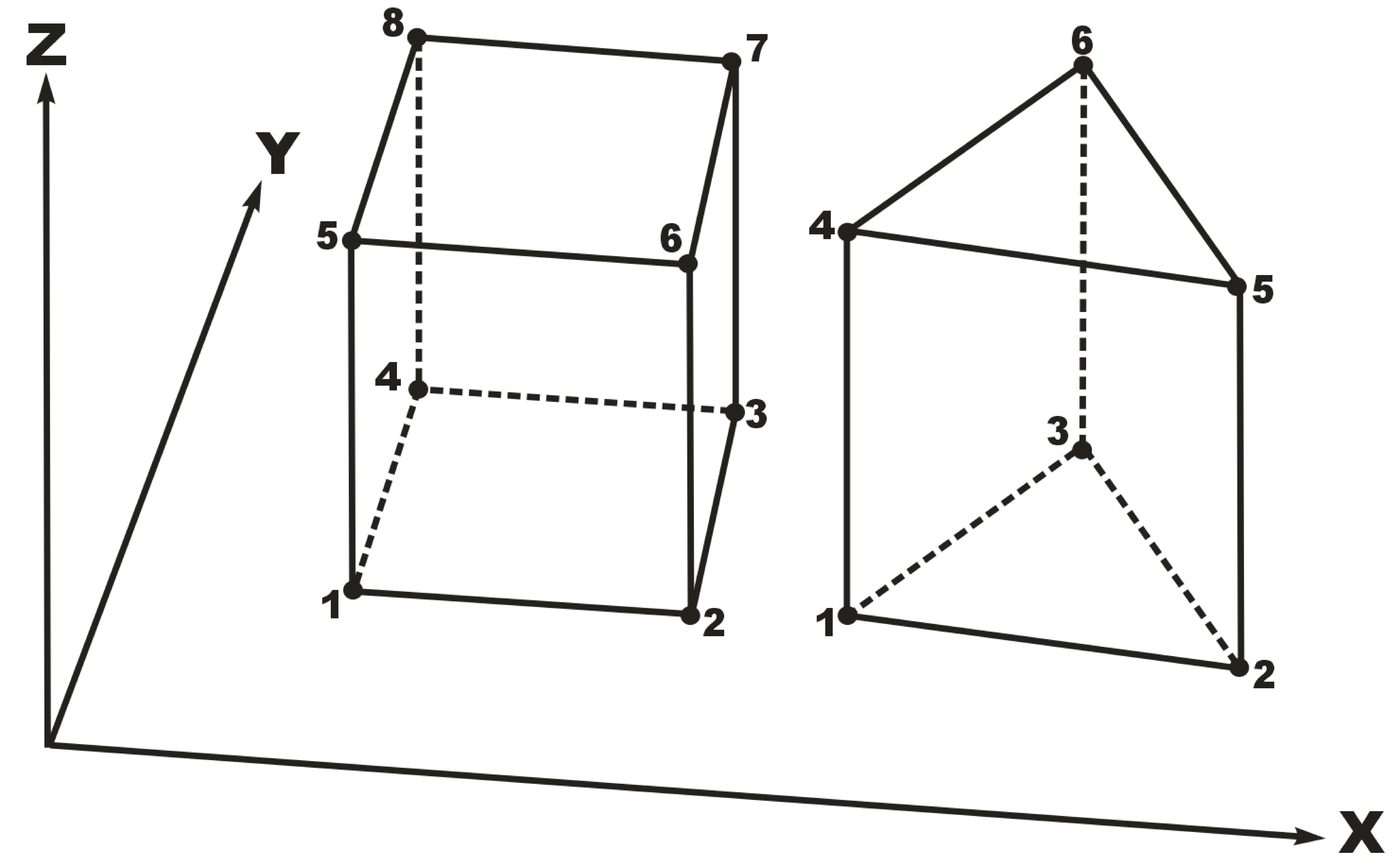
Element types and local node numbering conventions.
We will first discuss options for generating simple grids, followed by irregular grids.
Simple Grids
domains which are adequate for many problems. They can have uniform or variable element sizes and can be made of hexahedral block or triangular prismatic elements. Each element in the grid is given a default zone number of 1.
Generate uniform blocks
xlen, nbx, (x0) Domain length [L] and number of blocks in the \(x\)-direction, the optional origin in the \(x\)-direction [L] (zero by default).
ylen, nby, (y0) Domain length [L] and number of blocks in the \(y\)-direction, the optional origin in the \(y\)-direction [L] (zero by default).
zlen, nbz, (z0) Domain length [L] and number of blocks in the \(z\)-direction, the optional origin in the \(z\)-direction [L] (zero by default).
Generates a grid for a rectangular domain made up of uniform blocks. In this case, the grid is formed by subdividing the domain in the \(x\)-direction into nbx blocks, each of length xlen/nbx. The domain is subdivided in a similar fashion in the \(y\)- and \(z\)-directions, using the other input parameters.
\(\bullet \bullet \bullet\)
Generate uniform prisms
Generates a grid for a rectangular domain made up of uniform prisms. Requires identical input to the routine Generate uniform blocks described above. In this case though, instead of generating block elements, this instruction generates prism elements by subdividing each block into two prism elements.
\(\bullet \bullet \bullet\)
Generate variable blocks
nx Number of nodes in the \(x\)-direction.
x(i), i=1,nx Nodal \(x\)-coordinates [L].
ny Number of nodes in the \(y\)-direction.
y(i), i=1,ny Nodal \(y\)-coordinates [L].
nz Number of nodes in the \(z\)-direction.
z(i), i=1,nz Nodal \(z\)-coordinates [L].
Generates a grid for a rectangular domain made up of variably-sized blocks. It is almost identical to the Generate uniform blocks instruction except that instead of entering a domain length in each direction we enter a list of coordinates, which are each used to define the position of a plane of nodes along that axis. The structure x(i), i=1,nx is called an implied do and means that you must supply nx values for the array xi. One or more values can be entered per line until the read statement is satisfied, then a new line should be started for the next read statement. Note that the line length is limited by 3000 characters in any input instructions and thus, use additional lines for x(i), y(i), z(i) should your input exceed this limit.
\(\bullet \bullet \bullet\)
Generate variable prisms
Generates a grid for a rectangular domain made up of variably-sized prisms. Requires identical input to the routine Generate variable blocks described above. In this case though, instead of generating block elements, this instruction generates prism elements by subdividing each block into two prism elements.
\(\bullet \bullet \bullet\)
Interactive Block Grids
Interactive block instructions can be used to generate a grid made up of variably-sized blocks. The user can grade the mesh as desired in each of the three principal directions. This is particularly useful for regions in which fine meshes are required, for example, near a discrete fracture or well.
Note that these instructions cannot be used in conjunction with the other grid generation instructions such as Generate uniform block, Generate uniform prisms, Generate variable blocks, or Generate variable prisms.
Generate blocks interactive…End
Causes grok to begin reading a group of interactive block instructions until it encounters an End instruction. The group should contain of at least one instruction for each of the principal directions.
\(\bullet \bullet \bullet\)
The available instructions are:
Grade x
x1, x2, dxstart, xfac, dxmax Starting \(x\)-coordinate [L], ending \(x\)-coordinate [L], starting element size, element size multiplication factor, and maximum element size.
Grid lines (i.e. elements) are generated along the \(x\)-axis from x1 to x2 which grade up in size from dxstart to dxmax. Element sizes are increased steadily by a factor of xfac.
\(\bullet \bullet \bullet\)
Grade y
As above but for the \(y\)-axis.
\(\bullet \bullet \bullet\)
Grade z
As above but for the \(z\)-axis.
\(\bullet \bullet \bullet\)
generate blocks interactive
grade x
 75.0     0.0   0.01   1.5  5.0
grade x
 75.0   100.0   0.01   1.5  5.0
grade x
125.0   100.0   0.01   1.5  5.0
grade x
125.0   200.0   0.01   1.5  5.0
grade y
100.0     0.0   0.01   1.5  5.0
grade y
100.0   200.0   0.01   1.5  5.0
grade z
  1.0     0.0   0.25   1.0  0.25
grade z
  3.0     1.0   0.01   1.3  0.25
grade z
  3.0    11.0   0.01   1.3  0.25
grade z
 11.0    12.0   0.25   1.0  0.25
end generate blocks interactive
3-D Random Fracture Generator for Block Grids
The following command can be used to generate a 3-D random fracture network in an orthogonal domain (i.e., composed of 8-node block elements). Fractures with random locations, lengths, and apertures can be generated.
Rfgen driver
rfgfile Name of the file that contains the random fracture grid and fracture generation information.
The structure of the input file is described below.
\(\bullet \bullet \bullet\)
Grid information
x1, x2 \(x\)-range [L] of the domain.
y1, y2 \(y\)-range [L] of the domain.
z1, z2 \(z\)-range [L] of the domain.
botfracbnd Elevation [L] of lowest extent of a fracture. No fractures will be generated below this elevation.
nwell Number of wells.
xwell(i), ywell(i), i=1,nwell \(xy\)-coordinates [L] of the well. Generates \(x\)- and \(y\)-grid lines through each point.
xsource1, xsource2 \(x\)-coordinates [L] of the source. Generates \(x\)-grid lines at these points.
ysource1, ysource2 \(y\)-coordinates [L] of the source. Generates \(y\)-grid lines at these points.
zsource1, zsource2 \(z\)-coordinates [L] of the source. Generates \(z\)-grid lines at these points.
mingrspacx, mingrspacy, mingrspacz Minimum grid spacing [L] in the \(x\)-, \(y\)-, and \(z\)-directions, respectively. For example, a mingrspacx value of 1 would ensure that no gridlines are less than 1 length unit apart along the \(x\)-axis.
fixed_grid Logical value (T/F) that controls whether grid lines are generated randomly (F) or according to fixed spacing input parameters (T). If true, then read the following:
fixed_space Logical value (T/F) that controls whether uniform (T) or variable (F) grid line spacing is applied. If true, then read the following:
fixgrspacx, fixgrspacy, fixgrspacz Fixed spacing [L] in the \(x\)-, \(y\)-, and \(z\)-directions, respectively.
Otherwise, read the following:
nx Number of nodes in the \(x\)-direction.
x(i), i=1,nx Nodal \(x\)-coordinates [L].
ny Number of nodes in the \(y\)-direction.
y(i), i=1,ny Nodal \(y\)-coordinates [L].
nz Number of nodes in the \(z\)-direction.
z(i), i=1,nz Nodal \(z\)-coordinates [L].
This instruction should be placed at the top of the file and should not appear more than once.
\(\bullet \bullet \bullet\)
Fracture information
seed Seed for the random number generator. If this number is changed, a new random number sequence is produced, which in turn causes new realizations of fracture location, length and aperture to be generated.
xmeanfreq Mean fracture frequency [L:math:^{-1}] in the \(x\)-direction.
ymeanfreq Mean fracture frequency [L:math:^{-1}] in the \(y\)-direction.
zmeanfreq Mean fracture frequency [L:math:^{-1}] in the \(z\)-direction.
decay Aperture decay constant [L:math:^{-1}]. Aperture size can be made to decrease with increasing depth. Set to zero for no decay.
lnsbetween Minimum number of grid lines between fractures.
cap Maximum number of times to attempt generating a fracture.
This instruction should follow the Grid information instruction and should not appear more than once.
\(\bullet \bullet \bullet\)
Fracture location distribution x-axis
type An integer value indicating the probability distribution used to generate the variable fracture locations in the \(x\)-direction. Acceptable values are:
A ĀA ̄ 1 Uniform.2 Normal.3 Exponential.var1, var2 Distribution parameters [L].
For the uniform distribution var1 is the minimum and var2 is the maximum. For the normal distribution var1 is the mean and var2 is the variance. For the exponential distribution var1 is the mean and var2 is the standard deviation.
\(\bullet \bullet \bullet\)
The following instructions use the same input data structure as Fracture location distribution x-axis except they are applied to the \(y\)- and \(z\)-directions:
The following instructions use the same input data structure as Fracture location distribution x-axis to generate fracture lengths in the three principal directions:
The following instructions use the same input data structure as Fracture location distribution x-axis to generate fracture apertures in the three principal orientations:
Note that when generating fracture apertures from the normal distribution, random samples are truncated to the interval \((0,\infty)\). A negative fracture aperture generated from either the truncated normal or uniform distribution will result in an error.
The remaining commands are optional but should not be used more than once:
Vertical fracture from top
vertical_frac_top Logical value (T/F), which if true, ensures that all vertical fractures start from the top of the domain.
\(\bullet \bullet \bullet\)
Zone fractures how
zone_rfgen_fracs Controls how fracture zone numbers are assigned. Acceptable values are:
A ĀA ̄ 1 Assign zone numbers by fracture.2 Assign zone numbers by orientation.
If zoned by orientation, horizontal fractures are in zone 1, vertical fractures parallel to the \(xy\)-axis are in zone 2, and vertical fractures parallel to the \(xz\)-axis are in zone 3.
\(\bullet \bullet \bullet\)
End
This instruction signals the end of the 3-D random fracture generator input at which point control is passed back to the pre-processor.
\(\bullet \bullet \bullet\)
Interactive 3-D Mesh Generator
coordinates, element incidences and element zones for a 2-D slice which is composed of triangular or quadrilateral elements. Currently, triangles and quadrilaterals can not be mixed in the same slice. These slices can then be replicated to form a 3-D mesh composed of 6-node prisms (from triangles) or 8-node hexahedra (from quadrilaterals).
Defining a 2-D Mesh
The following instructions can be used to obtain 2-D slice data.
Generate uniform rectangles
xlen, nbx, (x0) Domain length [L] and number of rectangles in the \(x\)-direction, the optional origin in the \(x\)-direction [L] (zero by default).
ylen, nby, (y0) Domain length [L] and number of rectangles in the \(y\)-direction, the optional origin in the \(y\)-direction [L] (zero by default).
Generates a 2-D grid for a rectangular domain made up of uniform rectangles. Each rectangular element will be assigned a default zone number of 1. It is identical to the Generate uniform blocks instruction except that we drop the \(z\)-axis parameters.
\(\bullet \bullet \bullet\)
nx Number of nodes in the \(x\)-direction.
x(i), i=1,nx Nodal \(x\)-coordinates [L].
ny Number of nodes in the \(y\)-direction.
y(i), i=1,ny Nodal \(y\)-coordinates [L].
Generates a 2-D grid for a rectangular domain made up of variably-sized rectangles. Each rectangular element will be assigned a zone number of 1. It is almost identical to the Generate variable blocks instruction except that we drop the \(z\)-axis parameters. Note that the line length is limited by 3000 characters in any input instructions and thus, use additional lines for x(i), y(i) should your input exceed this limit.
T
Scope .grokxlen, nbx, (x0) Domain length [L] and number of rectangles in the \(x\)-direction, the optional origin in the \(x\)-direction [L] (zero by default).
ylen, nby, (y0) Domain length [L] and number of rectangles in the \(y\)-direction, the optional origin in the \(y\)-direction [L] (zero by default).
Generates a 2-D grid for a rectangular domain made up of uniform triangles. Each triangular element is assigned a default zone number of one. This command is identical to the command Generate uniform prisms except that we drop the \(z\)-dependence.
gmsfile Filename of the 2-D GMS formatted mesh.
ah2_mesh Filename of the 2-D
.ah2mesh exported from AlgoMesh.
Generates a 2-D grid from the mesh defined in the input file.
Refine 2d grid
Causes grok to refine 2-D irregular triangular grid (one triangle to four triangles). This command can be repeated multiple times after the 2-D grid has been imported. Note that the number of nodes increases by about four times with this command.
\(\bullet \bullet \bullet\)
Reduce 2d grid, boundary file
polygon_file Filename of a text file that defines a polygon by the \(x\)- and \(y\)-coordinates of its vertices, one vertex per line of the file. Note that the number of lines in this file must be the same as the number of vertices in the polygon and the first and last vertices must be identical.
This command clips an existing 2-D grid to those elements/nodes that belong to the input polygon, renumbering nodes and elements in the process. A 2-D element is defined to belong to a polygon when all its vertices belong to that polygon. Combined with the command Refine 2d grid, this command provides a basis for telescopic mesh refinement.
\(\bullet \bullet \bullet\)
Read fractran 2d grid
prefix Prefix of the FRACTRAN files which contain the node coordinates, element incidences and element zone numbers for the 2-D rectangular element mesh. This is a string variable.
Reads the files which contain data defining a 2-D slice composed of 4-node rectangular elements. These files are compatible with output generated by the FRACTRAN program.
\(\bullet \bullet \bullet\)
For a 2-D slice made of 4-node rectangular elements, the following instructions can be used to remove elements:
Remove rectangles with shapefile
arcview_prefix Prefix of the ArcView shapefile.
- unproject_file Logical value (T/F), which if true, causes grok to read grid unprojection data as described in Section :ref:and to apply it to the data read from the ArcView shapefile.
- project_file Logical value (T/F), which if true, causes grok to read grid projection data as described in Section :ref:and to apply it to the data read from the ArcView shapefile.
outside Logical value (T/F), which if true, causes elements located outside the area defined in the ArcView shapefile to be removed. Otherwise, elements located inside the area are removed.
This command updates an existing 2-D grid by removing elements based whether they are either inside or outside a polygon defined by the shapefile. Inclusion/exclusion of an element is based on its centroid. Currently, this command applies only to rectangular elements.
\(\bullet \bullet \bullet\)
Remove rectangles with blanking file
As above except a blanking file in surfer format is used instead of an ArcView shapefile.
\(\bullet \bullet \bullet\)
Raster to scl
arcview_filename Name of the ArcView ASCII file.
bandwidth Cell bandwidth used for averaging.
Reads an ArcView ASCII file and interpolates a value for each 2-D mesh
node. The results are written to a GMS formatted scalar file named
output.scl.
\(\bullet \bullet \bullet\)
Raster to nprop
arcview_filename Name of the ArcView ASCII file.
bandwidth Cell bandwidth used for averaging.
Reads an ArcView ASCII file and interpolates a value for each 2-D mesh
node. The results are written to a binary file named
raster2nprop.output.nprop.
\(\bullet \bullet \bullet\)
Raster to element
arcview_filename Name of the ArcView ASCII file.
statistic Statistic to be used to interpolate values. Acceptable values for the variable statistic are:
A ̄ max countnearestIf variable statistic is set to “max count” read the following:
bandwidth Cell bandwidth used for averaging.
Reads an ArcView ASCII file and interpolates a value for each 2-D mesh
element. The results are written as a two-column list of element numbers
and values to the file named output.el.
\(\bullet \bullet \bullet\)
3-D Mesh Generation
Once you have a 2-D slice, you have the option of exiting the grid definition procedure, which will cause grok to automatically generate a unit thickness 3-D grid. It does this by duplicating the 2-D slice and constructing the appropriate 6-node prism or 8-node hexahedral element incidences and assigning a unit element length perpendicular to the slice. The element zone numbers for the slice are used to assign default zone numbers for each element. Such a grid could be used to simulate 2-D cross-sectional problems.
More often, you will want to generate a 3-D layered grid, perhaps with topography defined by a DEM (Digital Elevation Model) and/or uneven layer contacts based on the observed hydrostratigraphy.
To do so you should start by issuing the following instruction:
C
The basic procedure is to build up the 3-D mesh by defining the base, then adding layers one at a time from the base to ground surface.
By default, the domain will contain a single layer, one element high with a base elevation of zero and a top elevation of 1, and the element zone numbering scheme from the 2-D slice will be used to assign the 3-D mesh element zone numbers. Instructions that change the default behaviour are described below:
These commands are optional and should not be used more than once:
C
min_thick Minimum thickness [L].
This instruction causes grok to enforce a minimum thickness constraint for all layers. At nodes where the computed layer top elevation is less than or equal to the current base elevation, min_thick is subtracted from the top elevation to get the base elevation.
In contrast to the command Minimum layer thickness, this command applies to all layers and adjusts layers from the top down, maintaining the original surface layer elevations.
If this constraint is not enforced, then grok will stop and issue a warning message if the computed top elevation is less than or equal to the current base elevation.
Note that this command should be issued before any New layer commands.
C
Elevation Instructions
3-D mesh base elevations and new layer top elevations.
Elevation constant
elev Elevation value [L].
\(\bullet \bullet \bullet\)
Elevation from raster file
- rasterfile Name of the raster file containing the base elevation values. This is a string variable. The file should be formatted as outlined in Appendix :ref:.
\(\bullet \bullet \bullet\)
Scope .grokfilename Filename of GoCAD tsurf file, up to 120 characters. Note that the length units in this file must match the model’s length units.
This command assigns elevations by interpolating to a surface consisting of triangular elements. The surface is stored as a GoCAD tsurf file. Note that this command applies only to triangular prism or hexahedral block meshes.
Elevation from bilinear function in xy
xfrom, xto, yfrom, yto \(x\)-range [L] and \(y\)-range [L].
a1, a2, a3, a4, a5 Bilinear function coefficients.
For nodes falling within the given \(x\)- and \(y\)-range, the \(z\)-coordinate is computed according to the following function:
\(\bullet \bullet \bullet\)
Elevation from sine function in xy
xfrom, xto, yfrom, yto \(x\)-range [L] and \(y\)-range [L].
zz0 Elevation [L] at point (xfrom, yfrom).
num_sw_x, amplitude_x, slope_x Number of sine wave cycles, sine wave amplitude [L], and surface slope in the \(x\)-direction.
num_sw_y, amplitude_y, slope_y Number of sine wave cycles, sine wave amplitude [L], and surface slope in the \(y\)-direction.
For nodes falling within the given \(x\)- and \(y\)-range, the \(z\)-coordinate is computed according to the following function:
where:
\(\bullet \bullet \bullet\)
The number of cycles of the sine wave can be a fraction and the sine function rises from a value of zz0 at (xfrom, yfrom) as \(x\)- and \(y\)-values increase. Where the peaks coincide, the maximum elevation is given by \(\textbf{zz0} + \textbf{amplitude\_x} + \textbf{amplitude\_y}\).
Elevation from cosine function in xy
As above but uses the cosine function instead of the sine function.
\(\bullet \bullet \bullet\)
Elevation from xz pairs
xval(i), zval(i)…end List of \(xz\)-pairs [L].
Listed \(xz\)-coordinate pairs are read until an End instruction is encountered. They should be given in order from the smallest to largest \(x\)-value. For each node in the 2-D grid, the \(x\)-coordinate of the node is used to determine its position in the list, and a \(z\)-coordinate is then interpolated from the neighbouring \(xz\)-pairs.
\(\bullet \bullet \bullet\)
Elevation from file
ascii_elevation_filename Name of the ASCII text file containing the elevation [L] values. The file should contain one elevation value per line for each node in the surface mesh.
\(\bullet \bullet \bullet\)
Axisymmetric Flow
T
One should define a vertical cross-section of unit thickness in the \(y\)-direction (with two nodes in that direction), and locate a pumping/injection well at the origin \((x = 0)\).
Manipulating the 3-D Grid
angle Angle [deg] to rotate grid.
Rotates a grid by angle degrees about the \(x\)-axis. Note that a positive angle produces a counterclockwise rotation.
angle Angle [deg] to rotate grid.
Rotates a grid by angle degrees about the \(y\)-axis. Note that a positive angle produces a counterclockwise rotation.
Adapt grid to fractures
adapt_g2f_mode An integer value indicating how the grid is adapted to inclined fractures.
If block elements are used, two inclined fractures may intersect in the middle of an element instead of on a grid node, so the fractures will not be connected unless additional nodes are specified.
Acceptable values for the variable adapt_g2f_mode and the actions taken in each case are:
The default value is 1.
\(\bullet \bullet \bullet\)
Ending Grid Generation
S
Selecting Mesh Components
In order to assign boundary conditions, material properties etc. we need to be able to choose subsets of the grid. The method of choice must be flexible and easy to use as well as being able to handle complex input requirements.
The following is a list of grid components, ranked in order of increasing complexity:
Nodes: used to assign initial heads and first-type boundary conditions.
Segments: used to represent wells, tile drains, or observation wells.
Faces (triangles or rectangles): used to represent fractures or high-conductivity planes (as 2-D triangular or rectangular elements) and to assign second- and third-type boundary conditions to these as well as 3-D prism or block elements.
Elements (blocks or prisms): sometimes used to assign hydraulic conductivities or distribution coefficients.
Zones: generally used to assign material properties such as hydraulic conductivity. Elements are grouped into zones by assigning them the same ID number.
We will assign to all members of a grid component an attribute called
‘chosen’ that can be toggled on or off by the user. If an attribute is
chosen for certain members of a component, then subsequent instructions
issued by the user will affect those members only. For example, the
following section of a hypothetical prefix.grok file would
initially turn off all chosen nodes (i.e. instruction Clear chosen nodes
which requires no further input), then turn on only those nodes
satisfying the requirement that they are within \(10^{-5}\) distance
units of the plane defined by the equation \(x=0\) (i.e. instruction
Choose nodes x plane followed by two lines of input).
clear chosen nodes
choose nodes x plane
0.0                   ! x-coordinate of plane
1.e-5                 ! distance criteria
Once these nodes were chosen, we could set the property of interest by issuing another set of instructions, for example:
create node set
my_node_set

boundary condition
  type
  head

  node set
  my_node_set

  time value table
  0.0 10.0
  end
end
In this case we are assigning a constant head of 10.0 to all chosen nodes at time zero, which will apply for the duration of the simulation. We note that the head boundary condition instruction is acting on nodes via the Node set instruction. In general, it is up to the user to be aware of which components each group of instructions acts upon.
The effect of issuing two such instructions in succession is cumulative. For example, the following input would choose nodes that are within \(10^{-5}\) distance units of the planes \(x = 0\) and \(x = 10\).
clear chosen nodes

choose nodes x plane
0.0                   ! x-coordinate of plane
1.e-5                 ! distance criteria

choose nodes x plane
10.0                  ! x-coordinate of plane
1.e-5                 ! distance criteria
The following sections introduce all instructions that are available for choosing subsets of the various grid components.
Selecting Segments
We can use the following instructions to alter the set of chosen segments.
Clear chosen segments
All segments in the domain are flagged asnot chosen. This is recommended if you are unsure of which segments are chosen due to previously issued instructions.
\(\bullet \bullet \bullet\)
Choose segments all
All segments in the domain will be chosen. This is useful if you wish to assign a property to all segments in the grid.
\(\bullet \bullet \bullet\)
Choose segments line
x1, y1, z1 \(xyz\)-coordinates [L] of the first end point of the line.
x2, y2, z2 \(xyz\)-coordinates [L] of the second end point of the line.
Segments which fall on or close to the line are chosen. The routine finds the two nodes closest to the end points of the line and then finds the group of connected line segments which form the shortest path between the two nodes.
\(\bullet \bullet \bullet\)
Choose segments polyline
npts The number of points defining the polyline, which should be entered in order from one end of the polyline to the other.
x(i), y(i), z(i), i=1,npts List of polyline point \(xyz\)-coordinates [L].
Segments that fall on or close to the polyline are chosen. The routine proceeds along the polyline, considering two points at a time. For each set of points it finds the two nearest nodes and then finds the group of connected line segments that form the shortest path between the two nodes.
\(\bullet \bullet \bullet\)
nsheet The sheet number.
npts The number of points defining the polyline, which should be entered in order from one end of the polyline to the other.
x(i), y(i), z(i), i=1,npts List of polyline point \(xyz\)-coordinates [L].
Segments that fall on or close to the polyline are chosen. The routine proceeds along the polyline, considering two points at a time. For each set of points it finds the two nearest nodes in the specified sheet and then finds the group of connected line segments that form the shortest path between the two nodes.
Choose segments am node list
npts The number of points defining the polyline, which should be entered in order from one end of the polyline to the other.
node(i), sheet(i), i=1,npts List of polyline point node and sheet numbers.
Segments which fall on or close to the polyline are chosen. This instruction is intended to help to build horizontal wells/drains.
\(\bullet \bullet \bullet\)
Choose segments xy between sheets
x1, y1 \(xy\)-coordinates [L] to define a vertical segment.
isheet1, isheet2 Bottom and top sheet numbers to define the segment.
This instruction is intended to help to build vertical wells/drains.
\(\bullet \bullet \bullet\)
Selecting Faces
Allow internal faces
Causes grok to define internal faces, which cut through elements.
By default, only the external faces (six orthogonal faces for 8-node blocks and five faces for 6-node prisms) are defined for the mesh.
\(\bullet \bullet \bullet\)
The following instructions are used to alter the set of chosen faces:
Clear chosen faces
All faces in the domain are flagged as not chosen. This is recommended if you are unsure of which faces are chosen due to previously issued instructions.
\(\bullet \bullet \bullet\)
Choose faces all
All faces in the domain will be chosen. This is useful if you wish to assign a property to all faces in the grid. Rarely used.
\(\bullet \bullet \bullet\)
Choose faces x plane
x1 \(x\)-coordinate [L] of the plane.
ptol Distance [L] from the plane.
Faces within distance ptol of the plane defined by the equation \(x\) = x1 will be chosen. This command is particularly useful when assigning boundary conditions to a specific face of a rectangular domain.
\(\bullet \bullet \bullet\)
Choose faces y plane
As above but for the \(y\)-plane.
\(\bullet \bullet \bullet\)
Choose faces z plane
As above but for the \(z\)-plane.
\(\bullet \bullet \bullet\)
Scope .grokx1, y1, z1 \(xyz\)-coordinates [L] of a point on the disk.
x2, y2, z2 \(xyz\)-coordinates [L] of a point on the disk.
x3, y3, z3 \(xyz\)-coordinates [L] of disk center.
radius Radius [L] of the disk \((> 0)\).
tol Distance [L] above and below the disk \((> 0)\).
Faces whose centroids are within the cylindrical region bisected by the disk with height tol above and below the disk are chosen. Note that all three points on the disk must be distinct.
Choose faces 3pt plane
x1, y1, z1 \(xyz\)-coordinates [L] of the first point.
x2, y2, z2 \(xyz\)-coordinates [L] of the second point.
x3, y3, z3 \(xyz\)-coordinates [L] of the third point.
ptol Distance [L] from the plane.
Faces within distance ptol of the plane defined by the three points will be chosen. This allows you to choose planes of faces with an arbitrary orientation, and is particularly useful for setting up a set of sloping fractures.
\(\bullet \bullet \bullet\)
Choose faces 3pt plane bounded
x1, y1, z1 \(xyz\)-coordinates [L] of the first point.
x2, y2, z2 \(xyz\)-coordinates [L] of the second point.
x3, y3, z3 \(xyz\)-coordinates [L] of the third point.
ptol Distance [L] from the plane.
x4, x5 \(x\)-range [L] of the block.
y4, y5 \(y\)-range [L] of the block.
z4, z5 \(z\)-range [L] of the block.
Faces within distance ptol of the plane defined by the three points and within the rectangular block defined by the three ranges will be chosen.
\(\bullet \bullet \bullet\)
Choose faces block
x1, x2 \(x\)-range [L] of the block.
y1, y2 \(y\)-range [L] of the block.
z1, z2 \(z\)-range [L] of the block.
Faces whose centroids are within the rectangular block defined by the 3 ranges are chosen. Note that the values given for one, two or all of the ranges can be identical and in that case, the block will collapse to a plane, line or point respectively.
\(\bullet \bullet \bullet\)
Choose faces block by layer
x1, x2 \(x\)-range [L] of the block.
y1, y2 \(y\)-range [L] of the block.
z1, z2 \(z\)-range [L] of the block.
nlaybot, nlaytop Bottom and top element layer numbers.
Faces whose centroids are within the rectangular block which is defined by the three coordinate ranges, and which lie within the element layers defined by nlaybot and nlaytop are chosen. These layer numbers do not correspond to those given during grid generation but are simply defined by numbering each sheet of elements from 1 (bottom) to \(n-1\) (top) where \(n\) is the number of node sheets (2-D meshes) making up the grid.
This instruction is intended for grids that are regular in the \(x\)- and \(y\)-directions, but which have variable \(z\)-values for a given element layer. It can be used if the top and bottom elevations of a 3-D element layer vary spatially.
Note that the values given for one, two or all of the ranges can be identical and in that case, the block will collapse to a plane, line or point respectively.
\(\bullet \bullet \bullet\)
Choose faces sheet
nsheet_bot,nsheet_top Bottom and top sheet numbers.
Faces which are between the two specified sheets (inclusive) and are not oriented perpendicular to the sheet will be chosen.
\(\bullet \bullet \bullet\)
Choose faces top
All faces in the top sheet of the domain will be chosen.
\(\bullet \bullet \bullet\)
Choose faces top block
x1, x2 \(x\)-range [L] of the block.
y1, y2 \(y\)-range [L] of the block.
z1, z2 \(z\)-range [L] of the block.
Faces in the top layer whose centroids are within the rectangular block defined by the three ranges are chosen. Note that the values given for one, two or all of the ranges can be identical and in that case, the block will collapse to a plane, line or point respectively.
\(\bullet \bullet \bullet\)
Choose faces top from raster
filename File path to raster file.
n1, n2 Range of raster values.
Faces in the top layer whose centroids lie within the given raster class range are chosen. Selects all raster values that lie between n1 and n2 (inclusive).
\(\bullet \bullet \bullet\)
Choose faces bottom
All faces in the bottom sheet of the domain will be chosen.
\(\bullet \bullet \bullet\)
Choose faces front
Faces on the front of the domain will be chosen. This instruction can only be applied to meshes composed of block elements. Front faces are parallel to the \(xz\)-coordinate plane and have small \(y\)-coordinates.
\(\bullet \bullet \bullet\)
Choose faces back
Faces on the back of the domain will be chosen. This instruction can only be applied to meshes composed of block elements. Back faces are parallel to the \(xz\)-coordinate plane and have large \(y\)-coordinates.
\(\bullet \bullet \bullet\)
Choose faces left
Faces on the left side of the domain will be chosen. This instruction can only be applied to meshes composed of block elements. Left side faces are parallel to the \(yz\)-coordinate plane and have small \(x\)-coordinates.
\(\bullet \bullet \bullet\)
Choose faces right
Faces on the right side of the domain will be chosen. This instruction can only be applied to meshes composed of block elements. Right side faces are parallel to the \(yz\)-coordinate plane and have large \(x\)-coordinates.
\(\bullet \bullet \bullet\)
Choose faces top am
filename Name of the AlgoMesh chosen elements file am_prefix
.echos.description.
Faces flagged as true in the file, that are in the top sheet, and are not oriented perpendicular to the sheet are chosen.
\(\bullet \bullet \bullet\)
Choose faces top am common
filename1 Name of the AlgoMesh chosen elements file am_prefix
.echos.description1.filename2 Name of the AlgoMesh chosen elements file am_prefix
.echos.description2.
Faces flagged as true in the both files, that are in the top sheet, and are not oriented perpendicular to the sheet are chosen.
\(\bullet \bullet \bullet\)
Choose faces top am exclude
filename1 Name of the AlgoMesh chosen elements file am_prefix
.echos.description1.filename2 Name of the AlgoMesh chosen elements file am_prefix
.echos.description2.
Faces flagged as true in the first file and flagged as false in the second file, that are in the top sheet, and are not oriented perpendicular to the sheet are chosen.
\(\bullet \bullet \bullet\)
Choose faces top for chosen elements
Faces are chosen if they are in the top sheet and the 3-D element they belong to is chosen.
\(\bullet \bullet \bullet\)
Choose faces am
filename Name of the AlgoMesh chosen elements file am_prefix
.echos.description.nsheet_bot,nsheet_top Bottom and top sheet numbers.
Faces flagged as true in the file, that are between the top and bottom sheets (inclusive), and that are not oriented perpendicular to the sheet are chosen.
\(\bullet \bullet \bullet\)
Choose faces vertical from am nodes
filename Name of the AlgoMesh chosen nodes file am_prefix
.nchos.description.nsheet_bot,nsheet_top Bottom and top sheet numbers.
This instruction is intended for use with meshes that are generated from AlgoMesh 2-D meshes, and is used to choose faces that are oriented perpendicular to the mesh.
If a node is chosen in the 2-D mesh, then the nodes in the 3-D mesh that have the same \(xy\)-coordinates (i.e., that fall in the same column of nodes as the 2-D node) and between the top and bottom sheets (inclusive) will be chosen. A face is then chosen if all of its four nodes are chosen.
\(\bullet \bullet \bullet\)
isheet1, isheet2 Bottom and top sheet numbers (inclusive), respectively.
npts Number of points defining the polyline.
x(i), y(i), i=1,npts The \(xy\)-coordinates [L] of points on the polyline within a single sheet. The points should be ordered from one end of the polyline to the other.
Vertical faces that fall on or close to the polyline for the specified node sheet interval are chosen. The routine proceeds along the polyline, considering two points at a time. For each set of points it finds the two nearest nodes and then finds the group of connected line segments that form the shortest path between the two nodes.
Choose horizontal faces on layer
nlayer Element layer number.
x1, x2 The \(x\)-range [L] of the block.
y1, y2 The \(y\)-range [L] of the block.
Horizontal faces which are in the layer of elements numbered nlayer and within the rectangular block which is defined by the \(x\)- and \(y\)-range are chosen. This instruction can be used to select horizontal faces (e.g. to make fractures) when the elevation of a given layer of nodes is irregular.
\(\bullet \bullet \bullet\)
Choose faces stairway
x1, y1, z1 \(xyz\)-coordinates [L] of the first point.
x2, y2, z2 \(xyz\)-coordinates [L] of the second point.
x3, y3, z3 \(xyz\)-coordinates [L] of the third point.
Horizontal and vertical faces of an inclined plane that is defined by three points are chosen. This instruction is mainly designed for verification purpose of modelling results using inclined fractures. Note that if using this instruction, fracture velocities are multiplied by a correction factor that accounts for the longer path that contaminants have to travel from node to node.
\(\bullet \bullet \bullet\)
Choose fracture faces block
x1, x2 \(x\)-range [L] of the block.
y1, y2 \(y\)-range [L] of the block.
z1, z2 \(z\)-range [L] of the block.
Faces which are fracture elements and whose centroids are within the rectangular block defined by the 3 ranges are chosen. Note that the values given for one, two or all of the ranges can be identical and in that case, the block will collapse to a plane, line or point respectively.
\(\bullet \bullet \bullet\)
n1, n2, n3, n4 Node numbers of the face to be chosen.
The face whose vertices correspond to the given nodes will be chosen. Note that in order to select a triangular face simply set \(\textbf{n4} = 0\).
n1(i), n2(i), n3(i), n4(i)…end Node numbers for each face to be chosen.
For each set of node numbers, the face whose vertices correspond to the given nodes will be chosen. Note that in order to select a triangular face simply set \(\textbf{n4(i)} = 0\).
Clear chosen faces by nodes
As above except the face will be cleared (i.e., not chosen).
\(\bullet \bullet \bullet\)
Choose faces horizontal circle
x_mid, y_mid, z_mid \(xy\)-coordinates [L] of the centre of the circle and elevation of the circle.
radius Radius [L] of the circle.
ptol Vertical tolerance [L].
Faces within a vertical distance ptol of elevation z_mid, and within the circle with centre x_mid, y_mid and radius radius are chosen. This allows you to choose faces in a domain that has a circular ground-plan.
\(\bullet \bullet \bullet\)
Write chosen faces
filename Name of the file to which the chosen face information will be written.
Setting up complex fracture networks with combinations of Choose face instructions can be very time consuming in grok and this step does not need to be repeated as long as the grid structure remains the same. This instruction is intended to be used in conjunction with the following instruction.
\(\bullet \bullet \bullet\)
Write chosen faces and host element numbers
filename Name of the file to which the chosen face and host element information will be written.
For each currently chosen face, this instruction writes the face number and associated 3-D element numbers. If the second element number is zero, the face is on the outside of the 3-D domain.
\(\bullet \bullet \bullet\)
Read chosen faces
filename Name of the file from which the chosen face information will be read.
If you want only those faces read from the file to be chosen then make sure to issue the instruction Clear chosen faces before you use Read chosen faces. If not, the results will be merged with the currently chosen set of faces. This could be useful if you want to apply a certain set of fracture material properties to more than one group of faces at a time.
\(\bullet \bullet \bullet\)
‘
o.eco file.Selecting Inclined Faces
These instructions only work for rectangular meshes with the standard element numbering scheme.
For each block element, there are 6 potential inclined faces which may be selected. These are given ID numbers according to the following convention:
PLANE ID   LOCAL NODES
    1       1-2-7-8
    2       4-3-6-5
    3       2-3-8-5
    4       1-4-7-6
    5       1-3-7-5
    6       2-4-8-6
Clear chosen inclined faces
All faces in the domain are flagged asnot chosen. This is recommended if you are unsure of which inclined faces are chosen due to previously issued instructions.
Note that this instruction also clears chosen regular (horizontal and vertical) faces. This is necessary because a previously defined inclined plane may also consist of horizontal or vertical faces which have to be unselected as well.
\(\bullet \bullet \bullet\)
Choose faces 3pt inclined plane
nplane Plane ID number, as defined above.
x1, y1, z1 \(xyz\)-coordinates [L] of the first point on the plane.
x2, y2, z2 \(xyz\)-coordinates [L] of the second point on the plane.
x3, y3, z3 \(xyz\)-coordinates [L] of the third point on the plane.
ptol Distance [L] from the plane.
xmin, xmax \(x\)-range [L] of the block.
ymin, ymax \(y\)-range [L] of the block.
zmin, zmax \(z\)-range [L] of the block.
Faces which have the appropriate plane ID, whose centroids lie within the distance ptol of the plane which is defined by the three points, and whose centroids are within the rectangular block defined by the three ranges are chosen.
Note that if the plane defined by the three points is parallel to one coordinate axis, the pre-processor will automatically use the ID of the plane parallel to that axis, and the user-defined plane ID will be ignored.
\(\bullet \bullet \bullet\)
Simulation Control Options
General
Transient flow
Causes HydroGeoSphere to perform a time-stepping, transient flow solution.
\(\bullet \bullet \bullet\)
Unsaturated
Causes HydroGeoSphere to perform a variably-saturated flow solution.
\(\bullet \bullet \bullet\)
Do transport
Causes HydroGeoSphere to perform a transport solution.
\(\bullet \bullet \bullet\)
If surface loading with hydromechanical coupling is required, you must issue the following instruction:
Surface loading
Causes HydroGeoSphere to consider surface loading with hydromechanical coupling.
\(\bullet \bullet \bullet\)
C
C
C
C
C
C
Backward-in-time
Defines if flow is to be reversed (backward transport solution). This command only works for a single conservative species.
\(\bullet \bullet \bullet\)
Evaluate capture zone
Defines if an outlet capture zone is to be evaluated. This command only works for a single conservative species.
\(\bullet \bullet \bullet\)
Species attribution
Defines the species number (absolutely necessary in the case of multi-species transport).
\(\bullet \bullet \bullet\)
These instructions are of general interest:
Y vertical
Causes HydroGeoSphere to assume that the \(y\)-coordinate points in the vertical direction (i.e., instead of the \(z\)-coordinate).
This instructiondoes not switch coordinates, but merely cause HydroGeoSphere to use the \(y\)-coordinate of a node to calculate the total hydraulic head (pressure + elevation) for variably-saturated simulations. It is intended to be used for variably-saturated flow problems when using triangular prism elements, when one wants to have the triangular mesh (which is defined in the \(xy\)-plane) to be oriented along the vertical direction.
\(\bullet \bullet \bullet\)
Data check only
Causes HydroGeoSphere to halt execution after reading all data files, initializing arrays, etc., but prior to the start of the solution procedure
This command can be useful for very large problems, where it is desirable to make sure that all the input is correct before actually doing the simulation.
\(\bullet \bullet \bullet\)
T
.grok file and applies the predefined flow conditions
for the entire solute transport simulation.Defined transient flow
filename File path to a porous media domain head input file, for example, prefix
o.head_pm.0001, at most 256 characters.
This command defines the flow conditions for a transient simulation
based on head output files generated by a previous simulation. For
example, suppose you run a simulation which generates the head output
files prefixo.head_pm.0001, …, prefixo.head_pm.0009 and
prefixo.head_olf.0001, …, prefixo.head_olf.0009 that you
would like to run again to produce some additional output. Instead of
having to rerun the full simulation, which may be costly, you can copy
the head output files to a folder under your simulation folder, e.g.,
``heads ``, and then rerun your simulation by defining the flow field
from the head files in ``heads `` at each output time. Note that initial
head values are supplied by your initial conditions.
There are a number of things to keep in mind when using this command:
The names of all head input files must match the following format:
prefix
o.head_domain.####where prefix can be different from your current model prefix, domain may be any of pm, dual, olf, frac, chan, well, tile, and
####is the output time number.Head input files must be available for all domains within your model. For example, if your model defines discrete fracture and overland flow domains in addition to the porous media domain, then you must provide
head_fracandhead_olfinput files in addition tohead_pminput files.The output times at which your head input files were generated must match the output times in your model. However, head input files may be provided at different temporal resolutions. For example, suppose your simulation duration is two months with daily output times. Then you could provide porous media head input on a monthly basis (0001, 0030, 0060) and overland flow head input on a daily basis (0001, …, 0060).
The head input units must agree with the units in your model.
Your model setup, in particular, your mesh and domain setup, must match exactly the mesh and domain setup of the simulation that generated the head input files. Your numerical convergence criteria should also be the same.
Adaptive timestepping is disabled and cannot be used.
Not all output that is possible with a full simulation may be available.
Finite-Difference Options
Finite difference mode
Causes HydroGeoSphere to use the finite difference approach instead of the default finite element method.
\(\bullet \bullet \bullet\)
The following instructions affect the transport simulation in a general way when finite difference method is being used.
Compute fd cross terms
Causes HydroGeoSphere to compute cross terms explicitly when a finite difference representation is chosen, which, by default, are ignored.
\(\bullet \bullet \bullet\)
C
Matrix Solver
The matrix solution procedure consists of three phases: initialization, preconditioning and solution. The instructions presented here can be used to control the preconditioning and solution phases in order to increase the efficiency of the model.
The default preconditioning scheme is level-based factorization without red/black system reduction. Improving model performance requires a good understanding of these options, and so if you are unsure you should just use the default settings. However, if you decide to experiment with the solver preconditioning parameters, here are a few suggestions for doing so:
For transient, simple (i.e., small number of nodes) problems, level-based preconditioning works better, because the static data structure analysis does not need to be done for each time step.
For steady state or complex problems, drop tolerance preconditioning works better, because WATSIT spends most of its time in the solution phase, not the preconditioning phase.
For a very smoothly varying solution (e.g., a weakly stressed, homogeneous property field) red/black reduction will speed convergence.
Level of fill
level Level of fill.
Assigns the level of fill to be preserved in level-based factorization, which defaults to 0. If drop tolerance preconditioning is used, this value is not used.
\(\bullet \bullet \bullet\)
Red black reduction
Tells the solver to use red black reduction. This can be used either using level-based or drop tolerance preconditioning.
\(\bullet \bullet \bullet\)
Drop tolerance preconditioning
Tells the solver to use drop tolerance preconditioning. This will remove elements based on how small they are. The default threshold is 0.1.
\(\bullet \bullet \bullet\)
Drop tolerance threshold
thres Drop tolerance threshold.
Assign a new drop tolerance threshold.
\(\bullet \bullet \bullet\)
Once the preconditioning phase is complete, the matrix can be solved using several acceleration techniques. The following command can be used to change the solver procedure:
Solver acceleration technique
iaccel Type of acceleration to use.
Assigns a new value for the acceleration technique for the linear solver, which defaults to 3 (CGSTAB-P). Appropriate values are 0 (CG, for symmetric matrices only), 1 (OrthoMin), 2 (CGS), 3 (CGSTAB-P) or 4 (GMRES). If unsure, don’t use this command.
\(\bullet \bullet \bullet\)
No matrix scaling
Tells the solver not to use matrix scaling preconditioning.
\(\bullet \bullet \bullet\)
Timestep Control
the behaviour of a transient solution, some background information is required. The pre-processor grok generates an array of target times that are derived from the following sources:
Times specified by the user to meet timestep constraints.
Times specified by the user to meet output requirements.
Times at which transient boundary condition values change.
The following instructions can be used to modify the timestepping behaviour of a transient solution within the adaptive timestepping framework (they do not apply if adaptive timestepping is disabled):
Initial time
tinit Initial time [T].
Assigns a new value for the initial time, which defaults to zero. This is useful if you are restarting the simulation and want to index the times used to an earlier run.
\(\bullet \bullet \bullet\)
Initial timestep
val Initial timestep size [T].
Assigns a new value for the initial timestep, which defaults to 0.01 time units.
\(\bullet \bullet \bullet\)
Maximum timestep
val Maximum timestep size [T].
Assigns a new value for the maximum timestep size, which defaults to \(10^{25}\) time units.
\(\bullet \bullet \bullet\)
time(i), max_timestep(i)…end Simulation time [T] and maximum timestep size [T] list.
This command assigns a time varying value for the maximum timestep size. For each simulation time \(t\), the maximum timestep size, \(\Delta t_{\textrm{max}}\), is defined as
where \(n\) is the size of the input list. Note that \(\Delta t_{\textrm{max}}\) is unchanged for all \(t < t_1\).
Minimum timestep
val Minimum timestep size [T].
Assigns a new value for the minimum timestep size, which defaults to \(10^{-10}\) time units. If the timestep becomes smaller than this value as a result of the adaptive timestepping procedure, HydroGeoSphere will stop and issue a diagnostic message.
\(\bullet \bullet \bullet\)
Target times
target_time(i)…end Target times [T] list.
Listed times are added to the current set of target times.
\(\bullet \bullet \bullet\)
Generate target times
tstart Start time [T].
delta Initial time step size [T].
tinc Time step multiplier [-].
dtmax Maximum time step size allowed [T].
tend End time [T].
New target times are generated from the start time tstart to end time tend by repeatedly adding the time step delta, which is increased each time by the multiplier tinc until it reaches a maximum size of dtmax.
\(\bullet \bullet \bullet\)
Output times
output_time(i)…end Output time [T] list.
Listed times are added to the current set of output times (i.e. times for which you want detailed output). Note that these values will automatically become part of the target time list.
\(\bullet \bullet \bullet\)
Auto save on
asv_interval Time interval in seconds for auto-saving restart files.
This command reads a wall clock time interval in seconds with which
restart files for head and concentration will be automatically
recorded/updated in prefixo.head.asv and
prefixo.conc.asv. The last time saved can be found in the
prefixo.lst file by searching for the text “auto save”.
\(\bullet \bullet \bullet\)
Adaptive Timesteps
Head control
dhead_allowed Maximum allowed absolute change in nodal head [L] during any time step.
\(\bullet \bullet \bullet\)
Water depth control
ddepth_allowed Maximum allowed absolute change in nodal surface water depth [L] during any time step.
\(\bullet \bullet \bullet\)
Saturation control
dsat_allowed Maximum allowed absolute change in nodal saturation [-] during any time step.
\(\bullet \bullet \bullet\)
Newton iteration control
nnri_allowed Maximum allowed number of NewtonRaphson iterations during any time step.
\(\bullet \bullet \bullet\)
DDF Picard iteration control
npicard_allowed Maximum allowed number of density-flow Picard iterations during any time step.
\(\bullet \bullet \bullet\)
Concentration control
dconc_allowed Maximum allowed absolute change in nodal concentration [M L:math:^{-3}] during any time step.
\(\bullet \bullet \bullet\)
Concentration control, multi-species
dconc_allowed(i) Maximum allowed absolute change in nodal concentration [M L:math:^{-3}] for the \(i\)th species during any time step. This command needs to be repeated, once per species, each on a separate line.
\(\bullet \bullet \bullet\)
Mass change control
dmass_change_allowed Maximum allowed absolute change in mass [M] during any time step.
\(\bullet \bullet \bullet\)
Mass error control
dmass_error_allowed Maximum allowed absolute mass error [M] during any time step.
\(\bullet \bullet \bullet\)
Maximum timestep multiplier
val Maximum timestep multiplier [-].
Assigns a new value for the maximum timestep multiplier, which defaults to \(2\).
\(\bullet \bullet \bullet\)
Minimum timestep multiplier
val Minimum timestep multiplier [-].
Assigns a new value for the minimum timestep multiplier, which defaults to \(0.5\).
\(\bullet \bullet \bullet\)
Variably-Saturated Flow
By default, HydroGeoSphere uses the upstream weighting scheme (weighted harmonic mean) for relative permeability, with an upstream weighting factor value of 1.0. The default behaviour can be changed with the following commands:
Upstream weighting factor
upwfactor Upstream weighting factor [-].
Assigns a new value for the upstream weighting factor, which defaults to 1.0. This value should be in the range of 0.5 (central weighting) to 1.0 (upstream weighting).
\(\bullet \bullet \bullet\)
Central weighting
Causes HydroGeoSphere to use central weighting (weighted arithmetic mean) instead of upstream weighting.
\(\bullet \bullet \bullet\)
C
Upper limit
- switch_t Upper limit [-] of the variable substitution approach, \(tol_f\) in Equation :ref:. The default value is \(0.99\).
\(\bullet \bullet \bullet\)
Lower limit
- switch_f Lower limit [-] of the variable substitution approach, \(tol_b\) in Equation :ref:. The default value is \(0.89\).
\(\bullet \bullet \bullet\)
Newton Iteration Parameters
Newton maximum iterations
maxnewt Maximum number of Newton iterations.
Assigns a new value for the maximum number of Newton iterations, which defaults to 15. If this number is exceeded during a timestep, then the current timestep length is reduced by half and a new solution is attempted.
\(\bullet \bullet \bullet\)
Newton minimum iterations
minnewt Minimum number of Newton iterations.
Assigns a new value for the minimum number of Newton iterations, which defaults to 0. Convergence of the Newton iteration can be achieved only after it has performed the minimum number of iterations.
\(\bullet \bullet \bullet\)
Jacobian epsilon
epsilon Jacobian epsilon [L].
Assigns a new value for the Jacobian epsilon, which defaults to \(10^{-4}\). The Jacobian epsilon is the shift in pressure head used to numerically compute the derivatives in the Jacobian matrix. As a rule of thumb, a value equal to \(10^{-5}\) times the average pressure head in the domain is recommended.
\(\bullet \bullet \bullet\)
Newton absolute convergence criteria
delnewt Newton absolute convergence tolerance [L].
Assigns a new value for the Newton absolute convergence tolerance, which defaults to \(10^{-5}\). Convergence of the Newton iteration is achieved when the maximum absolute nodal change in pressure head over the domain for one Newton iteration is less than this value.
\(\bullet \bullet \bullet\)
Newton residual convergence criteria
resnewt Newton residual convergence tolerance [L:math:^3 T:math:^{-1}].
Assigns a new value for the Newton residual convergence tolerance, which defaults to \(10^{-8}\). Convergence of the Newton iteration is achieved when the maximum absolute nodal residual over the domain for one Newton iteration is less than this value.
\(\bullet \bullet \bullet\)
Minimum relaxation factor for convergence
minrelfac_convergence Minimum relaxation factor [-] to declare convergence.
Assigns a new minimum relaxation factor to declare convergence of the Newton iteration, which defaults to 0.95. Convergence of the Newton iteration can only be achieved when the computed relaxation factor is larger than this minimum value.
\(\bullet \bullet \bullet\)
Newton maximum update for head
NR_dhtol Newton maximum update for head [L].
Assigns a new value for the Newton maximum update for head, which defaults to \(1.0\). This value is used to calculate the underrelaxation factor \(\omega_r\) according to
where \(\max(dh_r)\) is the computed maximum update for head in \(r\)th Newton iteration and \(h_r\) is the head flow solution after \(r\) iterations. As NR_dhtol becomes smaller, the Newton solution becomes more stable but with possibly more iterations. For highly nonlinear problems for which Newton linearization easily fails to converge, it is recommended to set this value smaller.
\(\bullet \bullet \bullet\)
Newton maximum update for depth
NR_ddtol Newton maximum update for depth [L].
Assigns a new value for the Newton maximum update for water depth, which defaults to \(10^{-2}\). The update equations are the same as those for command Newton maximum update for head, but are applied to water depth.
\(\bullet \bullet \bullet\)
NR_max_resnorm Newton absolute maximum residual value [L:math:^3 T:math:^{-1}].
If after any iteration the Euclidean norm of the Newton residual exceeds NR_max_resnorm, then the Newton iteration is restarted with a smaller timestep. By default this tolerance is set to zero, which is treated the same as \(\infty\).
Newton maximum residual increase
NR_resnorm_fac Newton maximum residual increase [-].
Assigns a new value for the Newton maximum residual increase, which defaults to \(10^{30}\). If after any iteration the Newton residual increases by more than NR_resnorm_fac, then the Newton iteration is restarted with a smaller timestep.
\(\bullet \bullet \bullet\)
Remove negative coefficients
Forces negative inter-nodal conductances to zero. Negative inter-nodal conductances result in inter-nodal flow from lower to higher heads and can cause oscillatory behavior during Newton iterations .
\(\bullet \bullet \bullet\)
T
n_flow_check_tol Nodal flow check tolerance [-].
Assigns a new nodal flow check tolerance, which defaults to \(10^{-2}\). The tolerance is used to constrain a particular measure of nodal flow error, \(\textrm{flow}_i^{\textrm{error}}\), such that
where the index \(i\) ranges over all nodes in the porous media and dual continuum domains. The definition of the error term and its derivation are given by .
Underrelaxation factor
under_rel Underrelaxation factor [-].
Assigns a new value for the underrelaxation factor for the Newton iteration, which defaults to 1. This value can range from 0 (full underrelaxation) to 1 (no underrelaxation).
\(\bullet \bullet \bullet\)
Compute underrelaxation factor
Causes the underrelaxation factor \(\omega\) [-] to be computed according to the following method described by :
where
In the equations above, \(r\) and \(r+1\) represent the previous and current iteration level, \(\omega_{r}\) and \(\omega_{r+1}\) represent the underrelaxation factor for the previous and current iteration levels, and \(e\) represents the maximum value of the largest difference between head values for two successive iterations, \(e_r = \max_i | \psi_i^r - \psi_i^{r-1} |\).
\(\bullet \bullet \bullet\)
Compute underrelaxation factor limit
dellim Maximum computed underrelaxation factor [-].
Assigns a new upper limit on the computed underrelaxation factor, which defaults to 1000. A value of 10 times the system domain thickness is recommended.
\(\bullet \bullet \bullet\)
Minimum relaxation factor allowed
min_relfac_allowed Minimum omputed underrelaxation factor [-].
Assigns a new lower limit on the computed underrelaxation factor, which defaults to \(10^{-3}\). If not at the first timestep and the computed underrelaxation factor is less than this value, then the current timestep is cut in half and the NewtonRaphson iteration loop is restarted.
\(\bullet \bullet \bullet\)
Newton information
Causes HydroGeoSphere to write more detailed information to the listing file about the performance of the Newton iteration process.
\(\bullet \bullet \bullet\)
Discrete Fracture Flow
Also by default, HydroGeoSphere uses the common node approach to define the discrete fracture flow domain. If the dual-node approach is required, you must issue the following instruction:
Dual nodes for fracture flow
Surface Flow
Dual nodes for surface flow
Causes HydroGeoSphere to use the dual-node approach to define the discrete surface flow domain. By default, the common node approach is used.
\(\bullet \bullet \bullet\)
Transport
Transport time weighting
twc Time-weighting factor [-] for the transport solution.
Assigns a new value for the time-weighting factor for the transport solution, which defaults to 0.5. Values can range from 0.0 (explicit) to 0.5 (central or CrankNicholson) or 1.0 (fully implicit). Fully implicit time-weighting is less prone to exhibit oscillations but more prone to numerical smearing than central time-weighting.
\(\bullet \bullet \bullet\)
Peclet number
pectol Peclet number [-].
Assigns a new value for the Peclet number, which defaults to \(10^{20}\). The Peclet number does not influence the solution in any way, but is merely used to generate warning messages. The Peclet number can be computed as
where \(\mathbf{v}\) is a flow velocity, \(\Delta x\) is an element length, in this case in the \(x\)-direction, and \(\mathbf{D}\) is a dispersion coefficient. It is a measure of the adequacy of mesh fineness, with large numbers indicating poor spatial discretization. The large default value serves to suppress the generation of warning messages.
\(\bullet \bullet \bullet\)
T
o.Peclet_pm.0001 and the
diffusion Peclet number for each element to the file
prefixo.DiffPeclet_pm.0001, at the first timestep only.Courant number
courtol Courant number [-].
Assigns a new value for the Courant number, which defaults to \(10^{20}\). The Courant number does not influence the solution in any way, but is merely used to generate warning messages. The Courant number can be computed as:
where \(\mathbf{v}\) is a flow velocity, \(\Delta x\) is an element length, in this case in the \(x\)-direction, and \(\Delta t\) is the timestep length. It is a measure of the adequacy of timestep size, with large numbers indicating poor temporal discretization. The large default value serves to suppress the generation of warning messages.
\(\bullet \bullet \bullet\)
restolc Transport solver convergence tolerance [M L:math:^{-3} T:math:^{-1}].
Assigns a new value for the transport solver convergence tolerance, which defaults to \(10^{-10}\). Convergence is obtained when absolute maximum value of the residual of the latest transport solution is less than this tolerance. For the matrix equation \(Ax = b\), where \(A\) is the coefficient matrix, \(x\) the vector of unknowns, and \(b\) is a vector of known values, the residual vector \(r\) for a given vector \(x\) is defined by
The convergence test then takes the form \(\|r\|_\infty \leq \textbf{restolc}\).
Transport solver detail
isolv_infoc Transport solver detail level.
Assigns a new value for the transport solver detail level, which defaults to 0. This value controls the level of detail of solver performance information printed to the screen and listing file, and can have values of 0 (no information) or 1 (full information).
\(\bullet \bullet \bullet\)
Transport solver maximum iterations
maxtit Maximum number of transport solver iterations.
Assigns a new value for the maximum number of transport solver iterations, which defaults to 2000.
\(\bullet \bullet \bullet\)
Upstream weighting of velocities
almax, btmax, gammax Upstream weighting factors [-] in the \(x\)-, \(y\)-, and \(z\)-directions, respectively.
Causes upstream-weighting of velocities, which by default is disabled. Values can range from \(0\) (no upstream-weighting) to \(1\) (full upstream weighting). Note that these variables do not apply for the control volume case, where full upstream weighting is always applied.
\(\bullet \bullet \bullet\)
Flux limiter for transport
\(\bullet \bullet \bullet\)
Iteration parameters flux limiter
maxiter_flim, resmax_flim, delmax_flim Maximum number of iterations, absolute maximum residual convergence tolerance [M L:math:^{-3} T:math:^{-1}], and absolute concentration change convergence tolerance [M L:math:^{-3}], respectively, for the non-linear flux limiter iteration procedure.
Assigns new values to the parameters that affect the behaviour of the Van Leer flux limiter, and which default to 15, \(10^{-5}\), and \(10^{-8}\), respectively.
T
The following three instructions can be used to define a threshold concentration for flagging output and optionally stopping a run.
Detection threshold concentration
detection_threshold_conc Detection threshold concentration [M L:math:^{-3}]. This instruction sets the value that is used to control the behaviour of the next two instructions.
\(\bullet \bullet \bullet\)
Flag observation nodes if exceed detection threshold concentration
Causes HydroGeoSphere to tag observation well output with the string
> detection threshold if the concentration at the node exceeds
detection_threshold_conc, defined above.
\(\bullet \bullet \bullet\)
Stop run if flux output nodes exceed detection threshold concentration
Causes HydroGeoSphere to halt execution if the concentration at any observation well node exceeds detection_threshold_conc, defined above.
\(\bullet \bullet \bullet\)
Density-Dependent Flow Solution
The following command can be used to control the Picard iteration for the solution of the weakly nonlinear density-dependent flow problem.
head_tol Convergence tolerance [L] for the maximum absolute difference in head for the Picard iteration. Default value of \(10^{-5}\).
conc_tol Convergence tolerance [M L:math:^{-3}] for the maximum absolute difference in concentration for the Picard iteration. Default value of \(10^{-5}\).
maxits Maximum number of iterations for the Picard iteration. If the maximum number of iterations is reached without satisfying the stopping criteria, then the timestep is cut in half and the iteration is started over. Default value of 100.
Assigns new values to the Picard convergence criteria. Note that both the head and concentration stopping criteria must be satisfied in order to stop the Picard iteration.
C
denmarch.in and multiplication_factor.dat be
present in the simulation folder.The file denmarch.in contains the input parameters required by the
numerical scheme. An example file is provided below.
__MaxDensity_TimeStep_PiccardIterWeighting
0.025 ! Maximum density (gamma = rho_max/rho_0 - 1)
1e4   ! Minimum timestep size for convergence
1.0   ! Minimum relaxation factor for Picard iteration convergence

__Tolerances:_HeadChange_ConcentrationChange
1e-6     ! Convergence tolerance for head change
1e-6     ! Convergence tolerance for concentration change

__Initial_MultiplicationFactors:_m1_m2_m3
1.0   ! Multiplication factor 1 (m1) for density increase
1.0   ! Multiplication factor 2 (m2) for timestep increase
1.0   ! Multiplication factor 3 (m3) for relaxation factor

__PenaltyFactors:_TimeStep_Relaxation
1.0   ! Penalty factor for timestep size
1.0   ! Penalty factor for relaxation factor

__Initial_DensityIncrease_MaxDensityIncrease
1e-3     ! Initial density increase (gamma)
1e-3     ! Maximum density increase (gamma)
We note that a steady-state density dependent flow solution is accepted when the maximum absolute change in both the head and concentration are less than their respective tolerances. In practice, we recommend using convergence tolerances no smaller than \(10^{-10}\).
The file multiplication_factor.dat contains three tables for
determining the multiplication factors: \(m_1\), \(m_2\), and
\(m_3\). In this file, the first table is for \(m_1\), the
second table is for \(m_2\), and the third table is for \(m_3\).
Each table consists of two columns, the first being the number of Picard
iterations and the second being a multiplication factor. The
multiplication factors are computed from their respective tables via
linear interpolation. An example file is provided below.
 6            ! Number of points for m1 table
 0  1.5
10  1.2
20  1.0
30  0.5
40  0.25
50  0.1
 0.25     ! Penalty for timestep size
 6            ! Number of points for m2 table
 0  1.5
10  1.2
20  1.0
30  0.5
40  0.25
50  0.1
 0.25     ! Penalty for relaxation factor
 6            ! Number of points for m3 table
 0  1.5
10  1.2
20  1.0
30  0.5
40  0.25
50  0.1
Heat Transfer
Do heat transfer…End
Causes grok to begin reading a group of heat transfer instructions until it encounters an End instruction.
\(\bullet \bullet \bullet\)
The available instructions are:
Thermal conductivity of air
k_air Thermal conductivity [W m:math:^{-1} K:math:^{-1}] of the air phase.
Assigns a uniform value to the thermal conductivity of air.
\(\bullet \bullet \bullet\)
Specific heat capacity of air
c_air Specific heat capacity [J kg:math:^{-1} K:math:^{-1}] of the air phase.
Assigns a uniform value to the specific heat capacity of air.
\(\bullet \bullet \bullet\)
Density of air
rho_air Density [kg m:math:^{-3}] of the air phase.
Assigns a uniform value to the density of air.
\(\bullet \bullet \bullet\)
Thermal conductivity of water
k_l Thermal conductivity [W m:math:^{-1} K:math:^{-1}] of the liquid phase.
Assigns a uniform value to the thermal conductivity of water. If this instructions is used, the thermal conductivity of water is assumed constant and equal to \(k_l\). It is therefore not calculated from the water temperature, which is the default setting.
\(\bullet \bullet \bullet\)
Specific heat capacity of water
c_l Specific heat capacity [J kg:math:^{-1} K:math:^{-1}] of the liquid phase.
Assigns a uniform value to the specific heat capacity of water. If this instructions is used, the specific heat capacity of water is assumed constant and equal to \(c_l\). It is therefore not calculated from the water temperature, which is the default setting.
\(\bullet \bullet \bullet\)
Mechanical heat dispersion
Causes mechanical heat dispersion to be simulated. The default is no mechanical heat dispersion.
\(\bullet \bullet \bullet\)
The following instruction can be used to define initial temperatures for the problem:
Initial temperature profile
temp_top Temperature [ °C] at the top of the domain.
temp_grad Prevailing geothermal gradient [L:math:^{-1} K].
Calculates a depth profile of temperature and assigns the values to the initial temperature.
\(\bullet \bullet \bullet\)
The following instructions can be used to define the heat source boundary condition:
npanel Number of panels in the time-variable, zero-order source function.
ton(i), toff(i), (prate(i,j), j=1,nspeciesmob), i=1,npanel Time on [T], time off [T], heat production rate [M L:math:^{-1} T:math:^{-3}].
Nodes that belong to the chosen zones are assigned zero-order source boundary conditions.
A panel is a point in time at which the source term is set to a new value. The first panel would normally start at time zero. The source term specified for the last panel will be maintained until the end of the simulation. You can assign a static source term for the duration of the simulation by setting npanel to one, ton to zero, and toff to a large number.
Note that if nspeciesmob is greater than 1, additional values of prate should be included. For example, with three panels and two species the input format is
3 ! npanel
ton1 toff1 prate11 prate12
ton2 toff2 prate21 prate22
ton3 toff3 prate31 prate32
Exponential zero order source
heat_q_zero Heat production [M L:math:^{-1} T:math:^{-3}] at time \(t = 0\).
heat_constant Exponential function growth constant [T:math:^{-1}].
Nodes in the chosen zones area assigned an exponentially decreasing zero-order heat source boundary conditions.
\(\bullet \bullet \bullet\)
Inactive Elements
These instructions can be used to discretize irregular boundaries with block elements by deactivating portions of the grid, where all elements become inactive for both the flow and transport simulation. Elemental assembly is skipped and all nodes that only belong to the inactive element, and are not at all connected to active elements, are assigned default values of head and concentration equal to \(-9999\). This option is similar to what is done in MODFLOW to specify inactive cells.
Make element inactive
All chosen elements will become inactive.
\(\bullet \bullet \bullet\)
Make zone inactive
All elements in the current set of chosen zones will become inactive.
\(\bullet \bullet \bullet\)
For a 2-D slice made of 4-node rectangular elements, the following instruction can be used to make elements inactive:
Make element inactive using shapefile
arcview_prefix Prefix of the ArcView shapefile.
- unproject_file Logical value (T/F), which if true, causes grok to read grid unprojection data as described in Section :ref:and to apply it to the data read from the ArcView shapefile.
- project_file Logical value (T/F), which if true, causes grok to read grid projection data as described in Section :ref:and to apply it to the data read from the ArcView shapefile.
outside Logical value (T/F), which if true, causes elements located outside the area defined in the ArcView shapefile to become inactive. Otherwise, elements located inside the area will become inactive.
\(\bullet \bullet \bullet\)
Write inactive elements to file
inactive_file Name of the file to which the inactive element information will be written.
Setting up inactive elements with the Make element inactive using shapefile instruction can be time consuming in grok and this step does not need to be repeated as long as the grid structure remains the same. This instruction is intended to be used in conjunction with the following instruction.
\(\bullet \bullet \bullet\)
Read inactive elements from file
inactive_file Name of the file from which the inactive element information will be read.
The results of successive calls to this instruction are cumulative, if different sets of inactive elements are read.
\(\bullet \bullet \bullet\)
Restarting a Simulation
In the event that a HydroGeoSphere simulation fails or is terminated
by the user, it can be restarted at a point near to where it stopped.
Restarting is possible for either transient flow or transient flow with
transport simulations, but is not applicable to steady state or defined
flow simulations. To restart a simulation, simply open the
parallelindx.dat file and set the restart index, i.e., the number
under the heading
__Simulation_Restart
to any integer greater then one. Then start your simulation again,
without running grok, and it will continue from a point near to
where it stopped. When restarting, head and optionally concentration
(when running transport) are read from the binary file
prefixo.restart and used as initial conditions for the restarted
simulation. The initial time and timestep of the restarted simulation as
well as some other timestepping details are read in from the ASCII file
restart_file_info.dat. These files (prefixo.restart and
restart_file_info.dat) are generated and updated automatically by
HydroGeoSphere during a simulation.
By default, restarting a simulation causes output to be appended to
existing output files. You can instead cause new output files to be
generated with the restart index appended to their name by editing the
file restart_file_info.dat. For example, if the restart index was
set to 2, then mass balance information for the flow solution of the
restarted simulation would be written to the file
prefixo.water_balance.0002.dat. Simply set the value under the
heading
__append_to_output_files(F=false,T=true)
to F for false.
You can control the frequency at which restart data is generated via the following grok command.
Restart file save interval
restart_interval Time interval in seconds for saving restart information.
This command causes restart information to be saved every restart_interval seconds as measured by the simulation wall clock time. Note that setting restart_interval to any value less than or equal to zero will cause restart information to be saved after every timestep, which is the default setting.
In certain situations you may want to disable updating of the restart
files prefixo.restart and restart_file_info.dat during a
simulation. You can do so via the command Restart write off (restart
files are always updated at the end of a successful simulation
regardless of this command). Use this command with caution, however,
since if your simulation does not complete successfully you will be
unable to restart it via the restart feature.
D
o.restart and
restart_file_info.dat. By default these files are updated
automatically during a simulation.Note that when restarting a simulation it is very important that you do
not change your model setup, i.e., your prefix.grok file
followed by running grok. If you do need to change your model setup,
then it is recommended that you start a new simulation.
Initial Conditions
Subsurface Flow
Surface Flow
depth Initial water depth [L].
Chosen nodes in the surface flow domain are assigned an initial depth value.
filename Name of the ASCII-formatted nodal properties file prefix
.ascii_nprop.description that contains the initial water depth [L] data.
Transport
Currently the initial condition (for both mobile and immobile zones if dual porosity) defaults to zero unless one of the following instructions are included.
conc(i), i=1,nspeciesmob Initial concentration [M L:math:^{-3}] for each solute.
filename Name of the file that contains the initial concentration [M L:math:^{-3}] data.
c_11
c_21
c_31
c_12
c_22
c_32
filename(i), i=1,nspeciesmob Name of the file that contains the initial concentration [M L:math:^{-3}] data for each solute.
o.conc_domain.species.suffix.
Here, domain specifies the active domain (pm, dual, olf, or
frac), species is the name of the solute, and suffix is a
zero-padded integer identifying the output file.max_dist Maximum search distance [L].
filename Name of the file that contains the initial concentration data.
z1, conc1(i), i=1,nspeciesmob First elevation [L] and concentration [M L:math:^{-3}] for each solute.
z2, conc2(i), i=1,nspeciesmob Second elevation [L] and concentration [M L:math:^{-3}] for each solute.
F
izone(i), czone(i)…end Zone number and initial concentration [M L:math:^{-3}].
Porous media nodes that belong to elements whose zone number is in the input list are assigned the corresponding initial concentration value, for the first solute only. All other nodes are assigned an initial concentration of zero, for the first solute only. If a node straddles the boundary between one or more zones, then the average initial concentration value is assigned.
filename Name of the file that contains the initial immobile zone concentration [M L:math:^{-3}] data.
Porous media nodes are assigned an immobile zone initial concentration,
for the first solute only, from a previously generated output file named
prefixo.iconc_pm.species.suffix. Here,
species is the name of the solute and suffix is a zero-padded
integer identifying the output file. This command ensures that the
mobile and immobile zones will be in equilibrium at the start of a
simulation if the same concentration output file is used to define the
initial conditions.
conc Initial concentration [M L:math:^{-3}].
Porous media nodes are assigned the immobile zone initial concentration conc for the first solute only.
filename Name of the file that contains the initial immobile zone concentration [M L:math:^{-3}] data.
Porous media nodes are assigned an immobile zone initial concentration, for the first solute only, which is read from a free-format ASCII file. The concentrations must be listed in the file in order from node 1 to node \(N\), where \(N\) is the total number of nodes in the active domain. Each line may contain one or more values.
filename Name of the file that contains the concentration [M L:math:^{-3}] results computed in a previous transport solution.
All nodes are assigned an initial concentration value which is read from the file. This allows concentrations from a previous run to be used as initial conditions for a subsequent simulation, for example, if one wants to carry on the simulation further in time without restarting from time zero.
Since, by default, concentration values for the last time step are
output in BINARY format to a file named prefixo.cen, this data
is always available for restarting a transport simulation. It is
recommended that this file be renamed in order to avoid accidentally
overwriting it and changing the restart conditions for a later run.
W
D
   solute 1d temperature profile
  surface temperature
      0             -7.0
      2592000         -6.1
      5184000         -0.9
      7776000          6.2
      10368000   12.9
      12960000   18.0
      15552000   20.2
      18144000   19.3
      20736000   14.8
      23328000    8.6
      25920000    2.4
      28512000   -4.0
      31104000   -7.0
  end

  thermal diffusivity
  2.0e-7

  background temperature
  6.0

  maximum depth
  2.0

  integration convergence tolerance
  0.01

  integration maximum iterations
  20

  number of points
  500

  integration memory length
  15552000.0
end
D
The commands Solute 1d temperature profile and Solute dual 1d temperature profile are composed of the following subcommands:
time(i), temp(i)…end Time [T] and surface temperature [ °C] value list.
At time time(i) the value temp(i) is applied and maintained until time time(i + 1). The last value entered in the list will be applied until the end of the simulation.
thermal_diff Thermal diffusivity [L:math:^2 T:math:^{-1}]. Default value of \(2\times 10^{-7}\) [m:math:^2 s\(^{-1}\)].
background_temp Background temperature [ °C].
max_depth Maximum depth [L] for which the temperature profile is defined.
Note that the temperature beyond the maximum depth is constant and is equal to the temperature at the maximum depth.
tol Convergence tolerance [T:math:^{-1/2} °C]. Default value of 0.01 [s:math:^{-1/2} °C].
Controls the approximation quality of the integral that defines the porous medium temperature. If \(I_n\) is the approximation of the integral on \(n\) points and \(I_{2n}\) is the approximation of the integral on \(2n\) points, then convergence of this approximation is defined by
where \(n = 2^k n_0\) for \(k = 0,1,2,\ldots\).
maxits Maximum number of iterations for integration convergence. Default value of 20.
Terminates the approximation of the integral that defines the porous
medium temperature after maxits iterations and issues a warning
message to the screen and the prefixo.lst file.
- memory_length Memory length for convolution integral [T]. Default value of15,552,000.0 [s] (6 months).
The memory length of the convolution integral can be set to control the amount of thermal memory in the system. After a certain amount of time relative to the past, there should be no influence on the present value of the porous medium temperature. In practice, the memory length of the convolution integral should be set to half the surface temperature cycle length. For example, if seasonally varying ground surface temperature is cyclic over a period of a year, then an appropriate memory length is 6 months (in consistent time units). If a diurnal temperature cycle was being simulated, then an appropriate memory length would be 12 hours.
num Number of values in depth-dependent temperature profile. Default value of 500.
At a given time \(t\), a depth-dependent temperature profile is defined as a lookup table over a range of num uniformly spaced depth values between zero and the maximum depth defined by the command Maximum depth. For a given depth value \(z\) in this range, the temperature is interpolated, via linear interpolation, from the endpoints of the bin that contains \(z\). For any value of \(z\) that falls outside this range, the temperature is treated as constant and equal to the temperature of the endpoint nearest to \(z\).
Solute Definition
\[{\rm Uranium}^{234} \rightarrow {\rm Thorium}^{230} \rightarrow {\rm Radium}^{226}\]which indicates that the decay of the radioactive isotope Uranium\(^{234}\) produces the daughter product Thorium\(^{230}\), which in turn decays to form Radium\(^{226}\). For an example of a straight decay chain see Section :ref:
Note that a solute can have different values for the decay constant and distribution coefficient (retardation factor for fractured media) in porous, dual or fractured media or from zone to zone in a single medium.
C
The available instructions are:
spname Solute name.
Changes the solute name, which defaults to Species n, where n is the current solute number.
Free-solution diffusion coefficient
diffrac Free-solution diffusion coefficient [L:math:^2 T:math:^{-1}].
\(\bullet \bullet \bullet\)
Parents
npa Number of parent species for the current species.
kparen(i), aparen(i), i=1,npa Parent species number and the mass fraction.
Assigns a value for the number of parent species, which defaults to 0. The mass fraction is a number between 0 and 1 which defines how much of the parent species transforms into the daughter species (i.e. the current species).
\(\bullet \bullet \bullet\)
The following parameters affect porous media solute properties:
Decay constant
clambda First-order decay constant [T:math:^{-1}].
\(\bullet \bullet \bullet\)
Zoned decay constant
clambda(j), j=1,nzones First-order decay constant [T:math:^{-1}] for each porous media zone j.
\(\bullet \bullet \bullet\)
coeff Nonlinear decay coefficient \(\alpha\) [T:math:^{-1}].
rsat Nonlinear decay reference saturation \(S_r\) [-].
shape Nonlinear decay shape parameter \(\beta\) [-].
\[\lambda = \alpha\cdot\min\left[1,\, \left(\frac{S_w}{S_r}\right)^\beta\right],\]where \(S_w\) is the water saturation. This command can be combined with the commands Nonlinear decay with temperature or Zoned nonlinear decay with temperature, for the same species, in which case the decay coefficients have a multiplicative effect. Note that this command overrides the commands Decay constant and Zoned decay constant for the same species.
coeff(j), rsat(j), shape(j), j=1,nzones Nonlinear decay coefficient \(\alpha_j\) [T:math:^{-1}], reference saturation \(S_{r,j}\) [-], and shape parameter \(\beta_j\) [-], respectively, for each porous medium zone j.
\[\lambda = \alpha_j\cdot\min\left[1,\, \left(\frac{S_w}{S_{r,j}}\right)^{\beta_j}\right],\]where \(S_w\) is the water saturation and \(j\) indexes the \(j\)th porous medium zone. This command can be combined with the commands Nonlinear decay with temperature or Zoned nonlinear decay with temperature, for the same species, in which case the decay coefficients have a multiplicative effect. Note that this command overrides the commands Decay constant and Zoned decay constant for the same species.
ref_coeff Decay coefficient at reference temperature \(\alpha\) [T:math:^{-1}].
ref_temp Reference temperature \(T_r\) [ °C].
act_energy Activation energy of the reaction \(E_a\) [J mol\(^{-1}\)].
\[\lambda = \alpha\cdot\exp\left[\frac{E_a(T_b - (T_r + 273.15))}{R \cdot T_b (T_r + 273.15)}\right],\]where \(T_b\) is the temperature in Kelvin of the bulk porous medium and \(R\) is the universal gas constant [J K\(^{-1}\) mol\(^{-1}\)]. In order to use this command, the user must issue the command Solute 1d temperature profile once outside of the solute definition to define a depth-dependent 1-D temperature profile of the bulk porous medium. This command can be combined with the commands Nonlinear decay with saturation or Zoned nonlinear decay with saturation, for the same species, in which case the decay coefficients have a multiplicative effect. Note, however, that this command overrides the commands Decay constant and Zoned decay constant for the same species.
ref_coeff(j), j=1,nzones Decay coefficient at reference temperature \(\alpha_j\) [T:math:^{-1}] for each porous medium zone j.
ref_temp Reference temperature \(T_r\) [ °C].
act_energy Activation energy of the reaction \(E_a\) [J mol\(^{-1}\)].
\[\lambda = \alpha_j\cdot\exp\left[\frac{E_a(T_b - (T_r + 273.15))}{R \cdot T_b (T_r + 273.15)}\right],\]where \(T_b\) is the temperature in Kelving of the bulk porous medium and \(R\) is the universal gas constant [J K\(^{-1}\) mol\(^{-1}\)]. In order to use this command, the user must issue the command Solute 1d temperature profile once outside of the solute definition to define a depth-dependent 1-D temperature profile of the bulk porous medium. This command can be combined with the commands Nonlinear decay with saturation or Zoned nonlinear decay with saturation, for the same species, in which case the decay coefficients have a multiplicative effect. Note, however, that this command overrides the commands Decay constant and Zoned decay constant for the same species.
Distribution coefficient
dkd Distribution coefficient [M:math:^{-1} L:math:^3].
\(\bullet \bullet \bullet\)
Zoned distribution coefficient
dkd(j), j=1,nzones Distribution coefficient [M:math:^{-1} L:math:^3] for each porous media zone j.
\(\bullet \bullet \bullet\)
coeff Freundlich adsorption capacity \(K_F\) [M:math:^{-1} L:math:^3].
rconc Freundlich reference concentration \(C_0\) [M L:math:^{-3}].
expon Freundlich exponent of non-linearity \(n\) [-].
\[X = K_F\cdot C_0\left(\frac{C}{C_0}\right)^n\]Note that for \(n = 1\), we recover the linear Freundlich isotherm. The solution distribution coefficient, \(K'\) (Equation :ref:
\[K' = \frac{dX}{dC} = n\cdot K_F\left(\frac{C}{C_0}\right)^{n - 1}\]Note that this command overrides the commands Distribution coefficient and Zoned distribution coefficient for the same species.
coeff(j), rconc(j), expon(j), j=1,nzones Freundlich adsorption capacity \(K_{F\!,j}\) [M:math:^{-1} L:math:^3], reference concentration \(C_{0,j}\) [M L:math:^{-3}], and exponent of non-linearity \(n_j\) [-], respectively, for each porous medium zone j.
\[X = K_{F\!,j}\cdot C_{0,j}\left(\frac{C}{C_{0,j}}\right)^{n_j}\]Note that for \(n_j = 1\), we recover the linear Freundlich isotherm. The solution distribution coefficient, \(K'\) (Equation :ref:
\[K' = \frac{dX}{dC} = n_j\cdot K_{F\!,j}\left(\frac{C}{C_{0,j}}\right)^{n_j - 1}\]where \(j\) indexes the \(j\)th porous medium zone. Note that this command overrides the commands Distribution coefficient and Zoned distribution coefficient for the same species.
partition_constant The fraction of solute in the transpiration stream relative to the full stream (value between 0 and 1) in the porous medium domain [-]. Note that a value of 1 means full transpiration-stream solute uptake across the plant root depth.
Causes the uptake of solute by plant roots. By default there is no solute uptake.
The following parameters affect the dual media solute properties:
Dual decay constant
clambda First-order decay constant [T:math:^{-1}].
\(\bullet \bullet \bullet\)
Zoned dual decay constant
clambda(j), j=1,nzones First-order decay constant [T:math:^{-1}] for each dual continua zone j.
\(\bullet \bullet \bullet\)
coeff Nonlinear decay coefficient \(\alpha\) [T:math:^{-1}].
rsat Nonlinear decay reference saturation \(S_r\) [-].
shape Nonlinear decay shape parameter \(\beta\) [-].
\[\lambda_d = \alpha\cdot\min\left[1,\, \left(\frac{S_w}{S_r}\right)^\beta\right],\]where \(S_w\) is the water saturation. This command can be combined with the commands Dual nonlinear decay with temperature or Zoned dual nonlinear decay with temperature, for the same species, in which case the decay coefficients have a multiplicative effect. Note that this command overrides the commands Dual decay constant and Zoned dual decay constant for the same species.
coeff(j), shape(j), j=1,nzones Nonlinear decay coefficient \(\alpha_j\) [T:math:^{-1}], reference saturation \(S_{r,j}\) [-], and shape parameter \(\beta_j\) [-], respectively, for each dual continua zone j.
\[\lambda_d = \alpha_j\cdot\min\left[1,\, \left(\frac{S_w}{S_{r,j}}\right)^{\beta_j}\right],\]where \(S_w\) is the water saturation and \(j\) indexes the \(j\)th dual continua zone. This command can be combined with the commands Dual nonlinear decay with temperature or Zoned dual nonlinear decay with temperature, for the same species, in which case the decay coefficients have a multiplicative effect. Note that this command overrides the commands Dual decay constant and Zoned dual decay constant for the same species.
ref_coeff Decay coefficient at reference temperature \(\alpha\) [T:math:^{-1}].
ref_temp Reference temperature \(T_r\) [ °C].
act_energy Activation energy of the reaction \(E_a\) [J mol\(^{-1}\)].
\[\lambda_d = \alpha\cdot\exp\left[\frac{E_a(T_b - (T_r + 273.15))}{R \cdot T_b (T_r + 273.15)}\right],\]where \(T_b\) is the temperature in Kelvin of the bulk dual continuum and \(R\) is the universal gas constant [J K\(^{-1}\) mol\(^{-1}\)]. In order to use this command, the user must issue the command Solute dual 1d temperature profile once outside of the solute definition to define a depth-dependent 1-D temperature profile of the bulk dual continuum. This command can be combined with the commands Dual nonlinear decay with saturation or Zoned dual nonlinear decay with saturation, for the same species, in which case the decay coefficients have a multiplicative effect. Note, however, that this command overrides the commands Dual decay constant and Zoned dual decay constant for the same species.
ref_coeff(j), j=1,nzones Decay coefficient at reference temperature \(\alpha_j\) [T:math:^{-1}] for each dual continua zone j.
ref_temp Reference temperature \(T_r\) [ °C].
act_energy Activation energy of the reaction \(E_a\) [J mol\(^{-1}\)].
\[\lambda_d = \alpha_j\cdot\exp\left[\frac{E_a(T_b - (T_r + 273.15))}{R \cdot T_b (T_r + 273.15)}\right],\]where \(T_b\) is the temperature in Kelvin of the bulk dual continuum and \(R\) is the universal gas constant [J K\(^{-1}\) mol\(^{-1}\)]. In order to use this command, the user must issue the command Solute dual 1d temperature profile once outside of the solute definition to define a depth-dependent 1-D temperature profile of the bulk dual continuum. This command can be combined with the commands Dual nonlinear decay with saturation or Zoned dual nonlinear decay with saturation, for the same species, in which case the decay coefficients have a multiplicative effect. Note, however, that this command overrides the commands Dual decay constant and Zoned dual decay constant for the same species.
Dual distribution coefficient
dkd Distribution coefficient [M:math:^{-1} L:math:^3].
\(\bullet \bullet \bullet\)
Zoned dual distribution coefficient
dkd(j), j=1,nzones Distribution coefficient [M:math:^{-1} L:math:^3] for each dual continua zone j.
\(\bullet \bullet \bullet\)
coeff Freundlich adsorption capacity \(K_F\) [M:math:^{-1} L:math:^3].
rconc Freundlich reference concentration \(C_0\) [M L:math:^{-3}].
expon Freundlich exponent of non-linearity \(n\) [-].
\[X = K_F\cdot C_0\left(\frac{C}{C_0}\right)^n\]Note that for \(n = 1\), we recover the linear Freundlich isotherm. The solution distribution coefficient, \(K_d'\) (Equation :ref:
\[K_d' = \frac{dX}{dC} = n\cdot K_F\left(\frac{C}{C_0}\right)^{n - 1}\]Note that this command overrides the commands Dual distribution coefficient and Zoned dual distribution coefficient for the same species.
coeff(j), rconc(j), expon(j), j=1,nzones Freundlich adsorption capacity \(K_{F\!,j}\) [M:math:^{-1} L:math:^3], reference concentration \(C_{0,j}\) [M L:math:^{-3}], and exponent of non-linearity \(n_j\) [-], respectively, for each dual continua zone j.
\[X = K_{F\!,j}\cdot C_{0,j}\left(\frac{C}{C_{0,j}}\right)^{n_j}\]Note that for \(n_j = 1\), we recover the linear Freundlich isotherm. The solution distribution coefficient, \(K_d'\) (Equation :ref:
\[K_d' = \frac{dX}{dC} = n_j\cdot K_{F\!,j}\left(\frac{C}{C_{0,j}}\right)^{n_j - 1}\]where \(j\) indexes the \(j\)th dual continua zone. Note that this command overrides the commands Dual distribution coefficient and Zoned dual distribution coefficient for the same species.
The following parameters affect the fracture domain solute properties:
Fracture decay constant
clambda_f First-order decay constant [T:math:^{-1}].
\(\bullet \bullet \bullet\)
Zoned fracture decay constant
clambda_f(j), j=1,nzones First-order decay constant [T:math:^{-1}] for each discrete fracture zone j.
\(\bullet \bullet \bullet\)
Fracture retardation factor
rfrac Fracture retardation factor [-].
\(\bullet \bullet \bullet\)
Zoned fracture retardation factor
rfrac(j), j=1,nzones Retardation factor [-] for each discrete fracture zone j.
\(\bullet \bullet \bullet\)
The following parameters affect the overland domain solute properties:
Overland decay constant
clambda_o First-order decay constant [T:math:^{-1}].
\(\bullet \bullet \bullet\)
Zoned overland decay constant
clambda_o(j), j=1,nzones First-order decay constant [T:math:^{-1}] for each overland flow zone j.
\(\bullet \bullet \bullet\)
Overland retardation factor
rolf Overland flow retardation factor [-].
\(\bullet \bullet \bullet\)
Zoned overland retardation factor
rfrac(j), j=1,nzones Retardation factor [-] for each overland flow zone j.
\(\bullet \bullet \bullet\)
The following instructions can be used to identify certain species. This is especially important to calculate fluid density and viscosity (for variable-density transport) from individual species concentrations and temperature. Note that fluid temperature is treated as a mobile species.
T
The following instructions can be used likewise to identify other species:
By default, no species impacts fluid density or viscosity. This default can be changed with the following instruction:
W
cmax The maximum relative concentration, corresponding to the fluid with maximum density. This instruction proved to be especially useful to simulate the lab experiments by , where the concentration of the fluid with maximum density is not one.
rhomax The maximum fluid density (which corresponds to the maximum solute concentration).
Assigns the maximum relative concentration (defaults to 1) and the maximum fluid density (defaults to 0), respectively.
Note that instructions like Decay constant and Zoned decay constant are mutually exclusive for a given solute, and should not appear in the same Solute\(\ldots\)End block. This also applies to distribution coefficient definitions for all types of media. You can however, define a solute with decay or attenuation properties which are uniform throughout the domain while a second solute has a zoned behaviour.
Since a new species is created each time the instruction Solute is used,
any instructions (e.g. Make fractures, Specified concentration,
Specified third-type concentration etc. which depend on it should be
placed after it in the prefix.grok file.
The following simple example shows how to define a single, conservative, non-decaying solute called ‘Species 1’ with a free-solution diffusion coefficient of (0.0) zero:
Solute
End solute
solute
    name
    DCB

    free-solution diffusion coefficient
    3.689e-5            ! free solution diffusion coefficient (m2/d)

    zoned decay constant
    0.693           ! 1  first-order decay constant (1/d)
    0.0             ! 2
    0.0             ! 3
    0.0             ! 4
    0.0             ! 5
    0.0             ! 6
    0.0             ! 7

    zoned distribution coefficient
    0.0005              ! 1   distribution coefficient (kg/m3)
    0.0005              ! 2
    0.0005              ! 3
    0.0013              ! 4
    0.005               ! 5
    0.014               ! 6
    0.020               ! 7
end solute
solute
    name
    BAM

    free-solution diffusion coefficient
    3.7295e-5           ! free solution diffusion coefficient (m2/d)

    parents
    1               ! i.e. DCB
    ! parent #          ! mass ratio
    !==========      =============
        1                 1.0

    decay constant
    0.0             ! first-order decay constant (1/d)

    zoned distribution coefficient
    0.0005              ! 1   distribution coefficient (kg/m3)
    0.0005              ! 2
    0.0005              ! 3
    0.0013              ! 4
    0.005               ! 5
    0.014               ! 6
    0.020               ! 7
end solute
Travel Time Probability
Find zero age zones
HydroGeoSphere will automatically find the inlet (or outlet for the backward problem) nodes and assign the proper initial condition (or boundary condition for the moment equations). This option is valid for the case of age/life expectancy computations at aquifer scale, in which case each node belonging to the inlet/outlet zone is to be assigned a zero age/life expectancy condition.
\(\bullet \bullet \bullet\)
Zero travel time
Assigns a zero travel time condition for the chosen nodes.
\(\bullet \bullet \bullet\)
Heat Transfer
Do heat transfer…End
Causes grok to begin reading a group of heat transfer instructions until it encounters an End instruction.
\(\bullet \bullet \bullet\)
The available instructions are:
Thermal conductivity of air
k_air Thermal conductivity [W m:math:^{-1} K:math:^{-1}] of the air phase.
Assigns a uniform value to the thermal conductivity of air.
\(\bullet \bullet \bullet\)
Specific heat capacity of air
c_air Specific heat capacity [J kg:math:^{-1} K:math:^{-1}] of the air phase.
Assigns a uniform value to the specific heat capacity of air.
\(\bullet \bullet \bullet\)
Density of air
rho_air Density [kg m:math:^{-3}] of the air phase.
Assigns a uniform value to the density of air.
\(\bullet \bullet \bullet\)
Thermal conductivity of water
k_l Thermal conductivity [W m:math:^{-1} K:math:^{-1}] of the liquid phase.
Assigns a uniform value to the thermal conductivity of water. If this instructions is used, the thermal conductivity of water is assumed constant and equal to \(k_l\). It is therefore not calculated from the water temperature, which is the default setting.
\(\bullet \bullet \bullet\)
Specific heat capacity of water
c_l Specific heat capacity [J kg:math:^{-1} K:math:^{-1}] of the liquid phase.
Assigns a uniform value to the specific heat capacity of water. If this instructions is used, the specific heat capacity of water is assumed constant and equal to \(c_l\). It is therefore not calculated from the water temperature, which is the default setting.
\(\bullet \bullet \bullet\)
Mechanical heat dispersion
Causes mechanical heat dispersion to be simulated. The default is no mechanical heat dispersion.
\(\bullet \bullet \bullet\)
The following instruction can be used to define initial temperatures for the problem:
Initial temperature profile
temp_top Temperature [ °C] at the top of the domain.
temp_grad Prevailing geothermal gradient [L:math:^{-1} K].
Calculates a depth profile of temperature and assigns the values to the initial temperature.
\(\bullet \bullet \bullet\)
The following instructions can be used to define the heat source boundary condition:
npanel Number of panels in the time-variable, zero-order source function.
ton(i), toff(i), (prate(i,j), j=1,nspeciesmob), i=1,npanel Time on [T], time off [T], heat production rate [M L:math:^{-1} T:math:^{-3}].
Nodes that belong to the chosen zones are assigned zero-order source boundary conditions.
A panel is a point in time at which the source term is set to a new value. The first panel would normally start at time zero. The source term specified for the last panel will be maintained until the end of the simulation. You can assign a static source term for the duration of the simulation by setting npanel to one, ton to zero, and toff to a large number.
Note that if nspeciesmob is greater than 1, additional values of prate should be included. For example, with three panels and two species the input format is
3 ! npanel
ton1 toff1 prate11 prate12
ton2 toff2 prate21 prate22
ton3 toff3 prate31 prate32
Exponential zero order source
heat_q_zero Heat production [M L:math:^{-1} T:math:^{-3}] at time \(t = 0\).
heat_constant Exponential function growth constant [T:math:^{-1}].
Nodes in the chosen zones area assigned an exponentially decreasing zero-order heat source boundary conditions.
\(\bullet \bullet \bullet\)
Auxiliary Features
commands that do not belong to any of the previous sections.
Scope .groknzones, nspecies Number of zones and species, respectively.
.mprop) and thus, the command
Effective diffusion coefficient list is required to assign the values.Scope .grokdiff_coeff(i), i=1,nspecies Effective diffusion coefficient [L:math:^2 T:math:^{-1}] for each species.
.mprop), assigns the
effective diffusion coefficient, \(\tau D_{free}\) in
Equation :ref:Boundary Conditions
General
The boundary condition input routines have been completely rewritten in this version of HydroGeoSphere. The old routines were developed over the years by many different developers and for a host of reasons. There was a lack of continuity between the routines that has made it increasingly difficult to update and maintain HydroGeoSphere. With this in mind, a more well defined data structure has been developed for defining boundary conditions and, where possible, the functionality of the old routines has been incorporated. For the end user, this means having to learn a new approach to defining boundary conditions, but one that we hope will be more logical and therefore easier to understand and apply.
In its simplest form, a boundary condition is defined by a value that is associated with a node, for example, a specified head. In some cases, such as a well that has a variable pumping rate, the value may change temporally. If the well were turned off abruptly then started up again at a later time, the value would not be applied continuously. Some inputs are not defined by a single value, but rather by a two- or three-dimensional field. For example, rainfall may be given in the form of 2-D raster data defined in a certain region. Other inputs might be in the form of tables of values at defined locations, which is often the case when we incorporate information from another model. As you can see, we need a combination of data structure and input format that are general, yet flexible.
boundary condition
    type
        {bc_type}

    node set/face set/segment set
        {bc_set_name}

    time value table/time raster table/time file table
        {bc_time(i), bc_file(i)...end}
            or
        {bc_time(i), bc_raster(i)...end}
            or
        {bc_time(i), bc_file(i)...end}

    constraints/tecplot options   !optional not required
end
D
A boundary condition may be assigned a user specified name via the following instruction.
bc_name Name of boundary condition, at most 40 characters.
Assigns the name bc_name to a boundary condition. By default, if no name is given a unique one is generated.
Set Creation
The generic boundary condition format requires that either a node set, face set, or segment set be created. Once you have selected nodes you can create the appropriate sets by issuing the following commands:
Create node set
Creates a node set from the selected nodes.
\(\bullet \bullet \bullet\)
Create face set
Creates a face set from the selected nodes.
\(\bullet \bullet \bullet\)
Create segment set
Creates a segment set from the selected nodes.
\(\bullet \bullet \bullet\)
Additionally if you already have selected faces you can use:
Create face set from chosen faces
The selected faces become a face set that can be used with boundary condition assignments.
\(\bullet \bullet \bullet\)
Type
To define what type of boundary condition (e.g. head, flux etc.) is to be applied use:
Type
bc_type The type of boundary condition to be applied.
The allowable flow boundary condition types are described below in detail.
\(\bullet \bullet \bullet\)
Specified Head
This is also known as a first-type, Dirichlet, or constant head boundary condition. It is a nodal property so you should first define the subset of nodes for which you want to apply the condition and write them to a nodal data set.
The following instructions can be used as input to the Type instruction inside the Boundary condition…End instruction group to assign various specified head boundary conditions:
Head
Sets the input type to be a general specified head boundary condition. Note that when applying a specified head boundary condition to the overland flow domain it is treated as “water depth”. If the value of the head boundary condition at an overland flow node is exactly equal to the elevation at that node, then this node will behave a like a sink and will not add water to the system, even if the water table is below ground surface.
\(\bullet \bullet \bullet\)
For example:
boundary condition
    type
    head

    node set
    inflow

    time value table
    0.0    100.0
    end
end
would define a specified head of 100.0 from time zero for the duration
of the simulation for all of the nodes contained in the node set
inflow.
Head equals elevation
Sets the input type to be a special form of the specified head boundary condition where head is set equal to the elevation of the node. This is normally the \(z\)-coordinate, unless the instruction Y vertical has been issued, in which case the \(y\)-coordinate is used instead.
\(\bullet \bullet \bullet\)
For example:
boundary condition
    type
    head equals elevation

    node set
    inflow
end
This example shows that a time-value table is not required, since heads are derived from the nodal elevation. However, if you wish to turn the boundary condition on or off, then this can be accomplished by including a Time value table instruction:
boundary condition
    type
    head equals elevation

    node set
    inflow

    time value table
    0.0    1.0
    10.0   -99999.
    end
end
The value 1.0 at time zero is ignored, but the NODATA value \(-99999\) at time 10.0 causes the boundary condition to be turned off and the nodes become unconstrained.
Head equals initial
Sets the input type to be a special form of the specified head boundary condition where head is set equal to the initial head at the node.
\(\bullet \bullet \bullet\)
For example:
boundary condition
    type
    head equals initial

    node set
    inflow
end
This condition can be turned on and off as discussed above for Head equals elevation.
Each time you issue a Boundary condition…End instruction, a new boundary condition is formed with a unique ID number. HydroGeoSphere processes the boundary conditions in order and later ones may take precedence over later ones. The position in the grok file determines the order.
If the node was assigned a specified head or fluid flux value by a previous instruction then it might be overwritten by later head boundary conditions, depending on whether or not both nodes are active at a given time.
Specified Flux
This is also known as a second-type, Neumann, specified or constant flux boundary condition. It is an areal property and so you should first choose the subset of faces for which you want to apply the condition. These faces should normally be part of the outer boundary of the grid.
The following instructions can be used as input to the Type instruction inside the Boundary condition…End instruction group to assign various specified flux boundary conditions:
S
For example, the following boundary condition declaration would define a
specified flux that is mapped from the raster file recharge.asc and
is applied from time zero for the duration of the simulation for all of
the nodes contained in the face set top.
boundary condition
    type
    flux

    face set
    top

    time raster table
    0.0    recharge.asc
    end
end
Rain
Sets the input type to be a general specified flux boundary condition and converts fluxes to nodal volumetric fluxes [L:math:^3 T:math:^{-1}] by multiplying by the contributing area of the chosen face when projected onto the \(xy\)-plane.
\(\bullet \bullet \bullet\)
S
For example, the following boundary condition declaration would assign a
specified nodal flux that is read from the input file nflux.txt and
is applied from time zero for the duration of the simulation for all of
the nodes contained in the node set top. Note that the number of
entries in the file must be the same as the number of nodes in the set.
boundary condition
    type
    flux nodal

    node set
    top

    time file table
    0.0    nflux.txt
    end

    nodal flux reduction by pressure head
    0.01
    0.1
end
The following two instructions can be used to constrain the Flux nodal boundary condition.
Nodal flux reduction by pressure head
min_pressure_head Minimum pressure head threshold \(h_{min}\) [L].
max_pressure_head Maximum pressure head threshold \(h_{max}\) [L].
The specified nodal flux can be optionally reduced as a function of the nodal pressure head to avoid pumping from the dry materials. Let \(Q_0\) denote the specified nodal flux value and \(h\) the pressure head. Then, for \(Q_0 < 0\) the updated nodal flux value \(Q\) is defined as
where \(\alpha = (h - h_{min})/(h_{max} - h_{min})\).
\(\bullet \bullet \bullet\)
The old instructions Specified volumetric flowrate and Specified volumetric flowrate, head constrained are no longer used, as they are covered by the boundary condition type Flux nodal. If you want to force the nodal flux to operate within a specified hydraulic head range, you can do so with the following instruction.
inflow_min, inflow_max Minimum and maximum constraining head values [L] for positive nodal flux.
outflow_min, outflow_max Minimum and maximum constraining head values [L] for negative nodal flux.
If the nodal flux is positive, and the head at the node is less than inflow_min, then the flux will be applied until such time as the head at the node exceeds inflow_max. Once the head at the node exceeds inflow_max, then the flowrate will be set to zero until such time as the head at the node drops below inflow_min.
If the flowrate is negative, and the head at the node is greater than outflow_min, then the flowrate will be applied until such time as the head at the node drops below outflow_max. Once the head at the node drops below outflow_max, then the flowrate will be set to zero until such time as the head at the node exceeds outflow_min.
S
For example, the following boundary condition declaration would assign a
specified nodal flux that is computed from a pressure-discharge table
via linear interpolation and is applied to all nodes in the node set
StageDischargeOutflow.
boundary condition
    type
    flux nodal by pressure

    name
    StageDischargeOutflow

    node set
    StageDischargeOutflow

    pressure-discharge table
    0.01   0.0
    0.05  -0.01
    0.1   -0.1
    0.5   -1.0
    end
end
coeff Power rating curve coefficient [L:math:^{3-alpha} T:math:^{-1}] \(C\), where \(\alpha\) is the power rating curve exponent defined below.
min_depth Minimum depth [L] for water flow \(\psi_0\).
expon Power rating curve exponent [-] \(\alpha\).
This command defines a functional stage-discharge relationship that is used by the boundary condition Flux nodal by pressure. The specified volumetric flux \(Q\) [L:math:^3 T:math:^{-1}] is computed via the equation
where \(\psi\) is the pressure head.
depth(i), flux(i),…end Depth [L] and specified volumetric flux [L:math:^3 T:math:^{-1}] table.
This command defines a tabular stage-discharge relationship that is used by the boundary condition Flux nodal by pressure. The specified volumetric flux is computed from the table via linear interpolation of pressure head. Note that for any pressure head value that falls outside the table, the flux at the endpoint nearest to that pressure head value will be used.
elevation(i), flux(i),…end Elevation [L] and specified volumetric flux [L:math:^3 T:math:^{-1}] table.
This command defines a tabular stage-discharge relationship that is used by the boundary condition Flux nodal by pressure. The specified volumetric flux is computed from the table via linear interpolation of total head. Note that for any total head value that falls outside the table, the flux at the endpoint nearest to that total head value will be used.
S
For example, the following boundary condition declaration would assign a Simple drain boundary condition at the outlet and would then link that boundary condition to a set of surface nodes.
! Setup outlet boundary condition
use domain type
surface

clear chosen nodes

choose node
25 0 8

create node set
nsimpledrain

boundary condition
    type
    simple drain

    name
    nsimpledrain

    node set
    nsimpledrain

    time value table
    0 0.1 1e8
    end
end

! Re-injection boundary condition
clear chosen nodes
choose node
10 0 10

create node set
surface_dump

boundary condition
    type
    flux nodal from outlet

    name
    surface_dump

    node set
    surface_dump

    outlet bc name
    nsimpledrain
end
Flux nodal outlet rate threshold
threshold Injection rate threshold [L:math:^3 T:math:^{-1}] that limits the water flux at the inlet nodes.
If prescribed, this command limits the total water flux at the inlet nodes to be at most threshold. If the water flux at the inlet exceeds this value, the excess water is stored in an offline numerical reservoir and is added back into the system whenever the injection rate drops below the threshold and the reservoir is not empty. By default the injection rate is unlimited. Note that this command may only be applied to the Flux nodal from outlet boundary condition.
S
boundary condition
    type
    irrigation on demand

    face set
    top

    irrigation parameters
    observation_pt     ! name of observation point
    -10                ! pressure head threshold
    0.015              ! total height of water applied
    86400              ! duration of irrigation event
    604800             ! recurrence interval of irrigation
    12960000   23328000  ! time on and time off in year 1
    44496000   54864000  ! time on and time off in year 2
    end

    pressure irrigation table
     -1        0.015
     -2        0.035
     -3        0.045
     -4        0.05
    -10        0.075
    end
end
In this example, irrigation events of duration one day (86400 s) can occur once per week (604800 s) within each growing season. The first potential irrigation event is at the start of the first growing season (12960000 s). The input parameters are specified by the command Irrigation parameters and optionally by the command Pressure irrigation table described below.
obs_pt_name Name of the observation point at which pressure head is evaluated to trigger an irrigation event.
thresh Pressure head [L] threshold to trigger an irrigation event.
height Height [L] of water applied during an irrigation event.
duration Time duration [T] of an irrigation event.
interval Irrigation recurrence interval [T]. It is required that \(\textbf{duration} < \textbf{interval}\).
ton(i), toff(i),…end Time on [T] and time off [T] table. The time values should satisfy the following set of inequalities:
\[t_{\text{on}}(1) < t_{\text{off}}(1) < t_{\text{on}}(2) < t_{\text{off}}(2) < \dots < t_{\text{on}}(n) < t_{\text{off}}(n),\]where \(n\) is the number of panels. An irrigation event can occur at time \(t\) if and only if \(t_{\text{on}}(i) \leq t < t_{\text{off}}(i)\) for some \(i \in \{1,\ldots,n\}\).
This command specifies the input parameters for the boundary condition type Irrigation on demand.
pressure(i), height(i),…end Pressure head [L] and irrigation water height [L] table.
This command specifies that the height of water applied for the duration of an irrigation event be dependent on the pressure head at the observation point. It is an optional command, which if used, causes the water height to be defined via linear interpolation from the given table. In the absence of this command, the height of water applied during an irrigation event is given by the value specified in the command Irrigation parameters.
Fluid Transfer
condition and consists of a head value at a distance and a hydraulic conductivity representing the intermediate material. The direction of fluid flow, either in, or out, of the boundary condition, is determined hydraulic head and the reference head at some distance. The flux rate is determined by the gradient and hydraulic conductivity. This boundary condition may be assigned to the faces at the edge (side) of a model to represent the regional influence on the model domain. For example:
boundary condition
    type
    fluid transfer

    face set
    outflow

    time value table
    0 100
    end

    fluid transfer coefficients
    1e-5 ! hydraulic conductivity
    1e3 ! distance
end
would assign a fluid transfer with a head value of 100 m at a distance of 1000 m and a hydraulic conductivity of \(10^{-5}\) m/s for the material external to the boundary condition.
Free Drainage
The following instructions can be used as input to the Type instruction inside the Boundary condition…End instruction group to assign free drainage boundary conditions:
Free drainage
Sets the input type to be a free drainage boundary condition.
\(\bullet \bullet \bullet\)
For example:
boundary condition
    type
    free drainage

    face set
    outflow
end
This example shows that a time-value table is not mandatory. However, if you wish to turn the free drainage boundary condition on or off, then this can be accomplished by including a Time value table instruction:
boundary condition
    type
    free drainage

    face set
    outflow

    time value table
    0.0         1.0
    10.0   -99999.0
    end
end
The value 1.0 at time zero is ignored, but the NODATA value \(-99999\) at time 10.0 causes the boundary condition to be turned off and the nodes become unconstrained.
Potential Evapotranspiration
The following instructions can be used as input to the Type instruction inside the Boundary condition…End instruction group to assign potential evapotranspiration:
Potential evapotranspiration
Sets the input type to be a potential evapotranspiration flux [L T:math:^{-1}]. The input flux is converted internally to a nodal volumetric flux [L:math:^3 T:math:^{-1}] by multiplying it by the area of the chosen face contributing to each node belonging to the face. This boundary condition requires a surface flow domain using the dual-node approach (see Dual nodes for surface flow). It can be applied to either the surface flow or porous media domains. Actual evapotranspiration is calculated from potential evapotranspiration by accounting for surface evaporation in the surface flow domain and subsurface evaporation and transpiration in the porous media domain.
\(\bullet \bullet \bullet\)
For example:
boundary condition
    type
    potential evapotranspiration

    face set
    top

    time value table
    0.0    0.001
    end
end
would define a potential evapotranspiration flux of 0.001 (with units [L
T:math:^{-1}]) from time zero for the duration of the simulation for
all nodes contained in the face set top.
River Flux
The following instructions can be used as input to the Type instruction inside the Boundary condition…End instruction group to assign a river flux boundary condition:
Simple river
Sets the input type to be a river flux drainage boundary condition.
\(\bullet \bullet \bullet\)
For example:
boundary condition
    type
    simple river

    node set
    my_river

    time value table
    0.0      25.     1.e-5
    end
end
This example shows the use of a Time value table instruction to define the river head (25) and river conductance \((10^{-5})\) values. This would not be very useful in most cases, since conductance and head vary from node to node along a river. In such cases, the inputs would be defined by a Time file table, with unique values given for each node:
boundary condition
    type
    simple river

    node set
    my_river

    time file table
       0.0    my_river.lst
    1000.     none
    end
end
Here, the river flux boundary condition would become inactive after time
1000 and the nodes would become unconstrained. In this case, the file
my_river.lst would contain two values per line, the river
conductance and head value, and one line for each node in the set.
Drain Flux
The following instruction can be used as input to the Type instruction inside the Boundary condition…End instruction group to assign a drain flux boundary condition:
Simple drain
Sets the input type to be a drain flux drainage boundary condition.
\(\bullet \bullet \bullet\)
For example:
boundary condition
    type
    simple drain

    node set
    my_drain

    time value table
    0.0      25.      1.e-5
    end
end
This example shows the use of a Time value table instruction to define the pressure head \((25)\) and drain conductance \(10^{-5}\) values. This would not be very useful in most cases, since conductance and head would vary from drain node to drain node. In such cases, the inputs would be defined by a Time file table, with unique values given for each node:
boundary condition
    type
    simple drain

    node set
    my_drain

    time file table
       0.0    my_drain.lst
    1000.     none
    end
end
Here, the drain flux boundary condition would become inactive after time
1000 and the nodes would become unconstrained. In this case, the file
my_drain.lst would contain two values per line, the drain
conductance and head value, and one line for each node in the set.
Makeup Water
Simple drain in that its behavior is controlled by the difference between the pressure head at a specified set of nodes and the specified head value. These nodes typically belong the surface domain. The fundamental difference between them is that Makeup water only allows water to flow into the system, whereas Simple drain only allows water to flow out of the system. The following instruction can be used as input to the Type instruction inside the Boundary condition…End instruction group to assign a Makeup water boundary condition:
A
clear chosen nodes
choose node
100 100 100

create node set
nmakeup

boundary condition
    type
    makeup water

    node set
    nmakeup

    time value table
    0.0 1.25 1e8
    end
end
This example shows the use of a Time value table instruction to define the pressure head (1.25) and conductance \((10^8)\) values. In this case, the boundary condition will prevent pressure head from dropping below 1.25 m. The high conductance value ensures that there is no resistance to the addition of water.
Surface Loading
It is a nodal property, but because surface loading is applied to all nodes of a vertical column of nodes, only one node of the column needs to be chosen.
Specified stress variation
npanel Number of panels in the time-variable specified stress function.
ton_val(i), stress_var(i), i=1,npanel Time on [T] and specified stress variation [L T:math:^{-1}] list.
\[\frac{\partial \left( \sigma_{zz}/ \rho g \right) }{\partial t}\]and corresponds to an equivalent freshwater head change per unit time.
\(\bullet \bullet \bullet\)
filename Name of the file that contains the list of nodes to which specified stress variation will be assigned.
The input file must contain the following data for each node: the node number and number of panels on one line, followed by a two column list with entries of time [T] and stress variation [L T:math:^{-1}]. The length of the list must match the number of specified panels. For example:
n1 3
t1 sv1
t2 sv2
t3 sv3
n2 2
t1 sv1
t2 sv2
n3 2
t1 sv1
t2 sv2
 :  :
C
o.eco file.Hydromechanical Stress
Hydromechanical stresses can be computed externally and used as input to grok using the following instruction:
Elemental stress field from files
npanel Number of panels defining the time-variable external stress field.
ton_val(i), esvfile(i), i=1,npanel Time on [T] and name of file containing elemental stress values [L] list.
At each timestep, the simulation time is compared to the set of time-on values to determine whether or not to apply the current set of elemental stress values by reading the next file in the list. Input files are free-format ASCII files that contain a list of elemental stress values, one for each element in the 3-D domain, expressed as equivalent freshwater head.
\(\bullet \bullet \bullet\)
Surface Flow
Snowmelt
You can assign a snowmelt boundary condition to faces in the specified set. These faces should be part of the overland flow domain and are typically located on the outer boundary.
The following instructions can be used as input to the Type instruction inside the Boundary condition…End instruction group to assign snowmelt boundary conditions:
Snowmelt
Sets the input type to be a snowmelt boundary condition.
\(\bullet \bullet \bullet\)
For example:
 boundary condition
    type
    snowmelt

    face set
    top

    time value table
    !  time             snowfall                air temperature
        0               2.5848E-07              -7
        2592000         2.0447E-07              -6.1
        5184000         2.5463E-07              -0.9
        7776000         0                        6.2
        10368000        0                        12.9
        12960000        0                        18
        15552000        0                        20.2
        18144000        0                        19.3
        20736000        0                        14.8
        23328000        0                        8.6
        25920000        0                        2.4
        28512000        2.7006E-07              -4
        31104000        2.7006E-07              -4
    end

    interpolate

    snowmelt constants
    100.0            ! snow density
    5.78704E-06      ! melting constant
    0.0                           ! sublimation constant
    0.0                           ! threshold temperature
    0.1                           ! initial snow depth

    tecplot output
end
This example shows the use of a Time value table instruction to define the snowfall and air temperature values with the density of snow, melting constant, the rate of sublimation, threshold temperature, and the initial snow depth being assigned with Snowmelt constants instruction.
Snowmelt constants
snow_rho Snow density [M L:math:^{-3}].
snow_melt Snow melting constant [M L:math:^{-2} T:math:^{-1} °C:math:^{-1}].
snow_sublimation Snow sublimation constant [M L:math:^{-2} T:math:^{-1}].
snow_threshold_temp Snow threshold temperature [ °C].
snow_initial_depth Initial snow depth [L].
Defines values for the snow density, snow melting constant, snow sublimation constant, snow threshold temperature, and the initial snow depth.
\(\bullet \bullet \bullet\)
Node and Face Sets
Some boundary condition types are applied to nodes (e.g. head) while others are applied to faces (e.g. flux). To define the group of nodes use:
Node set
bc_set_name Name of the node set to apply the boundary condition to.
\(\bullet \bullet \bullet\)
To define the group of faces use:
Face set
bc_set_name Name of the face set to apply the boundary condition to.
\(\bullet \bullet \bullet\)
Time-Varying Inputs
To define more complex spatial and temporal properties for a boundary condition use:
Time value table
bc_time(i), bc_val(i)…end Time [T] and boundary condition value list.
At time bc_time(i) the value bc_val(i) is applied and maintained until time bc_time(i+1). The last value entered in the list will be applied until the end of the simulation.
\(\bullet \bullet \bullet\)
Time raster table
bc_time(i), bc_raster(i)…end Time [T] and raster filename list.
At time bc_time(i) the raster file bc_raster(i) is applied and maintained until time bc_time(i+1). The last raster file entered in the list will be applied until the end of the simulation. HydroGeoSphere uses the node (or face centroid) \(xy\)-coordinate for each member of the set to interpolate a value for the boundary condition at that point.
\(\bullet \bullet \bullet\)
The following instructions use the same input data structure except they are applied to \(xz\)- or \(yz\)-coordinates:
Time file table
bc_time(i), bc_file(i)…end Time [T] and filename list.
At time bc_time(i) the values read from file bc_file(i) are applied and maintained until time bc_time(i+1). The data from the last file entered in the list will be applied until the end of the simulation. HydroGeoSphere reads a list of values from the file and assigns them in order to the current set of nodes or faces, depending on what type of boundary condition is being applied. The number of values in the file must match the number of nodes or faces in the set or grok will stop with an error message. Note that first value in the file must be the number of data values in the file.
\(\bullet \bullet \bullet\)
This instruction can be used in conjunction with other instructions to create files of nodal values and then read them in to define boundary conditions. For example, these instructions:
clear chosen nodes
choose nodes x plane
0.0
1.e-5

nodal function z to file
    inflow.txt
    ! Z   value
     0.0   0.
     3.   10.
    10.    4.
end

create node set
inflow
create a file inflow.txt which contains a value for each currently
chosen node. It uses the nodal \(z\)-coordinate to interpolate the
value from the tabulated function of \(z\)-coordinate versus value.
We can now use the file like this:
boundary condition
    type
    head

    node set
    inflow

    time file table
    0.0   inflow.txt
    11.   none
    end
end
Note that we use the node set inflow in conjunction with the file
inflow.txt. Any mismatch in the number of nodes between the node set
file and the data file will cause grok to stop with an error
message.
filename Name of the local to regional sheet mapping file.
bc_time(i), bc_file(i)…end Time [T] and filename list.
This command reads a time-value table for head values from a regional model and maps them by sheet to the local model for a set of chosen nodes. The local to regional sheet mapping specifies for each sheet in the local model, the corresponding sheet in the regional model to which it maps. This mapping is helpful when the local model does not have as many layers as the regional model and thus the number of node sheets are different between the two models. For example, in a local model with five sheets, the mapping file could look like:
1  1
2  1
3  2
4  3
5  3
The regional model head files give the head values for each node in the regional model. At time bc_time(i) the values read from file bc_file(i) are applied and maintained until time bc_time(i+1). Values read from the last file are applied until the end of the simulation.
Interpolation
Time-varying boundary conditions change abruptly from value bc_val(i) to value bc_val(i+1) at time bc_time(i+1). To have HydroGeoSphere use linear interpolation to smooth the values used between time panel endpoints use:
Interpolate
This command causes time-varying values to be interpolated between panel values for the boundary condition currently being defined. This results in a smoother application of the time-varying function.
\(\bullet \bullet \bullet\)
Scaling Factor
Sometimes it is desirable to scale the values being used in a boundary condition time series without changing the actual values entered. This can be done by using the Scaling factor command which scales the entire time series. The scaling factor can be used with any of the Time value table, Time file table, and Time raster table inputs.
factor Scaling factor [-].
This command scales the values in a boundary condition time series without changing the actual values entered. For example, the following code block would cause the Flux boundary condition to be scaled by a factor of two. Meaning, that from time \(t = 0\) to \(t = 3000\) a flux of \(10^{-5}\) would be applied to the boundary condition.
clear chosen nodes
choose nodes top

create face set
top

boundary condition
    type
    flux

    face set
    top

    time value table
       0.0   5e-6
    3000.0   0.0
    end

    scaling factor
    2.0
end
Intermittent Conditions
Boundary conditions can be turned on and off by assigning special NODATA values instead of normal input in the time-value, time-raster and time-file tables. For example, the default NODATA value is \(-99999\) and the following table:
boundary condition
    type
    head

    ... etc

    time value table
       0.0       100.0
    1000.0    -99999.0
    2000.0       100.0
    end
end
would apply the specified head of 100 from time 0.0 to time 1000.0 and then allow the node to revert to an unconstrained condition until time 2000.0, when a specified head of 100.0 would again be applied for the duration of the simulation.
For rasters and files the default NODATA value is the string “none”.
If for some reason you need to change the default NODATA value you can the command Nodata value.
Nodata value
nodata_value The value that indicates there is no data.
\(\bullet \bullet \bullet\)
The following instructions may be used to change the NODATA values for rasters and files:
Tecplot Output
Tecplot formatted output files can be created for a specific boundary condition using this instruction:
T
o.bc.bcname.datTransport
assigning boundary conditions to the transport solution. These are to specify either first-type (concentration), second-type (mass flux, concentration gradient), or third-type (Cauchy) at a node. Although these are typically applied to nodes located on the surface of the domain, first- and second-type boundary conditions can can also be applied to internal nodes.
Once they are defined, you can check the transport boundary conditions
using the following instruction, which causes the current configuration
to be written to the prefixo.eco file:
C
o.eco file.Specified Concentration
This is also known as a first-type, Dirichlet, or constant concentration boundary condition. It is a nodal property so you should first choose the subset of nodes for which you want to apply the condition and then issue one of the following instructions.
If the node was assigned a specified concentration, mass flux or third-type value by a previous instruction then it will not be modified by subsequent specified concentration instructions.
npanel Number of panels in the time-variable concentration function.
ton_val(i), toff_val(i), (bc_val(i,j), j=1,nspeciesmob), i=1,npanel Time on [T], time off [T], and specified concentration [M L:math:^{-3}] of each species.
A panel is a point in time at which the specified concentration is set to a new value. The first panel would normally start at time zero. The concentration given for the last panel will be maintained until the end of the simulation. You can assign a static concentration for the duration of the simulation by setting npanel to 1, ton_val to 0.0 and toff_val to a large number.
Note that if nspeciesmob is greater than 1, additional values of bc_val should be included. For example, with three panels and two species the input format is
3 ! npanel
ton1 toff1 bcval11 bcval12
ton2 toff2 bcval21 bcval22
ton3 toff3 bcval31 bcval32
filename Name of the file that contains the time-varying concentration information.
This file should contain the following input data:
nnde Number of nodes to be assigned concentration data.
npanel Number of panels in the time-variable concentration function.
ton_val(i), toff_val(i), i=1,npanel Time on [T] and time off [T] list.
For each node k=1,nnde:
node(k) Node number.
bc_val(i,j,k), i=1,npanel, j=1,nspeciesmob Specified concentration [M L:math:^{-3}] history for each species.
For example, with two nodes, three panels, and two species the file format is
2 ! nnde
3 ! npanel
ton1 toff1
ton2 toff2
ton3 toff3
n1
bcval111 bcval211 bcval311 ! concentrations for species 1
bcval121 bcval221 bcval321 ! concentrations for species 2
n2
bcval112 bcval212 bcval312 ! concentrations for species 1
bcval122 bcval222 bcval222 ! concentrations for species 2
Listed nodes are assigned the time-variable concentration values contained in the file. If a node was previously assigned a specified concentration it will remain in effect.
Although all nodes in the file share the same time on/time off panel information the concentration values in each panel can vary from node to node.
Specified Mass Flux
This is also known as a second-type, Neumann, or constant mass flux boundary condition, that is applied to a subset of nodes. You should therefore first choose the subset of faces for which you want to apply the condition.
If a selected node was assigned a specified concentration or third-type concentration by a previous instruction then it will not be modified by further specified mass flux instructions.
If a selected node was assigned a specified mass flux value by a previous instruction then mass fluxes assigned in by subsequent instructions will be cumulative. This is because mass fluxes are applied to faces, and any node common to two such faces requires a contribution from each face
npanel Number of panels in the time-variable mass flux function.
ton_val(i), toff_val(i), (bc_val(i,j), j=1,nspeciesmob), i=1,npanel Time on [T], time off [T], and specified mass flux [M T\(^{-1}\)] of each species.
A panel is a point in time at which the specified mass flux is set to a new value. The first panel would normally start at time zero. The mass flux given for the last panel will be maintained until the end of the simulation. You can assign a static mass flux for the duration of the simulation by setting npanel to 1, ton_val to 0.0 and toff_val to a large number.
Note that the mass flux values are per unit time and the total mass which will be injected for a given timestep can be calculated by multiplying the value given here by the timestep length and the number of chosen nodes.
Note that if nspeciesmob is greater than 1, additional values of bc_val should be included. For example, with three panels and two species the input format is
3 ! npanel
ton1 toff1 bcval11 bcval12
ton2 toff2 bcval21 bcval22
ton3 toff3 bcval31 bcval32
Interpolate mass flux
This command causes time-varying mass fluxes to be interpolated between panel values. This results in a smoother application of the mass flux function.
\(\bullet \bullet \bullet\)
Specified Third-Type Concentration
This is also known as a third-type or Cauchy boundary condition. It is a distributed property so you should first choose the subset of faces for which you want to apply the condition and then issue one of the following instructions.
If the node was assigned a specified concentration by a previous instruction then it will not be modified by further specified mass flux instructions.
If the node was assigned a third-type concentration value by a previous instruction then third-type concentration fluxes assigned in subsequent instructions will be cumulative. This is because third-type concentrations are applied to faces, and any node common to two such faces requires a contribution from each face.
calcflux Logical value (T/F) that determines how fluid fluxes are handled for this third-type boundary condition. If false, then read the following:
userflux Fluid flux value [L T:math:^{-1}].
npanel Number of panels in the time-variable concentration function.
ton_val(i), toff_val(i), (bc_val(i,j), j=1,nspeciesmob), i=1,npanel Time on [T], time off [T], and specified concentration [M L:math:^{-3}] of each species.
If the variable calcflux is true, nodal fluxes are calculated by HydroGeoSphere from the flow solution and used to calculate the third-type boundary condition. Only positive fluxes (i.e., flowing into domain) are used. Otherwise, HydroGeoSphere reads a flux value, userflux, which is used instead.
A panel is a point in time at which the specified third-type concentration is set to a new value. The first panel would normally start at time zero. The concentration given for the last panel will be maintained until the end of the simulation. You can assign a static concentration for the duration of the simulation by setting npanel to 1, ton_val to 0.0, and toff_val to a large number.
Note that if nspeciesmob is greater than 1, additional values of bc_val should be included. For example, if calcflux is false, the number of panels is three, and the number of species is two, then the input format is
F
userflux
3 ! npanel
ton1 toff1 bcval11 bcval12
ton2 toff2 bcval21 bcval22
ton3 toff3 bcval31 bcval32
filename Name of the file that contains the time-varying third-type concentration information.
This file should contain the following input data:
nelem Number of elements.
npanel Number of panels in the time-variable concentration function.
calcflux Logical value (T/F) that determines how fluid fluxes are handled for this third-type boundary condition. If false, then read the following:
userflux Fluid flux value [L T:math:^{-1}].
ton_val(i), toff_val(i), i=1,npanel Time on [T] and time off [T] list.
For each element k=1,nelem:
nel(k), n1(k), n2(k), n3(k), n4(k) Element number and four node numbers defining a face.
bc_val(i,j,k), i=1,npanel, j=1,nspeciesmob Third-type concentration [M L:math:^{-3}] history for each species.
For example, if the number of elements is two, the number of panels is three, the number of species is two, and calcflux is false, then the input format is
2 ! nelem
3 ! npanel
F
userflux
ton1 toff1
ton2 toff2
ton3 toff3
nel1 n1(1) n2(1) n3(1) n4(1)
bcval111 bcval211 bcval311 ! concentrations for species 1
bcval121 bcval221 bcval321 ! concentrations for species 2
nel2 n1(2) n2(2) n3(2) n4(2)
bcval112 bcval212 bcval312 ! concentrations for species 1
bcval122 bcval222 bcval322 ! concentrations for species 2
For 3-node faces, enter a value of zero for node n4.
If the variable calcflux is true, nodal fluxes are calculated by HydroGeoSphere from the flow solution and used to calculate the third-type boundary condition. Only positive fluxes (i.e., flowing into domain) are used. Otherwise, HydroGeoSphere reads a flux value, userflux, which is used instead.
If nspeciesmob is greater than 1, additional values of bc_val should be included.
Although all elements in the file share the same time on/time off panel information the concentration values in each panel can vary from element to element.
filename Name of the file that contains the time-varying third-type concentration information.
This file should contain the following input data:
nface Number of faces.
npanel Number of panels in the time-variable concentration function.
calcflux Logical value (T/F) that determines how fluid fluxes are handled for this third-type boundary condition. If false, then read the following:
userflux Fluid flux value [L T:math:^{-1}].
ton_val(i), toff_val(i), i=1,npanel Time on [T] and time off [T] list.
For each face k=1,nface:
nfce(k) Face number.
bc_val(i,j,k), i=1,npanel, j=1,nspeciesmob Third-type concentration [M L:math:^{-3}] history for each species.
For example, if the number of faces is two, the number of panels is three, the number of species is two, and calcflux is false, then the input format is
2 ! nface
3 ! npanel
F
userflux
ton1 toff1
ton2 toff2
ton3 toff3
nfce1
bcval111 bcval211 bcval311 ! concentrations for species 1
bcval121 bcval221 bcval321 ! concentrations for species 2
nfce2
bcval112 bcval212 bcval312 ! concentrations for species 1
bcval122 bcval222 bcval322 ! concentrations for species 2
If the variable calcflux is true, nodal fluxes are calculated by HydroGeoSphere from the flow solution and used to calculate the third-type boundary condition. Only positive fluxes (i.e., flowing into domain) are used. Otherwise, HydroGeoSphere reads a flux value, userflux, which is used instead.
If nspeciesmob is greater than 1, additional values of bc_val should be included.
Although all faces in the file share the same time on/time off panel information the concentration values in each panel can vary from face to face.
npanel Number of panels in the time-variable fluid flux function.
ton_val(i), toff_val(i), q_val(i), i=1,npanel Time on [T], time off [T], and flux per unit area [L T:math:^{-1}] list.
A flushing boundary condition \(q(t)C\) is applied using the time series of \(q\) for chosen faces.
Thermal Energy
Specified temperature flux
npanel Number of panels in the time-variable, specified temperature flux function.
ton_val(i), toff_val(i), bc_val(i), bc_temp(i), i=1,npanel Time on [T], time off [T], specified volume flux (of liquid) [L:math:^3 T:math:^{-1}] multiplied by the heat capacity [J kg:math:^{-1} K:math:^{-1}] and density [M L:math:^{-3}] of the boundary medium, and temperature of water entering [K] list.
Although a fluid volume flux bc_val is specified, this does not influence the flow solution in any way. It is merely intended to give the user a straightforward way to input a known amount of energy to the system, as a function of fluid volume and temperature.
\(\bullet \bullet \bullet\)
Atmosphere…End
grok reads instructions that define atmospheric input parameters until it encounters an End instruction.
\(\bullet \bullet \bullet\)
Incoming shortwave radiation
npanel Number of panels in the time-variable, incoming shortwave radiation function.
- ton_val(i), value(i), i=1,npanel Time on [T] and incoming shortwave radiation [M T:math:^{-3}] (\(K^\downarrow\) in Equation :ref:). Default value is \(1.10 \times 10^2\) J m\(^{-2}\) s\(^{-1}\).
\(\bullet \bullet \bullet\)
Sinusoidal incoming shortwave radiation
npanel Number of panels in the time-variable, sinusoidal incoming shortwave radiation function.
- ton_val(i), value(i), amp(i), phase(i), period(i), i=1,npanel Time on [T], vertical shift [M T:math:^{-3}] (mid-point incoming shortwave radiation, \(K^\downarrow\) in Equation :ref:), amplitude [M T:math:^{-3}], phase, and period [T].
\(\bullet \bullet \bullet\)
Cloud cover
npanel Number of panels in the time-variable, cloud cover function.
- ton_val(i), value(i), i=1,npanel Time on [T] and cloud cover [-] (\(C_c\) in Equation :ref:). Default value is 0.5.
\(\bullet \bullet \bullet\)
Incoming longwave radiation
npanel Number of panels in the time-variable, incoming longwave radiation function.
- ton_val(i), value(i), i=1,npanel Time on [T] and incoming longwave radiation [M T:math:^{-3}] (\(L^\downarrow\) in Equation :ref:). Default value is \(3.0 \times 10^2\) J m\(^{-2}\) s\(^{-1}\).
\(\bullet \bullet \bullet\)
Temperature of air
npanel Number of panels in the time-variable, air temperature function.
- ton_val(i), value(i), i=1,npanel Time on [T] and air temperature [ °C] (\(T_a\) in Equation :ref:). Default value is 15 °C.
\(\bullet \bullet \bullet\)
Sinusoidal temperature of air
npanel Number of panels in the time-variable, sinusoidal air temperature function.
- ton_val(i), value(i), amp(i), phase(i), period(i), i=1,npanel Time on [T], vertical shift [ °C] (mid-point temperature, \(T_a\) in Equation :ref:), amplitude [ °C], phase [-], and period [T].
\(\bullet \bullet \bullet\)
Density of air
npanel Number of panels in the time-variable, air density function.
- ton_val(i), value(i), i=1,npanel Time on [T] and density of air [M L:math:^{-3}] (\(\rho_a\) in Equation :ref:). Default value is 1.225 kg m\(^{-3}\).
\(\bullet \bullet \bullet\)
Specific heat of air
npanel Number of panels in the time-variable, air specific heat function.
- ton_val(i), value(i), i=1,npanel Time on [T] and specific heat of air [L:math:^2 T:math:^{-2} K:math:^{-1}] (\(c_a\) in Equation :ref:). Default value is \(7.17 \times 10^2\) J kg\(^{-1}\) K\(^{-1}\).
\(\bullet \bullet \bullet\)
Wind speed
npanel Number of panels in the time-variable, wind speed function.
- ton_val(i), value(i), i=1,npanel Time on [T] and wind speed [L T:math:^{-1}] (\(V_a\) in Equation :ref:). Default value is 1.0 m s\(^{-1}\).
\(\bullet \bullet \bullet\)
Sinusoidal wind speed
npanel Number of panels in the time-variable, sinusoidal wind speed function.
- ton_val(i), value(i), amp(i), phase(i), period(i), i=1,npanel Time on [T], vertical shift [L T:math:^{-1}] (mid-point wind speed, \(V_a\) in Equation :ref:), amplitude [L T:math:^{-1}], phase, and period [T].
\(\bullet \bullet \bullet\)
Drag coefficient
npanel Number of panels in the time-variable, drag coefficient function.
- ton_val(i), value(i), i=1,npanel Time on [T] and drag coefficient [-] (\(c_D\) in Equation :ref:). Default value is \(2.0 \times 10^{-3}\).
\(\bullet \bullet \bullet\)
Latent heat of vapourization
npanel Number of panels in the time-variable, latent heat of vapourization function.
- ton_val(i), value(i), i=1,npanel Time on [T] and latent heat of vapourization [L:math:^2 T:math:^{-2}] (\(L_V\) in Equation :ref:). Default value is \(2.258 \times 10^6\) J kg\(^{-1}\).
\(\bullet \bullet \bullet\)
Specific humidity of air
npanel Number of panels in the time-variable, air specific humidity function.
- ton_val(i), value(i), i=1,npanel Time on [T] and specific humidity of air [M M:math:^{-1}] (\(SH_a\) in Equation :ref:). Default value is 0.01062.
\(\bullet \bullet \bullet\)
Soil-Water suction at surface
npanel Number of panels in the time-variable, soil-water suction at surface function.
- ton_val(i), value(i), i=1,npanel Time on [T] and soil-water suction at surface [L] (\(\psi_g\) in Equation :ref:). Default value is 0.138 m.
\(\bullet \bullet \bullet\)
Saturation vapour pressure
npanel Number of panels in the time-variable, saturation vapour pressure function.
- ton_val(i), value(i), i=1,npanel Time on [T] and saturation vapour pressure [M L:math:^{-1} T:math:^{-2}] (\(e_{sat}[T_g]\) in Equation :ref:). Default value is \(1.704 \times 10^3\) Pa.
\(\bullet \bullet \bullet\)
Relative humidity
npanel Number of panels in the time-variable, relative humidity function.
ton_val(i), value(i), i=1,npanel Time on [T] and relative humidity [-]. Default value is 0.75.
\(\bullet \bullet \bullet\)
Pressure of air
npanel Number of panels in the time-variable, air pressure function.
- ton_val(i), value(i), i=1,npanel Time on [T] and air pressure [M L:math:^{-1} T:math:^{-2}] (\(p_a\) in Equation :ref:). Default value is \(1.013 \times 10^5\) Pa.
\(\bullet \bullet \bullet\)
Immiscible Phase Dissolution Source
An immiscible phase dissolution source is one in which it is assumed that there is dissolution of an immobile liquid or solid phase into the subsurface water until all dissolvable material is exhausted. The following instruction can be used to define the source:
diss_mass(i), i=1,nspeciesmob Mass of dissolvable immiscible phase per unit volume of porous medium [M L:math:^{-3}] for each solute.
diss_conc(i), i=1,nspeciesmob Aqueous solubility for the immiscible phase expressed as the mass of solute per unit volume of aqueous solution [M L:math:^{-3}] for each solute.
diss_decay(i), i=1,nspeciesmob First-order decay constant [T:math:^{-1}] for dissolvable immiscible phase.
This instruction can be used to simulate an immiscible phase that releases a species into solution by dissolution.
Chosen nodes are assigned first-type concentration values equal to diss_conc. It is assumed that the total mass of the immiscible phase is located in the matrix only. For each time step, the remaining mass of the immiscible phase is updated by subtracting the mass released in solution for the time step, which is calculated by multiplying the contributing total volume (from all shared elements) by the porosity and the variable diss_mass. The decay constant is applied to the immiscible phase and is used to update its remaining mass.
When the immiscible phase associated with a node is entirely dissolved and the remaining immiscible phase mass reaches zero, the node reverts back to an unconstrained condition for transport. Care has to be taken to avoid locating dissolution nodes on inflow boundaries of the model because, once nodes are unconstrained, there will be an artificial advective flux entering the domain if the nodal concentration is greater than zero.
Zero-Order Source
A zero-order source is one in which the medium itself produces a solute. For example, some soils produce radon gas as a result of radioactive decay.
npanel Number of panels in the time-variable, zero-order source function.
ton(i), toff(i), (prate(i,j), j=1,nspeciesmob), i=1,npanel Time on [T], time off [T], solute mass production rate [M L:math:^{-3} T:math:^{-1}].
Nodes that belong to the chosen zones are assigned zero-order source boundary conditions.
A panel is a point in time at which the source term is set to a new value. The first panel would normally start at time zero. The source term specified for the last panel will be maintained until the end of the simulation. You can assign a static source term for the duration of the simulation by setting npanel to one, ton to zero, and toff to a large number.
Note that if nspeciesmob is greater than 1, additional values of prate should be included. For example, with three panels and two species the input format is
3 ! npanel
ton1 toff1 prate11 prate12
ton2 toff2 prate21 prate22
ton3 toff3 prate31 prate32
npanel Number of time panels.
ton(i), toff(i), (prate(i,j), j=1,nspeciesmob), (pcoeff(i,j), j=1,nspeciesmob) i=1,npanel Time on [T], time off [T], solute mass production rate at fully saturated conditions \((P_s)\) [M L:math:^{-3} T:math:^{-1}], aqueous/gas phase partitioning coefficient \((H_{cc})\) [-].
Nodes that belong to the chosen zones are assigned zero-order source boundary conditions. The effective production rate \(P\) is defined by the following equation that was derived via a simple instant-equilibration mass-balance model
where \(S_w\) is the water saturation [-] and the partitioning coefficient, \(H_{cc}\), is defined as the ratio of solute concentration in the aqueous phase to solute concentration in the gas phase. This command is equivalent to the command Zero order source in the limit as \(H_{cc} \to \infty\) (i.e., no partitioning) and for \(S_w = 1\) regardless of \(H_{cc}\). The unpartitioned formulation that sets \(P = P_s\) can be obtained for a given time panel/species by setting the partitioning coefficient to any strictly negative value for that time panel/species.
A panel is a point in time at which the source term is set to a new value. The first panel would normally start at time zero. The source term specified for the last panel will be maintained until the end of the simulation. You can assign a static source term for the duration of the simulation by setting npanel to one, ton to zero, and toff to a large number.
Note that if nspeciesmob is greater than one, then additional values of prate and pcoeff should be included. For example, with three panels and two species the input format is
3 ! npanel
ton1 toff1 prate11 prate12 pcoeff11 pcoeff12
ton2 toff2 prate21 prate22 pcoeff21 pcoeff22
ton3 toff3 prate31 prate32 pcoeff31 pcoeff32
threshold(i), i=1,nspeciesmob Water saturation threshold [-].
This command has no effect unless it is used in conjunction with the commands Zero order source or Zero order source with partitioning. For each species, it specifies a nodal water saturation threshold for the porous media domain. Only those nodes whose water saturation is greater than or equal to the threshold may act as zero-order source nodes. By default the threshold value is zero for all species. Hence, any nodes selected by the commands Zero order source or Zero order source with partitioning always act as zero-order source nodes.
Boundary Condition Linking for Transport
Boundary condition linking for transport facilitates the transfer of solute mass through nodes that are linked via a Flux nodal from outlet boundary condition. At each timestep, a mass flux [M T:math:^{-1}] is calculated using a concentration [M L:math:^{-3}] and water flow rate [L:math:^3 T:math:^{-1}] at an upstream node, and the calculated mass flux is assigned to its linked downstream node. Note that control volume and finite-difference mode are recommended when using this feature. Note also that this feature is not compatible with the command Flux nodal outlet rate threshold.
Boundary condition linking for transport Triggers solute mass transfer through linked boundary condition nodes via the Flux nodal from outlet boundary condition.
Write separate mass balance for boundary condition link Writes a mass
balance output file for each outlet boundary condition linked via the
Flux nodal from outlet boundary condition. Output is written to the
Tecplot ASCII file prefixo.bclink_bcname.dat, where
bcname is the name of the outlet boundary condition. Each line of the
file contains the simulation time [T] and the total water flux
[L:math:^3 T:math:^{-1}] at the inlet nodes.
Materials and Material Properties
General
defined in HydroGeoSphere:
Porous media
Dual continua
Discretely-fractured
Surface flow
ET
Channel flow
Well
Tile
Porous media and dual continua domains are defined by three-dimensional 8-node (block) or 6-node (prism) elements, discretely-fractured, surface flow, and ET domains are defined by two-dimensional 4-node (rectangle) or 3-node (triangle) elements, and well, tile, and channel flow domains are defined by 1-node (line) elements. By default, every 3-D element in the problem domain is a porous media element. Elements of the other domain types may or may not be defined for a specific problem.
Each porous media element is assigned a zone (i.e., material) number during grid generation. In simple cases, all elements are assigned a zone number of 1, while in more complex cases, elements may have been assigned different zone numbers. For example, if a multilayered grid was generated using the instruction Generate layers interactive then the elements would be assigned zone numbers based on the layer number (i.e., elements in the lowest layer number 1 would be assigned a material number of 1).
The first step in modifying zoned properties for a given problem is to indicate which type of medium is to be manipulated. The following instruction does this:
Use domain type
zone_type Can be one of the strings: “porous media”, “dual”, “fracture”, “surface”, “channel”, “well”, “tile”, or “et”.
Causes grok to read a string defining the type of domain to which additional instructions should be applied.
\(\bullet \bullet \bullet\)
Models with many zones may write a large amount of output to the
.eco file causing it to balloon in size, potentially slowing down
grok execution due to excessive I/O operations. The following
command is designed to address this problem.
max_zone The maximum zone number to output.
This command causes grok to limit the output of some zonal
information (e.g., material properties) to the .eco file for all
domain types. Output is written for all zone numbers between one and at
most max_zone. Setting \(\textbf{max\_zone} = 0\) will truncate
all output. By default zone output to the .eco file is unlimited.
Defining a New Zone
In a problem where there are to be dual, fracture, surface, channel, well, or tile zone types, a new zone must be defined since the default situation after grid generation is that there are no elements of these types. This is not the case for porous media zones, where by default all 3-D elements are in porous media zone 1.
Once elements of the appropriate type have been chosen, the following command groups them into a single zone.
New zone
num_zone Zone number.
Chosen elements are assigned a new zone number.
If num_zone is greater than the total number of zones of the current media type, the total number of zones will be incremented and default properties for that media type will be assigned.
\(\bullet \bullet \bullet\)
The following set of instructions, inserted in the
prefix.grok file would create a new fracture zone.
use domain type
fracture

clear chosen faces
choose faces z plane
0.05
1.e-5

new zone
1
Assign zone zero
Assign all elements to zone number zero.
\(\bullet \bullet \bullet\)
This instruction was added for the case where we are using multiple surfaces to choose elements and assign them unique zone numbers. If we first assign all elements to zone zero, we can then find elements that were not chosen by any surface and are still assigned to zone zero.
Saving and Retrieving Element Zone Numbers
retrieve porous media or surface flow domain element zone numbers.
zone_file Name of the file to which element zone numbers will be written.
Writes element zone numbers to file for the currently active domain (porous media or surface flow). Each line of the file contains the element number followed by the assigned zone number.
zone_file Name of the file from which zone information will be read.
Reads element zone numbers for the currently active domain (porous media or surface flow). Each line of the file contains the element number followed by the zone number. For example, if you want porous media elements 1, 5, 9, and 44 to have the zone number 2 and element 8 to have the zone number 3, then the file would contain:
 1  2
 5  2
 9  2
44  2
 8  3
zone_raster Name of raster file containing integers representing zones. Note: zone numbers should be sequential starting from 1.
Assigns zone numbers to selected porous media elements from the raster. For each selected porous media element, the zone number is assigned from the raster cell that contains the centroid of that element.
filename Filename of voxet file (exported to ASCII format), up to 256 characters. Note that the length units in this file must match the model’s length units.
colnum Column number in voxet file where zone numbers are found. An integer value \(\geq 4\) (the first three columns are reserved for \(xyz\)-coordinates of voxel centers).
nearest Logical value (T/F) that defines how the lookup behaves if the query point is not found. If true, the zone number of the voxel nearest to the query point is used. Otherwise, an error is raised.
This command assigns porous media material zone information from a GoCAD voxet file that has been exported to a simplified ASCII format, an example of which is given below. Note that this command applies only to triangular prism or hexahedral block meshes.
# type: Voxet
# domain: Depth
# nu: 121
# nv: 191
# nw: 79
# step_u: 25 0 0
# step_v: 0 25 0
# step_w: 0 0 -25
# origin: 313150 6071000 400
X Y Z Zone_Numbers
313150 6071000 400 1
313175 6071000 400 1
313200 6071000 400 2
313225 6071000 400 3
313250 6071000 400 3
313275 6071000 400 3
313300 6071000 400 3
   :      :     :  :
   :      :     :  :
zone_raster Name of raster file containing integers representing zones. Note: zone numbers should be sequential starting from 1.
Assigns zone numbers to surface flow domain elements from the raster. For each surface flow domain element, the zone number is assigned from the raster cell that contains the 2-D centroid of that element.
zone_raster Name of raster file containing integers representing zones. Note: zone numbers should be sequential starting from 1.
Assigns zone numbers to surface flow domain elements from the raster. For each surface flow domain element, the zone number is assigned from the raster cell that has the largest area of intersection with the projection of that element to the \(xy\)-plane. Note that this command applies only to triangular prism meshes.
Defining New Zones Using ArcView Files
The following commands can be used to assign porous media and surface
flow element zone numbers using files created by ESRI ArcView. Note that
ArcView .shp and .dbf files should have the same prefix and be
in the same directory. Currently, the following ArcView features are not
supported:
Attributes with a date format.
Files containing anything except polygons.
Shape files with, for example, geographical projections or coordinate translations that are stored in
.shxand.prjfiles.
Zones from arcview ascii grid
filename Name of the ArcView ASCII grid file.
nodata_replace Zone number to assign an element that does not belong to any grid cell.
zone_offset A nonnegative integer that is added to zone numbers read from the ArcView ASCII grid file. Input a value of zero to use the original zone numbers from the file.
Chosen elements are assigned zone numbers from the ArcView ASCII grid
file (.asc). Since these files are two-dimensional, elements with
the same \(x\)- and \(y\)-coordinates will be assigned the same
zone number, regardless of their \(z\)-coordinates.
For cells where there is no data value, the variable nodata_replace will replace the ArcView default (usually \(-9999\)).
The variable zone_offset can be used to preserve existing zone numbers. For example, if a model already has zones defined that are numbered from 1 to 7, and the ArcView file contains zones numbered from 1 to 4, you can set zone_offset to 7, and zones assigned from the ArcView file will be numbered from 8 to 11.
\(\bullet \bullet \bullet\)
filename Name of the ArcView shapefile without the file extension.
nodata_replace Zone number to assign an element that does not belong to any polygon.
attribute Field name used to assign the zones, which must be written exactly as in the
.dbffile (case sensitive).zone_offset A nonnegative integer that is added to zone numbers read from the ArcView shapefile. Input a value of zero to use the original zone numbers from the file.
Chosen elements are assigned zone numbers from the ArcView shapefile
(.shp). Since these files are two-dimensional, elements with the
same \(x\)- and \(y\)-coordinates will be assigned the same zone
number, regardless of their \(z\)-coordinates.
If an element centroid falls within a polygon, it will receive the
attribute of that polygon. Since a polygon may have several attributes,
the variable attribute can be used to specify which one is to be
applied. For example, a shapefile of the geology of a region may contain
polygons having the attributes: age, type, domain, unit, formation, and
name. Setting the value of attribute to ‘domain’ will assign zone
numbers based on the domain number. The choice of a different attribute
will result in a different pattern of zone numbering. The variable
attribute is chosen from the database file (.dbf), which can be
opened in a spreadsheet program in order to choose the name.
The variable zone_offset can be used to preserve existing zone numbers. For example, if a model already has zones defined that are numbered from 1 to 7, and the ArcView file contains zones numbered from 1 to 4, you can set zone_offset to 7, and zones assigned from the ArcView file will be numbered from 8 to 11.
Selecting Zones
zones for the current zone type (i.e. porous media, dual, fracture or surface.)
Clear chosen zones
Returns the set to the default state, in which no zones are chosen. This is recommended if you are unsure of which zones are chosen due to previously issued instructions.
\(\bullet \bullet \bullet\)
Choose zones all
Selects all zones. This is useful if you wish to assign a property to all zones in the grid.
\(\bullet \bullet \bullet\)
Choose zone number
num_zone Zone number.
Selects the zone numbered num_zone.
\(\bullet \bullet \bullet\)
Modifying Zoned Properties
be used to modify the property values associated with a zone or group of zones. Before these instructions are issued, it is necessary to select the appropriate type of media and then choose the zones which you want to modify.
For example, suppose that you wished to assign a new porous media
hydraulic conductivity to all zones, and thus to all elements in the
problem. The following set of instructions, inserted in the
prefix.grok file would accomplish this:
use domain type
porous media

clear chosen zones

choose zones all

k isotropic
1.0e-5
In this case, we are applying the instruction K isotropic to zones of
the porous media domain, although it is equally valid to use it with
dual-type zones. However, if you try to use this instruction with zones
of type fracture or surface, warning messages will be issued to the
screen and prefixo.eco file and execution will halt.
Another way to define zone properties is through the use of a material
properties file, which should be located in the same directory as the
prefix.grok file. This file contains lists of media-specific
instructions that can be used to define properties for one or more named
materials. These material properties can then be assigned to the current
set of chosen zones. To assign new properties through the use of a
material properties file, we first need to issue the following
instruction:
props_filename Name of the material properties file, at most 256 characters.
This file will be searched for materials given as input to the Read properties instruction described below.
The Properties file instruction has two benefits: it allows you to
create sets of material properties and give them meaningful file names,
and it allows you to easily switch between material property sets merely
by changing the file name given in the prefix.grok file.
Any line in a material properties file that is completely blank or that begins with an exclamation point (!) is treated as a comment and is ignored by grok. This allows you to include comments whenever required.
!------------------------------------------
Porous medium

k isotropic
500.0

specific storage
0.0

porosity
1.0

longitudinal dispersivity
10.0

transverse dispersivity
0.1

transverse vertical dispersivity
0.1

tortuosity
0.1

end material
To make use of the material properties file, you would issue the following instruction:
Read properties
mat_name Name of the material.
Chosen zones are assigned properties of the material named mat_name in the current material properties file as defined in a Properties file instruction.
\(\bullet \bullet \bullet\)
So for example, the following set of instructions could be inserted in
the prefix.grok file:
use domain type
porous media

properties file
my.mprops

clear chosen zones

choose zones all

read properties
sand
The instruction Read properties would, in this case, search the porous
media material properties file my.mprops for a material named
sand. If found, it would read the instructions defining the material
and modify the porous media properties for the current set of chosen
zones.
o.eco file, and an example is shown in
Figure :ref:----------------------------------------------------------
POROUS MEDIA PROPERTIES
ZONE: 1
MATERIAL: porous medium
Consists of 100 elements out of 100
Kxx: 500.000
Kyy: 500.000
Kzz: 500.000
Specific storage: 0.00000
Porosity: 1.00000
Longitudinal dispersivity 10.0000
Transverse dispersivity 0.100000
Transverse vertical dispersivity 0.100000
Tortuosity 0.100000
Bulk density 2650.00
Immobile zone porosity 0.00000
Mass transfer coefficient 0.00000
100 elements of 100 have been assigned properties
In this example, because flow is saturated, no variably-saturated porous
media flow properties need to be defined in the material properties
file. Also, default values for properties (e.g., bulk density, immobile
zone porosity, etc.) that have not been modified in the
prefix.grok or material properties file are used.
Saturated Subsurface Flow
Porous Medium
use domain type
porous media

properties file
    {props_file_name.mprops}

clear chosen nodes/elements/segments/faces/faces by nodes/zones
    {choose nodes/elements/segments/faces/faces by nodes/zones}
    {choose_description}

new zone
    {zone_type}

clear chosen zones
choose zone number
    {num_zone} ! same as {zone_type}

read properties
    {mat_name}
Note that each instruction given here has an associated scope of
operation. For example, some can only be used in the
prefix.grok file, in which case they will affect the current set
of chosen zones or elements. Other instructions can only be used in a
porous media properties (.mprops) file, in which case they affect
only the named material of which they are a part. Finally, some
instructions can be used in both types of files, in which case their
behaviour will be as described above, and will depend on which type of
file (i.e. prefix.grok or .mprops) that they are placed in.
It is very important that the user understand this behaviour, and the
scope of each instruction will be clearly indicated as they are
introduced and discussed below.
K isotropic
Scope .grokKval Hydraulic conductivity [L T:math:^{-1}].
Assign an isotropic hydraulic conductivity (i.e., \(K_{xx} = K_{yy} = K_{zz} = \textbf{Kval}\)).
\(\bullet \bullet \bullet\)
K anisotropic
Scope .grokKxx, Kyy, Kzz Hydraulic conductivities [L T:math:^{-1}] in the \(x\)-, \(y\)-, and \(z\)-directions, respectively.
Assigns anisotropic hydraulic conductivities.
\(\bullet \bullet \bullet\)
Scope .grokKval, Kratio Hydraulic conductivity [L T:math:^{-1}] in the \(x\)- and \(y\)-directions and a ratio to compute the hydraulic conductivity in the \(z\)-direction.
Assigns anisotropic hydraulic conductivities such that \(K_{xx} = K_{yy} = \textbf{Kval}\) and \(K_{zz} = \textbf{Kratio}\cdot \textbf{Kval}\).
K tensor
Scope .grokKxx, Kyy, Kzz Main-diagonal terms of the hydraulic conductivity tensor: \(K_{xx}, K_{yy}, K_{zz}\) [L T:math:^{-1}].
Kxy, Kxz, Kyz Off-diagonal terms of the hydraulic conductivity tensor: \(K_{xy}, K_{xz}, K_{yz}\) [L T:math:^{-1}].
Assign hydraulic conductivities that include the off-diagonal terms. Note that this option will only work if HydroGeoSphere is running in finite element mode and so this switch will automatically be set.
\(\bullet \bullet \bullet\)
Specific storage
Scope .grok- val Specific storage [L:math:^{-1}], \(S_s\) in Equation :ref:.
\(\bullet \bullet \bullet\)
Porosity
Scope .grok- val Porosity [L:math:^3 L:math:^{-3}], \(\theta_s\) in Equation :ref:.
\(\bullet \bullet \bullet\)
Poisson ratio
Scope .grok- val Poisson’s Ratio [-], \(\nu^*\) in Equation :ref:.
\(\bullet \bullet \bullet\)
Loading efficiency
Scope .grok- val Loading efficiency [-], \(\zeta^*\) in Equation :ref:.
\(\bullet \bullet \bullet\)
Compute loading efficiency
Scope .grok\(\bullet \bullet \bullet\)
Solids compressibility
Scope .grok- val Solids compressibility [L T:math:^2 M:math:^{-1}], \(K_s\) in Equation :ref:.
\(\bullet \bullet \bullet\)
Element K isotropic
Scope .grokKval Hydraulic conductivity [L T:math:^{-1}].
Chosen elements are assigned isotropic hydraulic conductivities (i.e., \(K_{xx} = K_{yy} = K_{zz} = \textbf{Kval}\)).
\(\bullet \bullet \bullet\)
Element K anisotropic
Scope .grokKxx, Kyy, Kzz Hydraulic conductivities [L T:math:^{-1}] in the \(x\)-, \(y\)-, and \(z\)-directions, respectively.
Chosen elements are assigned anisotropic hydraulic conductivities.
\(\bullet \bullet \bullet\)
Scope .grokinput_k_filename Name of the file which contains the variable K [L T:math:^{-1}] data.
This file should contain one of the following input data formats:
element_number, Kxx Element number, isotropic hydraulic conductivity [L T:math:^{-1}].
element_number, Kxx, Kyy, Kzz Element number, hydraulic conductivities [L T:math:^{-1}] in the \(x\)-, \(y\)-, and \(z\)-directions, respectively.
element_number, Kxx, Kyy, Kzz, Kxy, Kyz, Kzx Element number, hydraulic conductivity matrix components [L T:math:^{-1}].
All elements are assigned a variable K from the file. For example, if there are four elements, with \(K_{xx} = K_{yy} = 5\) m d\(^{-1}\) and :math:`K_{zz}
= 2` m d\(^{-1}\), the file would contain:
1   5.0   5.0   2.0
2   5.0   5.0   2.0
3   5.0   5.0   2.0
4   5.0   5.0   2.0
The user can supply variable values for any number of elements in file
input_k_filename. grok will then produce data for all elements
honouring any previous zoned values and the user specified
element-variable values, which are written to the file
prefixo.elemental_k.
Scope .grokfilename Name of the binary file that contains the hydraulic conductivity values.
The file must be formatted as follows:
bom Byte order mark, the number 32,767 (2-byte signed integer).
nelems Number of elements being assigned values (4-byte signed integer).
nprops Number of properties per element (1, 3, or 6) (4-byte signed integer).
elemIds(i), i=1,nelems Element numbers (4-byte signed integers).
The property value block consists of \(\textbf{nelems}\times\textbf{nprops}\) 8-byte real values. Its format depends on the value of nprops:
\(\textbf{nprops} = 1\): Kxx(i), i=1,nelems Isotropic hydraulic conductivity [L T:math:^{-1}].
\(\textbf{nprops} = 3\): Kxx(i), Kyy(i), Kzz(i), i=1,nelems Hydraulic conductivities [L T:math:^{-1}] in the \(x\)-, \(y\)-, and \(z\)-directions, respectively.
\(\textbf{nprops} = 6\): Kxx(i), Kyy(i), Kzz(i), Kxy(i), Kyz(i), Kzx(i), i=1,nelems Hydraulic conductivity [L T:math:^{-1}] matrix components.
Assigns hydraulic conductivity values from the input file to the
specified set of elements. Any previously set zoned values or user
specified element-variable values will be honoured. Note that if the
input file is being generated by Fortran, then it must be opened with
the access specifier access=stream to avoid the 4-byte record
headers that are added when writing with sequential access. Conversion
to the correct endianness is handled automatically when reading the
file.
Map isotropic K from raster
Scope .grok- rasterfile Name of the raster file containing the hydraulic conductivity [L T:math:^{-1}] values. This is a string variable. The file should be formatted as outlined in Appendix :ref:.
For each element in the set of currently chosen zones, a value for the isotropic hydraulic conductivity (i.e. \(K_{xx}=K_{yy}=K_{zz}\)) will be interpolated from the raster file data.
\(\bullet \bullet \bullet\)
Map anisotropic K from raster
Scope .grok- rasterfile_x Name of the raster file containing the \(x\)-component (i.e., \(K_{xx}\)) hydraulic conductivities [L T:math:^{-1}]. This is a string variable. The file should be formatted as outlined in Appendix :ref:.
rasterfile_y As above but for the \(y\)-component (i.e., \(K_{yy}\)) hydraulic conductivities [L T:math:^{-1}].
rasterfile_z As above but for the \(z\)-component (i.e., \(K_{zz}\)) hydraulic conductivities [L T:math:^{-1}].
For each element in the set of currently chosen zones, values for the anisotropic hydraulic conductivity (i.e. \(K_{xx}, K_{yy}\), and \(K_{zz}\)) will be interpolated from the raster file data.
\(\bullet \bullet \bullet\)
Map porosity from raster
Scope .grok- rasterfile Name of the raster file containing the porosity [-] values. This is a string variable. The file should be formatted as outlined in Appendix :ref:.
For each element in the set of currently chosen zones a value for the porosity will be interpolated from the raster file data.
\(\bullet \bullet \bullet\)
Read elemental porosity from file
Scope .grokinput_por_filename Name of the file which contains the variable porosity [-] data.
The input file should contain the following data:
element_number, por Element number, porosity [-].
Data is read from the file until end-of-file is reached. The user can
supply variable porosity values for any number of elements in file
input_por_filename. grok will then produce data for all elements
honouring any previous zoned values and the user specified
element-variable values, which are written to the file
prefixo.elemental_por.
\(\bullet \bullet \bullet\)
Scope .grokfilename Name of the binary file that contains the porosity [-] values.
The file must be formatted as follows:
bom Byte order mark, the number 32,767 (2-byte signed integer).
nelems Number of elements being assigned values (4-byte signed integer).
elemIds(i), i=1,nelems Element numbers (4-byte signed integer).
por(i), i=1,nelems Porosity [-] values (8-byte real).
Assigns porosity values from the input file to the specified set of
elements. Any previously set zoned values or user specified
element-variable values will be honoured. Note that if the input file is
being generated by Fortran, then it must be opened with the access
specifier access=stream to avoid the 4-byte record headers that are
added when writing with sequential access. Conversion to the correct
endianness is handled automatically when reading the file.
Read elemental specific storage from file
Scope .grokinput_stor_filename Name of the file which contains the variable specific storage data.
The input file should contain the following data:
- element_number, stor Element number, specific storage [L:math:^{-1}], \(S_s\) in Equation :ref:.
Data is read from the file until end-of-file is reached. The user can
supply variable specific storage values for any number of elements in
file input_stor_filename. grok will then produce data for all
elements honouring any previous zoned values and the user specified
element-variable values, which are written to the file
prefixo.elemental_stor.
\(\bullet \bullet \bullet\)
Scope .grokfilename Name of the binary file that contains the specific storage values.
The file must be formatted as follows:
bom Byte order mark, the number 32,767 (2-byte signed integer).
nelems Number of elements being assigned values (4-byte signed integer).
elemIds(i), i=1,nelems Element numbers (4-byte signed integer).
stor(i), i=1,nelems Specific storage [L:math:^{-1}] values (8-byte real).
Assigns specific storage values from the input file to the specified set
of elements. Any previously set zoned values or user specified
element-variable values will be honoured. Note that if the input file is
being generated by Fortran, then it must be opened with the access
specifier access=stream to avoid the 4-byte record headers that are
added when writing with sequential access. Conversion to the correct
endianness is handled automatically when reading the file.
Map tortuosity from raster
Scope .grok- rasterfile Name of the raster file containing the tortuosity [-] values. The file should be formatted as outlined in Appendix :ref:.
For each element in the set of currently chosen zones, a value for the tortuosity will be interpolated from the raster file data.
\(\bullet \bullet \bullet\)
Read elemental tortuosity from file
Scope .grokinput_tort_filename Name of the file which contains the variable tortuosity data.
The input file should contain the following data:
element_number, tort Element number, tortuosity [-].
Data is read from the file until end-of-file is reached. The user can
supply variable values of tortuosity for any number of elements in file
input_por_filename. grok will then produce data for all elements
honouring any previous zoned values and the user specified
element-variable values, which are written to the file
prefixo.elemental_tort.
\(\bullet \bullet \bullet\)
Scope .grokfilename Name of the binary file that contains the tortuosity values.
The file must be formatted as follows:
bom Byte order mark, the number 32,767 (2-byte signed integer).
nelems Number of elements being assigned values (4-byte signed integer).
elemIds(i), i=1,nelems Element numbers (4-byte signed integer).
tort(i), i=1,nelems Tortuosity [-] values (8-byte real).
Assigns tortuosity values from the input file to the specified set of
elements. Any previously set zoned values or user specified
element-variable values will be honoured. Note that if the input file is
being generated by Fortran, then it must be opened with the access
specifier access=stream to avoid the 4-byte record headers that are
added when writing with sequential access. Conversion to the correct
endianness is handled automatically when reading the file.
Scope .grokfilename Name of the file in which to write the hydraulic conductivity [L T:math:^{-1}] information, at most 80 characters.
Writes an ASCII text file of elemental hydraulic conductivity values. The file is formatted as follows:
1 Kxx_1 Kyy_1 Kzz_1
2 Kxx_2 Kyy_2 Kzz_2
:   :     :     :
:   :     :     :
n Kxx_n Kyy_n Kzz_n
Here Kxx_i, Kyy_i, and Kzz_i are the hydraulic conductivity
values in the three principal directions for the \(i\)th mesh
element, where the index \(i\) ranges from one to the number of mesh
elements \(n\).
Write element K at z
Scope .grokzfix \(z\)-coordinate [L] for choosing which element to write.
rtol Distance [L] from zfix for test.
filenm Name of the file in which to write the hydraulic conductivity [L T:math:^{-1}] information.
This command is identical to the command Write element K except that information if only written for elements whose centroid is within a distance of rtol of the \(z\)-coordinate zfix are written to the file.
\(\bullet \bullet \bullet\)
Get average K
Scope .groko.lst file. This is useful for example, when a
random conductivity field has been generated and the user would like
to know the average hydraulic conductivity of a region of the domain.\(\bullet \bullet \bullet\)
AECL properties
Scope .grokaecl_nd_file Name of the file which contains the nodal coordinates for the AECL Motif mesh.
aecl_ne_file Name of the file which contains the element incidences and material property numbers for the AECL Motif mesh.
AECL Motif grid element material numbers are mapped onto the existing HydroGeoSphere mesh. The mapping is performed based on the proximity of HydroGeoSphere and AECL Motif element centroids. Once the material numbers have been mapped, zones should be chosen and appropriate material properties should be assigned.
\(\bullet \bullet \bullet\)
Random K field from FGEN
Scope .grokfgenfile Name of file which contains the random hydraulic conductivity information generated by FGEN.
x_offset, y_offset, z_offset New origin of the FGEN coordinate system \((x_{\text{off}},\,y_{\text{off}},\,z_{\text{off}})\) [L].
anisotropy_y, anisotropy_z Dimensionless ratios \(K_{yy}/K_{xx}\) and \(K_{zz}/K_{xx}\).
xy_rotation Angle [deg] to rotate the FGEN coordinate system.
A random K field which was generated by the program FGEN is mapped onto the current mesh. HydroGeoSphere Automatically dimensions and treats the hydraulic conductivity vector as an elemental property, as opposed to a zoned property. Note that HydroGeoSphere assumes that values are \(\ln(K)\) and takes the exponential to convert the value to assign.
FGEN generates two cross-correlated random fields having user-specified geostatistical properties. The user can also control the type and degree of cross-correlation. The user should contact the authors regarding the availability of FGEN.
The output from FGEN is in the form of values distributed on a rectangular grid which can be either 2-D or 3-D. Normally, a 3-D distribution is used and values are mapped by first determining which rectangular grid block the element centroid falls in, and then generating a value at the centroid by trilinear interpolation of the eight neighbouring grid values. If an element is located outside of the FGEN grid, it is assigned a missing value, which is read from the FGEN file.
If the FGEN data is 2-D, values are generated using bilinear interpolation. For example, suppose the FGEN values are distributed on a plane parallel to the \(xy\)-plane. In this case any element whose centroid had \(xy\)-coordinates that fell inside the range of the FGEN data would receive a value determined by bilinear interpolation from the four neighbouring grid values, but independent of the \(z\)-coordinate of the element centroid.
o.elemental_k.\(\bullet \bullet \bullet\)
Random KD field from FGEN
Scope .grokfgenfile Name of file which contains the random distribution coefficient information generated by FGEN.
x_offset, y_offset, z_offset New origin of the FGEN coordinate system \((x_{\text{off}},\,y_{\text{off}},\,z_{\text{off}})\) [L].
anisotropy_y, anisotropy_z These values are ignored by this command but are input for consistency with the command Random K field from FGEN.
xy_rotation Angle [deg] to rotate the FGEN coordinate system.
This command works in the same way as the command Random K field from FGEN.
\(\bullet \bullet \bullet\)
Soil Frost K
Scope .groknpanel Number of panels.
ton_val(i), toff_val(i), Kval(i), i=1,npanel Time on [T], time off [T], and soil frost hydraulic conductivity [L T:math:^{-1}] for each panel.
Modifies K values for chosen elements.
\(\bullet \bullet \bullet\)
Soil Frost K by ratio
Scope .groknpanel Number of panels.
ton_val(i), toff_val(i), Kratio(i), i=1,npanel Time on [T], time off [T], and the ratio between soil frost hydraulic conductivity [L T:math:^{-1}] and the original soil conductivity [-] for each panel.
Applies the ratio for chosen elements.
\(\bullet \bullet \bullet\)
Time dependent K for chosen elements
Scope .groknpanel Number of panels.
ton_val(i), Kxx(i), Kyy(i), Kzz(i), i=1,npanel Time on [T] and hydraulic conductivities [L T:math:^{-1}] in the \(x\)-, \(y\)-, and \(z\)-directions, respectively, for each panel. The time values should satisfy the following set of inequalities:
\[t_{\text{on}}(1) < t_{\text{on}}(2) < \dots < t_{\text{on}}(n),\]where \(n\) is the number of panels.
This command modifies the hydraulic conductivity for chosen elements such that
Note that if \(t \leq t_{\text{on}}(1)\) then the hydraulic conductivity is unchanged. In the event that this command is issued more than once with common elements, for each common element the multiple time series are merged. In the unlikely event of identical ton_val values between multiple time series for a single element, the hydraulic conductivity that corresponds to the most recent issuing of the command will be honoured.
\(\bullet \bullet \bullet\)
Time dependent variable K for chosen elements
Scope .groknpanel Number of panels.
ton_val(i), k_filename(i), i=1,npanel Time on [T] and the filename where hydraulic conductivity values are listed for each panel. Each line of an input file specifies the hydraulic conductivities [L T:math:^{-1}] in the \(x\)-, \(y\)-, and \(z\)-directions (i.e., \(K_{xx}~K_{yy}~K_{zz}\)) for each chosen element. The time values should satisfy the following set of inequalities:
\[t_{\text{on}}(1) < t_{\text{on}}(2) < \dots < t_{\text{on}}(n),\]where \(n\) is the number of panels.
This command modifies the hydraulic conductivity for chosen elements such that
where \(j\) is the spatial index. Note that if \(t \leq t_{\text{on}}(1)\) then the hydraulic conductivity is unchanged. In the event that this command is issued more than once with common elements, for each common element the multiple time series are merged. In the unlikely event of identical ton_val values between multiple time series for a single element, the hydraulic conductivity that corresponds to the most recent issuing of the command will be honoured.
\(\bullet \bullet \bullet\)
Scope .grokimp_fac The impedance factor [-].
npanel Number of time panels in the time on/off table.
ton_val(i) toff_val(i), i=1,npanel Time on [T] and time off [T] for each panel. The time values should satisfy the following set of inequalities:
\[t_{\text{on}}(1) < t_{\text{off}}(1) < t_{\text{on}}(2) < t_{\text{off}}(2) < \dots < t_{\text{on}}(n) < t_{\text{off}}(n),\]where \(n\) is the number of panels.
This command modifies the hydraulic conductivity for chosen elements such that
where \(\Omega\) is the impedance factor and \(j\) is the spatial index. The impedance factor represents the maximum K-reduction in log-scale during the freezing season. The following example shows how to call this command:
k      reduction       by impedance factor for chosen elements
1.4
8
        0.0   7689600.0
 28339200.0  37584000.0
 59184000.0  70675200.0
 90547200.0 100396800.0
120960000.0 134697600.0
152841600.0 166838400.0
184723200.0 195004800.0
217123200.0 220665600.0
This command may be used in conjunction with the commands Soil Frost K, Soil Frost K by ratio, Time dependent K for chosen elements, or Time dependent variable K for chosen elements, in which case the reduction factor will have a multiplicative effect.
Scope .grokimpedance The impedance factor \((> 0)\) [-].
freezing_temp The freezing temperature [ °C].
time(i), filename(i)…end The time [T] and raster filename list.
This command, which applies to the porous media domain, uses the table of temperature raster files to modify hydraulic conductivities [L T:math:^{-1}] in the \(x\)-, \(y\)-, and \(z\)-directions for a set of chosen (near-surface) elements when the temperature drops below the freezing temperature. In particular, over the \(i\)th time window for each chosen element
where \(\Omega\) is the impedance factor, \(T_f\) is the freezing temperature, \(T(t)\) is the interpolated temperature over the time window at time \(t\), and \(j\) is the spatial index. The impedance factor represents the maximum K-reduction in log-scale during the freezing season. For example:
time varying k by impedance factor via temperature raster
7.0 ! impedance factor
0.0 ! freezing temperature
! times       raster files
       0.0    temperature1.asc
 2592000.0    temperature2.asc
 5184000.0    temperature3.asc
 7776000.0    temperature4.asc
10368000.0    temperature5.asc
12960000.0    temperature6.asc
end
This command may be used in conjunction with the commands Soil Frost K, Soil Frost K by ratio, Time dependent K for chosen elements, or Time dependent variable K for chosen elements, in which case the reduction factor will have a multiplicative effect.
filename Filename of the ASCII file containing permafrost formation locations and times.
The input file consists of blocks of the form:
node id, number of times (n)
t1, T/F
t2, T/F
:    :
:    :
tn, T/F
Each block defines a time on/off table for a given node in the mesh.
C
Kxx, Kyy, Kzz Permafrost hydraulic conductivities [L T:math:^{-1}] in the \(x\)-, \(y\)-, and \(z\)-directions, respectively.
Assigns anisotropic hydraulic conductivities of permafrost. The assigned values change with respect to the times defined by the command Permafrost formation from file.
porosity Permafrost porosity [-].
This command allows the porosity to change as a result of permafrost status. It is noted that the Permafrost porosity command used in transport simulations should be placed after transport command, i.e., after the Solute command block that defines solute properties. Otherwise, grok will terminate with an error message.
diff_coeff Permafrost effective diffusion coefficient [L:math:^2 T:math:^{-1}].
This command allows the effective diffusion coefficient to change as a result of permafrost status. It is noted that the Permafrost effective diffusion coefficient command used in transport simulations should be placed after transport command i.e., after the Solute command block that defines solute properties. Otherwise, grok will terminate with an error message.
Discrete Fractures
Dual Continuum
Wells
.wprops file Figure :ref:.grok file to produce a
pumping well:use domain type
well
properties file
prefix.wprops
clear chosen segments
choose segments polyline !Screen interval
2
100. 100. 0.
100. 100. 20.
new zone
1
clear chosen zones
choose zone number
1
read properties
well one
clear chosen nodes
choose node !Bottom of pump intake
100. 100. 0.
create node set
well
boundary condition
type
flux nodal
name
well
node set
well
time value table
0.0 -80.0e-3 !Pumping duration and rate
end
end
.wprops,
shown in Figure :ref:!------------------------------------------
well one
radius
0.05
coupling length
1.0e-4
coupling conductivity
0.0023
end
Radius
Scope: .grok .wpropsWellScreenRadius Well Screen Radius [L].
The radius of the screen interval of the well.
\(\bullet \bullet \bullet\)
Infilled
Scope: .grok .wpropsWellPropsInfilled Infilled well material name from porous medium
.mpropsfile.
\(\bullet \bullet \bullet\)
Hagen Poiseuille
Scope: .grok .wprops\(\bullet \bullet \bullet\)
Hazen Williams
Scope: .grok .wprops\(\bullet \bullet \bullet\)
Manning
Scope: .grok .wprops\(\bullet \bullet \bullet\)
Friction
Scope: .grok .wpropswell_friction Manning’s friction [L:math:^{-1/3} T] for wells.
\(\bullet \bullet \bullet\)
Hazen Williams coefficient
Scope: .grok .wpropswell_hw_coeffient HazenWilliams coefficient [L:math:^{0.37} T:math:^{-1}] for wells.
\(\bullet \bullet \bullet\)
Saturated wells
Scope: .grok .wprops\(\bullet \bullet \bullet\)
Dual nodes for wells
Scope: .grok .wprops\(\bullet \bullet \bullet\)
Coupling conductivity
Scope: .grok .wpropsWellPropsCplCond Coupling conductivity [L T:math:^{-1}] for wells.
Coupling conductivity parameter only required for the dual node approach for wells.
\(\bullet \bullet \bullet\)
Coupling length
Scope: .grok .wpropsWellPropsCplLngth Coupling length [L] for wells.
Coupling length parameter only required for the dual node approach for wells.
\(\bullet \bullet \bullet\)
Tile Drains
Channel Flow
.cprops file Figure :ref:.grok file to produce a
channel:use domain type
channel
properties file
prefixl.cprops
clear chosen segments
choose segments polyline
2
0.0 10.0 20.0
100.0 10.0 10.0
new zone
1
clear chosen zones
choose zone number
1
read properties
channel one
clear chosen nodes
choose nodes all
initial head surface elevation
clear chosen nodes
choose node
0.0 10.0 20.0
create node set
inlet_node
boundary condition
type
head
name
inlet_node_flux
node set
inlet_node
time value table
0.0 20.0001
end
end
clear chosen nodes
choose node
100.0 10.0 10.0
create node set
outlet_node
boundary condition
type
channel critical depth
name
cd_outlet_node
node set
outlet_node
end
clear chosen nodes
choose nodes top block
0.0 99.5
9.0 11.
0.0 20.
create node set
internal_node
boundary condition
type
flux nodal
name
internal_flux
node set
internal_node
time value table
0.0 0.601818e-2
end
end
.cprops, shown in Figure :ref:!------------------------------------------
channel one
type rectangle
1.0
friction
0.01
rill storage height
0.001
obstruction storage height
0.0
streambed thickness
0.3
streambed conductivity
1.0e-4
bank height
1.0
end
Dual nodes for channel flow
Scope: .grok\(\bullet \bullet \bullet\)
Type rectangle
Scope: .grok .cpropsChanWidth Channel width [L].
The width of the rectangular channel.
\(\bullet \bullet \bullet\)
Type trapezoid
Scope: .grok .cpropsChanWidth Channel width [L].
ChanTrapBankAngle Channel bank angle [deg].
The width of the bottom of the trapezoidal channel and the angle of the bank from the vertical line.
\(\bullet \bullet \bullet\)
Type circle
Scope: .grok .cpropsChanRadius Channel radius [L].
The radius of the circular channel.
\(\bullet \bullet \bullet\)
Type general
Scope: .grok .cpropsntab Number of water depth values in the table.
ChanTabD(i), ChanTabAF(i), ChanTabWP(i), ChanTabTW(i), i=1,ntab Tables for water depth [L], area of flow [L:math:^2], wetted perimeter [L], and top width [L].
A tabular form of data can be used to specify the area of flow, wetted perimeter, and top width for given water depth values.
\(\bullet \bullet \bullet\)
Friction
Scope: .grok .cpropsChanFrictn Manning friction [L:math:^{-1/3} T] for the channel.
Manning friction coefficient for the zone chosen.
\(\bullet \bullet \bullet\)
Rill storage height
Scope: .grok .cpropsChanRillStor Channel rill storage height [L].
A minimum water depth required for flow.
\(\bullet \bullet \bullet\)
Obstruction storage height
Scope: .grok .cpropsChanOnstructStor Channel obstruction storage height [L].
Obstruction storage height.
\(\bullet \bullet \bullet\)
Streambed thickness
Scope: .grok .cpropsChanStrmBedThick Thickness of streambed [L].
Streambed thickness that defines the coupling between channel and subsurface.
\(\bullet \bullet \bullet\)
Streambed conductivity
Scope: .grok .cpropsChanStrmBedK Hydraulic conductivity [L T:math:^{-1}] of streambed.
Streambed hydraulic conductivity together with thickness to define the coupling conductance between channel and subsurface.
\(\bullet \bullet \bullet\)
Bank height
Scope: .grok .cpropsChanBankHeight Height of river bank [L].
River bank height to define the interaction between the channel and overland flow domains.
\(\bullet \bullet \bullet\)
Cutoff Walls
Cutoff walls can be used to represent internal impermeable boundaries which could occur, for example, in a funnel-and-gate system.
nwalls Number of impermeable cutoff walls to be defined.
Read the following for i=1,nwalls:
iorient(i) Wall orientation number.
avalue(i), afrom(i), ato(i), verfrom(i), verto(i) Position [L], lateral minimum extent [L], lateral maximum extent [L], vertical minimum extent [L], and vertical maximum extent [L].
For example, with three cutoff walls the command format is
3
iorient1
avalue1 afrom1 ato1 verfrom1 verto1
iorient2
avalue2 afrom2 ato2 verfrom2 verto2
iorient3
avalue3 afrom3 ato3 verfrom3 verto3
The orientation parameter iorient should be set to 1 if the cutoff wall is in the \(xz\)-plane. In this case avalue is the \(y\)-coordinate of the wall and afrom and ato are the \(x\)-coordinates of the ends of the wall. If iorient is 2 the cutoff wall is in the \(yz\)-plane and avalue is the \(x\)-coordinate of the wall and afrom and ato are the \(y\)-coordinates of the ends of the wall. In either case verfrom and verto are the \(z\)-coordinates of the bottom and top of the wall respectively.
Note that only vertical cutoff walls are allowed and cutoff walls are restricted to rectangular block element grids.
Imported from FRACTRAN
Fractran properties
\(\bullet \bullet \bullet\)
Variably-Saturated Subsurface Flow
Porous Medium
the domain will use a constitutive relationship based on the pseudo-soil relation, as developed by . Essentially, in the pseudo soil relationship, the medium is assigned a nodal saturation of 1 above the water table and 0 (zero) below it. Relative permeability is applied to horizontal flow only and water travels vertically under saturated hydraulic conductivity conditions.
constitutive relationships, for the Van Genuchten and BrooksCorey models.
Parameter Value Unit ============================================= ===================== ================ Common Residual water saturation, \(S_{wr}\) 0.18 Pore-connectivity, \(l_p\) 0.5 Beta (power index), \(\beta\) 6.0 Van Genuchten Alpha (power index), \(\alpha\) 1.9 m\(^{-1}\) Gamma (Power index, computed), \(\gamma\) \(1 - 1/\beta\) BrooksCorey Exponent (computed) \(2/\beta+l_p+2\) Air entry pressure, \(\psi_{ae}\) 1.9 m Alpha (power index, computed), \(\alpha\) \(-1/\psi_{ae}\) m\(^{-1}\) ============================================= ===================== ================
Relative permeability xy
Scope: .grok .mprops\(\bullet \bullet \bullet\)
Discrete Fractures
elements) in the domain will use a constitutive relationship based on the pseudo-soil relation, as developed by . Essentially, in the pseudo soil relation, the medium is assigned a nodal saturation of 1 above the water table and 0 (zero) below it. Also by default, the effective area available for flow across the fracture-matrix interface is maintained at its maximum value, regardless of the state of fracture saturation.
constitutive relationships, for the Van Genuchten and BrooksCorey models.
Parameter Value Unit ============================================= ===================== ================ Residual water saturation, \(S_{wr}\) 0.053 Power index (alpha), \(\alpha\) 3.5237 m\(^{-1}\) Power index (beta), \(\beta\) 3.1768 Power index (gamma, computed), \(\gamma\) \(1 - 1/\beta\) Pore-connectivity, \(l_p\) 0.5 BrooksCorey exponent \(2/\beta+l_p+2\) ============================================= ===================== ================
If you wish to modify the default relationship between pressure,
saturation and effective area you can do so using the instructions given
below. For each instruction we will again indicate its scope (i.e.
.grok, .fprops). Note that the functional relationships are
always applied in a similar way to all fracture zones in the domain,
while tabular relationships can vary from fracture zone to fracture zone
if so desired.
Effective area tables…End
Scope:.grok .fpropsdiscrete fractured media.
Pressure (m) \(\psi\)
Effective Area (m:math:^2)
0.0
1.0
\(\bullet \bullet \bullet\)
These instructions are available for modifying the default pressure-effective area relationship:
Pressure-effective area
Scope: .grok .fpropspressure(i), effective_area(i)…end Pressure [L] and effective area [L:math:^2].
Causes HydroGeoSphere to begin reading instructions which describe the pressure-contact area table that defines the relationship for the fracture. Paired values of pressure \(\psi\) and effective area, which varies between 0 (full reduction) and 1 (no reduction), should be entered from lowest pressure (i.e. most negative) to highest pressure, usually zero. The last line of the table must be an End instruction, and the number of entries in the list are counted automatically to determine the table size.
\(\bullet \bullet \bullet\)
Effective area Wang-Narasimhan functions
Scope:.grok\(\bullet \bullet \bullet\)
Dual Continuum
will use a constitutive relationship based on the pseudo-soil relation, as developed by . Essentially, in the pseudo soil relationship, the medium is assigned a nodal saturation of 1 above the water table and 0 (zero) below it. Relative permeability is applied to horizontal flow only and water travels vertically under saturated hydraulic conductivity conditions.
Relative permeability xy
Scope: .grok .dprops\(\bullet \bullet \bullet\)
constitutive relationships, for the Van Genuchten and BrooksCorey models.
Parameter Value Unit ============================================= ===================== ================ Residual water saturation, \(S_{wr}\) 0.053 Power index (alpha), \(\alpha\) 3.5237 m\(^{-1}\) Power index (beta), \(\beta\) 3.1768 Power index (gamma, computed), \(\gamma\) \(1 - 1/\beta\) Pore-connectivity, \(l_p\) 0.5 BrooksCorey exponent \(2/\beta+l_p+2\) ============================================= ===================== ================
When simulating a system with porous and dual continua, the constitutive relationships of the interface between the two continua must also be defined. The following instructions provide this functionality:
Input is identical to the generic forms of the commands discussed in the
following sections, except that the scope is restricted to .dprops.
We will now discuss instructions of a general nature which can be used to modify the default constitutive relationships for the various media, beginning with the functional relationships.
Functional Constitutive Relationships
For each instruction we will again indicate its scope (i.e. .grok,
.mprops, .dprops, .fprops). Recall that if an instruction is used in
the prefix.grok file, it will affect the current set of chosen
zones, while in a properties (e.g. .mprops) file, it will only
affect the named material of which it is a part.
Unsaturated brooks-corey functions…End
Scope: .grok .mprops .fprops .dprops\(\bullet \bullet \bullet\)
Unsaturated van genuchten functions…End
Scope: .grok .mprops .fprops .dprops\(\bullet \bullet \bullet\)
In the case of porous and dual media, these instructions override the pseudo-soil default so that relative permeability factors are applied to both horizontal and vertical flow.
The following instructions can be used to modify the parameters which define the constitutive relationships:
Residual saturation
Scope: .grok .mprops .fprops .dpropsval Residual water saturation \(S_{wr}\) [-].
\(\bullet \bullet \bullet\)
Alpha
Scope: .grok .mprops .fprops .dpropsval Power index alpha \(\alpha\) [L:math:^{-1}].
For the BrooksCorey function, this parameter is computed automatically from the air entry pressure. If you use this instruction you will be prompted to enter an air-entry pressure instead and grok will stop.
\(\bullet \bullet \bullet\)
Beta
Scope: .grok .mprops .fprops .dpropsval Power index beta \(\beta\) [-].
\(\bullet \bullet \bullet\)
Pore connectivity
Scope: .grok .mprops .fprops .dpropsval Pore connectivity \(l_p\) [-].
Note that the default value of pore connectivity of 0.5 is a value recommended for the Van Genuchten formulation, so your will probably want to redefine it for the BrooksCorey formulation. The value recommended in this case is 2.0.
\(\bullet \bullet \bullet\)
Air entry pressure
Scope: .grok .mprops .fprops .dpropsval Air entry pressure [L].
\(\bullet \bullet \bullet\)
Exponent
Scope: .grok .mprops .fprops .dprops- val Exponent [-] in Equation :ref:, which is used to compute \(k_r\) in the BrooksCorey function. By default, the exponent is computed automatically from \(\beta\) and \(l_p\). This instruction allows you to enter a different value.
For the Van Genuchten function, this parameter is not used. If you use this instruction you will be prompted to remove it and grok will stop.
\(\bullet \bullet \bullet\)
Minimum relative permeability
Scope: .grok .mprops .fprops .dpropsval Minimum relative permeability [-].
During a simulation, the model will choose the maximum value for relative permeability between the minimum value specified here and the value computed from the active function, either Van Genuchten or BrooksCorey. This option may improve convergence of the non-linear solution.
\(\bullet \bullet \bullet\)
The following instructions can be used to generate pressure-saturation and saturation-relative permeability tables using the Van Genuchten or BrooksCorey parameters defined for the medium. In addition to the instructions given above which define the function, these additional instructions affect the properties of the tabular data.
Table smoothness factor
Scope: .grok .mpropsval Smoothness factor [-]. Smaller values cause more points to be generated for a smoother, more accurate table. The default value is \(10^{-3}\).
\(\bullet \bullet \bullet\)
Table minimum pressure
Scope: .grok .mpropsval Minimum pressure [L] value in the pressure-saturation table. The default value is \(-1000\) m.
\(\bullet \bullet \bullet\)
Table maximum s-k slope
Scope: .grok .mpropsval Maximum slope [-] of the saturation-relative permeability curve when nearing full saturation. The default value is 100.
\(\bullet \bullet \bullet\)
Generate tables from unsaturated functions
Scope: .grok .mpropso.p_s_table.material.dat and the
saturation-relative permeability data to the file
prefixo.s_k_table.material.dat. These files are
written in Tecplot compatible format so they can be easily plotted.
The tabular values in the files can be copied into the .mprops
file for use with the unsaturated table instructions described in
Section :ref:\(\bullet \bullet \bullet\)
For example, if the following Van Genuchten function parameters were
defined in the .mprops file:
unsaturated van genuchten functions
alpha
2.25
beta
1.89
residual saturation
0.16

minimum relative permeability
1e-2

table smoothness factor
1e-2

table minimum pressure
-10.

generate tables from unsaturated functions

end ! functions
then the contents of the pressure-saturation output file would be:
Title =  "test.mprops/porous medium"
#  Van Genuchten function:
#  Residual water saturation         0.160000
#  Alpha                              2.25000
#  Power index (beta)                 1.89000
#  Pore connectivity                 0.500000
#  Computed power index (gamma)      0.685218
#  Minimum relative permeability                0.100000E-01
#  Table minimum pressure                       -10.0000
#  Table maximum s-k slope                       100.000
#  Table smoothness factor                      0.100000E-01
variables="Pressure","Saturation"
zone t="Pressure - Saturation"
#unsaturated tables
#pressure-saturation
-10.0000000000000       0.174869375404582
-7.50000000000000       0.181552629607745
-5.00000000000000       0.196301039876425
-3.75000000000000       0.212424751627904
-2.50000000000000       0.247430530192203
-1.87500000000000       0.284639681867462
-1.25000000000000       0.361026934163956
-0.937500000000000       0.435114163471319
-0.625000000000000       0.564528209032747
0.000000000000000E+000   1.00000000000000
#end ! pressure-saturation
The values used to define the table are included as comments, as are the
instructions needed for incorporating the tabular data in the
.mprops file.
.mprops file and material names are used to form the Tecplot title
and appear on the plot.If desired, the .mprops file can be modified to use the tabular
relationships. It is recommended that the Van Genuchten parameters that
were used to generate the tabular data are retained in the file, either
as comments or inside a Skip on\(\ldots\)Skip off section. For
our example, we could do the following:
skip on
unsaturated van genuchten functions
...etc...
end ! functions
skip off

unsaturated tables
pressure-saturation
-10.0000000000000       0.174869375404582
-7.50000000000000       0.181552629607745
-5.00000000000000       0.196301039876425
-3.75000000000000       0.212424751627904
-2.50000000000000       0.247430530192203
-1.87500000000000       0.284639681867462
-1.25000000000000       0.361026934163956
-0.937500000000000       0.435114163471319
-0.625000000000000       0.564528209032747
0.000000000000000E+000   1.00000000000000
end ! pressure-saturation

saturation-relative k
0.000000000000000E+000  1.000000000000000E-002
0.500000000000000       2.340977494655262E-002
0.750000000000000       0.180180362276789
0.875000000000000       0.398602012758378
0.937500000000000       0.591618307040100
1.00000000000000        1.00000000000000
end ! saturation-relative k
end ! unsaturated tables
We will now move on to discuss instructions which can be used to define tabular relationships.
Tabular Constitutive Relationships
For each instruction we will again indicate its scope (i.e. .grok,
.mprops, .fprops, .dprops). Recall that if an instruction is used in
the prefix.grok file, it will affect the current set of chosen
zones, while in a properties (e.g. .mprops) file, it will only
affect the named material of which it is a part.
Unsaturated tables
Scope: .grok .mprops .fprops .dpropsIn the case of porous and dual media, this instruction overrides the pseudo-soil default so that relative permeability factors are applied to both horizontal and vertical flow.
\(\bullet \bullet \bullet\)
The following instructions can be used to modify the default tables which define the constitutive relationships:
Pressure-saturation
Scope: .grok .mprops .fprops .dpropspressure(i), saturation(i)…end Pressure \(\psi\) [L] and saturation \(S\) [-].
Paired values of pressure \(\psi\) and saturation \(S\) should be entered from lowest pressure (i.e. most negative) to highest pressure, usually zero. The last line of the table must be an End instruction, and the number of entries in the list are counted automatically to determine the table size.
\(\bullet \bullet \bullet\)
Saturation-relative k
Scope: .grok .mprops .fprops .dpropssaturation(i), rel_perm(i)…end Saturation \(S\) [-] and relative permeability \(k_{rw}\) [-].
Paired values of saturation \(S\) and relative permeability \(k_{rw}\) should be entered from lowest to highest saturation. The last line of the table must be an End instruction, and the number of entries in the list are counted automatically to determine the table size.
\(\bullet \bullet \bullet\)
Surface Flow
For each instruction we will again indicate its scope (i.e. .grok,
.oprops). Recall that if an instruction is used in the
prefix.grok file, it will affect the current set of chosen
zones, while in a properties (e.g. .oprops) file, it will only
affect the named material of which it is a part.
X friction
Scope: .grok .oprops- val Friction factor [L:math:^{-1/3} T] in the \(x\)-direction, \(n_x\) in Equation :ref:.
\(\bullet \bullet \bullet\)
Y friction
Scope: .grok .oprops- val Friction factor [L:math:^{-1/3} T] in the \(y\)-direction, \(n_y\) in Equation :ref:.
\(\bullet \bullet \bullet\)
Time varying friction…End
Scope: .opropstime(i), nmann(i)…end Time [T] and Manning roughness coefficient [L:math:^{-1/3} T].
Reads a table of time vs Manning roughness coefficient (\(n_x = n_y\)) instructions until it encounters an End instruction.
\(\bullet \bullet \bullet\)
Scope .grokinterpolate Logical value (T/F), which if true, causes scale factors to be interpolated from the time-value table.
time(i), scale(i)…end Time [T] and friction scale factor [-]. Note that times must be given in strictly increasing order.
This command uses a time series to scale the \(x\) and \(y\) frictions set by the commands X friction, Y friction, or Time varying friction…End. This command is useful for specifying conditions that override a background signal, e.g., timing of anthropogenic activities overprinted on an annual cycle of freeze-thaw.
Scope .grokscale Friction scale factor [-]. Must be a strictly positive real value.
freezing_temp The freezing temperature [ °C].
time(i), filename(i)…end The time [T] and raster filename list.
In cold regions during the winter, free surface water flow may be restricted as a result of water freezing at the ground surface. Freezing reduces the conductivity of the surface domain toward water. To represent this phenomenon, the surface conductivity can be reduced by an increase in surface friction at freezing temperatures. This command uses the table of temperature raster files to increase the surface friction by the provided scaling factor when the temperatures of the chosen surface elements drop below the freezing temperature. For example:
time varying surface friction by temperature raster
    10000 ! scale factor
    0.0   ! freezing temperature
    ! times       raster files
    0             temperature1.asc
    2592000       temperature2.asc
    5184000       temperature3.asc
    7776000       temperature4.asc
    10368000      temperature5.asc
    12960000      temperature6.asc
end
Note that this command cannot be used in conjunction with the command Time varying friction.
Rill storage height
Scope: .grok .oprops- val Rill storage height [L], \(H_d\) in Section :ref:.
\(\bullet \bullet \bullet\)
Obstruction storage height
Scope: .grok .oprops- val Obstruction storage height [L], \(H_o\) in Section :ref:.
\(\bullet \bullet \bullet\)
Coupling length
Scope: .grok .oprops- val Coupling length [L], \(l_{exch}\) in Equation :ref:.
\(\bullet \bullet \bullet\)
Maximum flow depth
Scope: .grok- val Maximum flow depth [L], in Equations :ref:and :ref:, the maximum of \(d_o\).
\(\bullet \bullet \bullet\)
Minimum elemental energy slope
Scope: .grok- val Minimum elemental energy slope [-], in Equations :ref:and :ref:, the minimum of \(\partial h_o/\partial s\).
\(\bullet \bullet \bullet\)
Scope .grokraster_filename Filename of raster file containing the surface elevation [L] values.
scale_factor Rill storage scaling factor [-]. Must be a strictly positive real value.
This command computes the rill storage height from the elevation values
in the raster file for each element in the surface layer of the mesh. It
overrides any rill storage values specified by a properties (i.e.,
.oprops) file. Computed rill storage values are written to the
Tecplot ASCII file prefixo.elemental_rill_storage.dat for
visualization.
Scope .grokfilename Name of file containing the rill storage values.
The input file should contain the following data:
element_id(i), rill_storage(i), i=1,nelems Element number and rill storage [L] value.
This command reads the rill storage height from the input file for each
element in the surface layer of the mesh. Note that element numbers must
belong to the range \(1,\dots,\textbf{nelems}\), where nelems is
the number of elements within a single mesh layer. It overrides any rill
storage values specified by a properties (i.e., .oprops) file. Rill
storage values are written to the Tecplot ASCII file
prefixo.elemental_rill_storage.dat for visualization.
Evapotranspiration
For each instruction we will again indicate its scope (i.e., .grok,
.etprops). Recall that if an instruction is used in the
prefix.grok file, it will affect the current set of chosen
zones, whereas when used in a properties (e.g. .etprops) file, it
will only affect the named material of which it is a part.
Scope .groktime(i), filename(i)…end Time [T] and raster filename list.
tecplot_output Logical value (T/F), which if true (T) writes the time-varying ET zones to the Tecplot ASCII file prefix
o.time_varying_et_zones_raster.dat.
This command allows for time-varying zones by assigning ET zones from
the time-file table. At time time(i) the file filename(i) is
applied and maintained until time time(i + 1). The last raster file
entered in the list will be applied until the end of the simulation. For
each ET domain element, the zone number is assigned from the raster cell
that contains the 2-D centroid of that element. Note that ET material
properties in ET properties files (.etprops) will not change over
time, rather it is the spatial distribution of the ET zones that changes
over time.
It is important to keep in mind that since zone numbers may vary over both space and time, a temporal change in zonation may require the definition of a new zone number. For example, consider a model in which there initially five ET zones labeled \(1, 2, 3, 4, 5\), where zone three corresponds to a forested area. Now suppose that at some point in the future the forest is destroyed by a fire, necessitating a change in land cover. The user would then need to create a new zone, say zone six, to define the new “burnt” land cover. In the HGS simulation, the ET zonation would then change to \(1, 2, 6, 4, 5\) after the forest fire occurs. Another possibility is that only part of the forest is destroyed by the fire. In this case, there is both a spatial and temporal change in zonation. So, the part of the forest that was untouched by the fire would remain at zone three, whereas the part of the forest destroyed by the fire would be assigned zone six. The zone assignment after the fire might then look like \(1, 2, 3, 6, 4, 5\). When setting up the time-file table, we suggest that a user first considers all the possible land covers that are required over the course of a simulation and assigns each one to a unique zone number. Then, each raster file in the time-file table simply contains a subset of these zone numbers.
Canopy storage parameter
Scope: .etprops- cint_et Canopy storage parameter [L], \(c_{int}\) in Equation :ref:.
\(\bullet \bullet \bullet\)
Note that canopy evaporation is assumed to be zero when the leaf area index is less than \(10^{-8}\).
Scope .groktime_interval The canopy evaporation time interval [T] (non-negative real value). The default value is zero.
The canopy evaporation interval \(\Delta t_{can}\) controls the calculation of canopy evaporation \(E_{can}\) by limiting the canopy evaporation rate over that time interval. Effectively, canopy storage is allowed to empty only once per interval. For each element in the porous media domain at simulation time \(t\)
where EP is the potential evapotranspiration, PCP is the precipitation, \(c_{int}\) is the canopy storage parameter, LAI is the leaf area index, \(\Delta t\) is the timestep, and \(S_{int}^0\) is the interception storage computed at the previous simulation time.
Initial interception storage
Scope: .etprops- init_sint_et Initial canopy interception storage value [L], \(S^0_{int}\) in Equation :ref:.
\(\bullet \bullet \bullet\)
The following instruction can be used to modify the default value (one for all time) of the leaf area index (LAI):
LAI tables…End
Scope: .etpropstime(i), lai(i)…end Time [T] and leaf area index [-].
Reads a table of time and leaf area index until it encounters an End instruction. Paired values of time \(t\) and leaf area index should be entered from earliest to latest time. The number of entries in the list are counted automatically to determine the table size.
\(\bullet \bullet \bullet\)
Scope .groktime(i), filename(i)…end Time [T] and raster filename list.
tecplot_output Logical value (T/F), which if true (T) writes time-varying LAI values to the Tecplot ASCII file prefix
o.time_varying_lai_raster.dat.
This command allows for time-varying leaf area index values from a
time-file table. For each ET domain element, the leaf area index is
interpolated at the 2-D centroid of that element from the raster files
at the endpoints of the time window that contains the current simulation
time. Note that this command overrides any leaf area index values set by
any ET properties file (.etprops).
Transpiration fitting parameters
Scope: .etprops- C_1 Coefficient \(C_1\) [-] in Equation :ref:.
- C_2 Coefficient \(C_2\) [-] in Equation :ref:.
- C_3 Coefficient \(C_3\) [-] in Equation :ref:. By default, this coefficient is set to one, which gives a linear ramping function whereas higher values would give higher order ramping functions.
\(\bullet \bullet \bullet\)
Transpiration limiting saturations
Scope: .etprops- thwp_et Saturation [-] at wilting point, equal to \(\theta_{wp}/\theta_s\), with \(\theta_{wp}\) used in Equation :ref:.
- thfc_et Saturation [-] at field capacity, equal to \(\theta_{fc}/\theta_s\), with \(\theta_{fc}\) used in Equation :ref:.
- tho_et Saturation [-] at oxic limit, equal to \(\theta_{o}/\theta_s\), with \(\theta_{o}\) used in Equation :ref:.
- than_et Saturation [-] at anoxic limit, equal to \(\theta_{an}/\theta_s\), with \(\theta_{anp}\) used in Equation :ref:.
\(\bullet \bullet \bullet\)
Transpiration limiting pressure head
Scope: .etpropsHwp_et Pressure head [L] at wilting point, \(\psi_{wp}=\psi(\theta_{wp})\).
Hfc_et Pressure head [L] at field capacity, \(\psi_{fc}=\psi(\theta_{fc})\).
Ho_et Pressure head [L] at oxic limit, \(\psi_{o}=\psi(\theta_{o})\).
Han_et Pressure head [L] at anoxic limit, \(\psi_{an}=\psi(\theta_{an})\).
This is an alternative to the command Transpiration limiting saturations.
\(\bullet \bullet \bullet\)
Evaporation limiting saturations
Scope: .etprops- the2_et Saturation [-] below which evaporation is zero, equal to \(\theta_{e2}/\theta_s\), with \(\theta_{e2}\) used in Equation :ref:.
- the1_et Saturation [-] above which full evaporation can occur, equal to \(\theta_{e1}/\theta_s\), with \(\theta_{e1}\) used in Equation :ref:.
\(\bullet \bullet \bullet\)
Evaporation limiting pressure head
Scope: .etpropsHe2_et Pressure head [L] below which evaporation is zero, \(\psi_{e2}=\psi(\theta_{e2})\).
He1_et Pressure head [L] above which full evaporation can occur, \(\psi_{e1}=\psi(\theta_{e1})\).
This is an alternative to the command Evaporation limiting saturations.
\(\bullet \bullet \bullet\)
Scope .etpropsmax_root_depth Maximum root depth \((L_r)\) [L].
Specifies a fixed maximum root depth.
The following command may be used to specify the root length density via a table.
Scope .etpropsdepth(i), density(i)…end Relative depth [-] and root length density [L L:math:^{-3}] table.
Defines root length density as a function of relative depth via a table. Depth values must be belong to the interval \([0,1]\). Density values are automatically normalized so that the area under the table is equal to one. Any depth values that fall below the minimum or above the maximum depth values in the table are assigned a density value of zero.

Normalized root depth functions.
Root growth can be defined by a table using the command:
Scope .etpropstime(i), root_depth(i)…end Time [T] and root depth [L] table.
Reads a root depth time series until it encounters an End instruction.
Root growth can also be defined by a logistic growth function via the following commands:
Scope .etpropsRoot growth period
Scope .etpropsRg_period Period for vegetation growth [T], typically one year.
\(\bullet \bullet \bullet\)
Growth beginning time
Scope .etpropsRg_begin Start time of root growth [T].
\(\bullet \bullet \bullet\)
Harvest time
Scope .etpropsRg_harvest Crop harvest time [T].
\(\bullet \bullet \bullet\)
Initial root depth
Scope .etpropsRg_initdepth Initial crop root depth [L].
\(\bullet \bullet \bullet\)
Maximum root depth
Scope .etpropsRg_maxdepth Maximum crop root depth [L].
\(\bullet \bullet \bullet\)
Verhulst-Pearl growth, time-depth
Scope .etpropsRg_vptime, Rg_vpdepth Time [T] and crop root depth [L] data that is used to derive a VerhulstPearl growth function.
\(\bullet \bullet \bullet\)
Verhulst-Pearl growth, 50% max depth
Scope .etprops\(\bullet \bullet \bullet\)
The following is an example of defining root growth via a logistic growth function.
root growth
! option #1
!    time-root depth table
!    end
! option #2
    root growth period
             365.0
             growth beginning time
             160.0
             harvest time
             250.0
             initial root depth
             0.1
             maximum root depth
             80.0
!   verhulst-pearl growth, time-depth
!   205.0  40.0
! option #3
         verhulst-pearl growth, 50\% max depth
end
Evaporation depth
Scope: .etpropsevap_depth Evaporation depth [L].
Evaporation as a function of depth is treated in a similar fashion as the root zone depth described above.
\(\bullet \bullet \bullet\)
By default, the linear form of the evaporation function is used. The following instructions are available for using the other forms:
Potential evaporation using transpiration
Scope .grok\(\bullet \bullet \bullet\)
Scope .grokx1, y1 \(xy\)-coordinates [L] of the point.
This instruction finds the column of nodes that the given coordinate
falls within and then writes the pertinent evapotranspiration
information to the prefixo.eco file. This command should only be
issued after all ET zones have been assigned property values. For
example:
ET properties for element column

ZONE:  1
 ET MATERIAL: et1
      Canopy storage parameter                   =   0.000000000000000E+000
      Transpiration fitting parameters:
          C1                                     =   0.300000000000000
          C2                                     =   0.200000000000000
          C3                                     =   3.000000000000000E-006
      Transpiration limiting saturations:
          Wilting point                          =   0.200000000000000
          Field capacity                         =   0.320000000000000
          Oxic limit                             =   0.760000000000000
          Anoxic limit                           =   0.900000000000000
      Evaporation limiting saturations:
          Minimum (no evaporation below this)    =   0.200000000000000
          Maximum (full evaporation above this)  =   0.320000000000000
      Initial interception storage               =   0.000000000000000E+000
  TABULAR DATA:
    Leaf Area Index (LAI):
     Time               LAI
      0.00000       2.08000
     0.100000E+42   2.08000

    Maximum evaporative zone depth             =    3.00000000000000
    Evaporation Function EF:
     Normalized Depth               EF
      0.00000                  2.99626
     0.500000E-01              2.70412
     0.100000                  2.42697
     0.150000                  2.16479
     0.200000                  1.91760
     0.250000                  1.68539
     0.300000                  1.46817
     0.350000                  1.26592
     0.400000                  1.07865
     0.450000                 0.906367
     0.500000                 0.749064
     0.550000                 0.606742
     0.600000                 0.479401
     0.650000                 0.367041
     0.700000                 0.269663
     0.750000                 0.187266
     0.800000                 0.119850
     0.850000                 0.674158E-01
     0.900000                 0.299626E-01
     0.950000                 0.749064E-02
      1.00000                  0.00000

    Maximum root zone depth                    =    3.00000000000000
    Evaporation Function RF:
     Normalized Depth               RF
      0.00000                  3.00000
     0.500000E-01              2.70750
     0.100000                  2.43000
     0.150000                  2.16750
     0.200000                  1.92000
     0.250000                  1.68750
     0.300000                  1.47000
     0.350000                  1.26750
     0.400000                  1.08000
     0.450000                 0.907500
     0.500000                 0.750000
     0.550000                 0.607500
     0.600000                 0.480000
     0.650000                 0.367500
     0.700000                 0.270000
     0.750000                 0.187500
     0.800000                 0.120000
     0.850000                 0.675000E-01
     0.900000                 0.300000E-01
     0.950000                 0.750000E-02
      1.00000                  0.00000

 ELEMENT    ET FLAG      DEPTH         EDF           RDF
 3529          T         0.00000       0.703246      0.703704
 3189          F         1.00000       0.259343      0.259259
 2849          F         2.00000       0.374116E-01  0.370370E-01
 2509          F         3.00000       0.00000       0.00000
 2169          F         4.00000       0.00000       0.00000
 1829          F         5.00000       0.00000       0.00000
 1489          F         6.00000       0.00000       0.00000
 1149          F         7.00000       0.00000       0.00000
 809           F         8.00000       0.00000       0.00000
 469           F         9.00000       0.00000       0.00000
 129           F         10.0000       0.00000       0.00000
                                     ------------  ------------
Totals                                 1.00000       1.00000
In this case, the element column falls in ET zone 1, and quadratic decay functions for root depth and evaporation depth have been specified. Because the total depth of the column (10 m) exceeds the maximum evaporative zone depth (3 m) and the maximum root zone depth (3 m), all of the transpiration and evaporative potentials have been distributed to the element column, as indicated by total RDF and EDF values of 1.0. The RDF and EDF values would be less than 1.0 if the total depth of the column was less than 3 m.
Transport
Porous Medium
.grok .mprops). Recall that if
an instruction is used in the prefix.grok file, it will affect
the current set of chosen zones, while in a properties
(e.g. .mprops) file, it will only affect the named material of
which it is a part.Longitudinal dispersivity
Scope: .grok .mprops- val Longitudinal dispersivity [L], \(\alpha_l\) in Equation :ref:.
\(\bullet \bullet \bullet\)
Transverse dispersivity
Scope: .grok .mprops- val Horizontal component of the transverse dispersivity [L], \(\alpha_t\) in Equation :ref:.
\(\bullet \bullet \bullet\)
Vertical transverse dispersivity
Scope: .grok .mprops- val Vertical component of the transverse dispersivity [L], \(\alpha_t\) in Equation :ref:.
\(\bullet \bullet \bullet\)
Tortuosity
Scope: .grok .mprops- val Tortuosity [-], \(\tau\) in Equation :ref:.
\(\bullet \bullet \bullet\)
Scope .grokdiff_coeff(i), i=1,nspecies Effective diffusion coefficient [L:math:^2 T:math:^{-1}] for each species.
Assigns an effective diffusion coefficient for each species.
Anisotropic tortuosity ratio
Scope: .grok .mpropsy_tortratio Tortuosity ratio [-] in the \(y\)-direction. Default value is 1.
z_tortratio Tortuosity ratio [-] in the \(z\)-direction. Default value is 1.
By default, tortuosity is isotropic, since the ratio values are set to 1 in both the \(y\)- and \(z\)-directions. You may make tortuosity anisotropic by entering a value greater than 0 and less than 1. These values will be used to multiple the tortuosity, \(\tau\) in the \(y\)- and \(z\)-directions respectively, to obtain the directional values.
\(\bullet \bullet \bullet\)
Bulk density
Scope: .grok .mpropsval Bulk density of dry soil [M L:math:^{-3}]. If necessary, the bulk density of a solid is calculated as \(\rho_s = \rho_b / (1 - \theta_s)\).
\(\bullet \bullet \bullet\)
By default, the porous medium acts as a single-porosity medium (i.e. the immobile zone is inactive) because the porosity and mass transfer coefficient are set to zero. In order to activate the double porosity feature, you can enter non-zero values for these parameters using the following two instructions:
Immobile zone porosity
Scope: .grok .mprops- val Immobile zone porosity [-], \(\theta_\textrm{\scriptsize{Imm}}\) in Equations :ref:, :ref:and :ref:.
\(\bullet \bullet \bullet\)
Immobile zone mass transfer coefficient
Scope: .grok .mprops- val Immobile zone mass transfer coefficient [T:math:^{-1}], \(\alpha_\textrm{\scriptsize{Imm}}\) in Equation :ref:.
\(\bullet \bullet \bullet\)
Isotope fractionation data…End
Scope: .mprops\(\bullet \bullet \bullet\)
The following three instructions can be used to change these values:
Reverse rate
Scope: .mprops- val Reverse fractionation rate [L:math:^{-1}], \(k_r\) in Equation :ref:.
\(\bullet \bullet \bullet\)
Fractionation factor
Scope: .mprops- val Fractionation factor [-], \(\alpha_r\) in Equation :ref:.
\(\bullet \bullet \bullet\)
Rock-water mass ratio
Scope: .mprops- val Isotopic rock-water mass ratio [-], \(x_r\) in Equation :ref:.
\(\bullet \bullet \bullet\)
The next instructions can be used to change the thermal properties of the porous medium:
Thermal conductivity of solid
Scope: .grok .mpropsval Temperature invariant thermal conductivity of the solids [M L T:math:^{-3} K:math:^{-1}]. The bulk thermal conductivity is computed internally from the volume fractions of the solid and liquid phases.
\(\bullet \bullet \bullet\)
Temperature-dependent thermal conductivity of solid
Scope: .grok .mpropsk_s1 Thermal conductivity [M L T:math:^{-3} K:math:^{-1}] at temperature t_s1.
t_s1 Temperature [ °C] at which the thermal conductivity is equal to k_s1.
If this instruction is specified, then the thermal conductivity of the solid phase is temperature dependent. The bulk thermal conductivity is also temperature dependent and is computed internally from the volume fractions of the solid and liquid phases. It is assumed here that the thermal conductivity of the solids decreases at a constant rate of 1% per 10 K increase in temperature and the relationship between thermal conductivity and temperature is defined by the pair of values \((\textbf{k\_s1}, \textbf{t\_s1})\).
\(\bullet \bullet \bullet\)
Geometric bulk thermal conductivity relation
Scope: .mprops\(\bullet \bullet \bullet\)
Nonlinear bulk thermal conductivity relation
Scope: .mpropsk_sat Thermal conductivity of the saturated porous medium [M L T:math:^{-3} K:math:^{-1}].
k_dry Thermal conductivity of the dry porous medium [M L T:math:^{-3} K:math:^{-1}].
k_C Fitting parameter [-].
\(\bullet \bullet \bullet\)
Specific heat capacity of solid
Scope: .grok .mpropsval Specific heat capacity of the solid phase [L:math:^2 T:math:^{-2} K:math:^{-1}].
\(\bullet \bullet \bullet\)
Note that the density of the solid phase of the porous medium is now computed automatically from the bulk density and porosity.
Discrete Fractures
Parameter |
Value |
Unit |
|---|---|---|
Longitudinal dispersivity \(\alpha_l\) |
1.0 |
m |
Transverse dispersivity \(\alpha_t\) |
1.0 |
m |
.grok .fprops). Recall that if
an instruction is used in the prefix.grok file, it will affect
the current set of chosen zones, while in a properties (e.g.,
.fprops) file, it will only affect the named material of which it
is a part.Longitudinal dispersivity
Scope: .grok .fprops- val Longitudinal dispersivity [L], similar to \(\alpha_l\) in Equation :ref:.
\(\bullet \bullet \bullet\)
Transverse dispersivity
Scope: .grok .fprops- val Transverse dispersivity [L], similar to \(\alpha_t\) in Equation :ref:.
\(\bullet \bullet \bullet\)
Coupling dispersivity
Scope: .grok .fpropsval Dispersivity value [L] to be applied during exchange between the discrete fracture and subsurface domains. Default value is 0.0.
\(\bullet \bullet \bullet\)
Dual Continuum
.grok .dprops). Recall that if
an instruction is used in the prefix.grok file, it will affect
the current set of chosen zones, while in a properties
(e.g. .dprops) file, it will only affect the named material of
which it is a part.Longitudinal dispersivity
Scope: .grok .dprops- val Longitudinal dispersivity [L], \(\alpha_{ld}\) in Equation :ref:.
\(\bullet \bullet \bullet\)
Transverse dispersivity
Scope: .grok .dprops- val Horizontal component of the transverse dispersivity [L], \(\alpha_{td}\) in Equation :ref:.
\(\bullet \bullet \bullet\)
Vertical transverse dispersivity
Scope: .grok .dprops- val Vertical component of the transverse dispersivity [L], \(\alpha_{td}\) in Equation :ref:.
\(\bullet \bullet \bullet\)
Tortuosity
Scope: .grok .dprops- val Tortuosity [-], \(\tau_d\) in Equation :ref:.
\(\bullet \bullet \bullet\)
Anisotropic tortuosity ratio
Scope: .grok .mpropsy_tortratio Tortuosity ratio [-] in the \(y\)-direction. Default value is 1.
z_tortratio Tortuosity ratio [-] in the \(z\)-direction. Default value is 1.
By default, tortuosity is isotropic, since the ratio values are set to 1 in both the \(y\)- and \(z\)-directions. You may make tortuosity anisotropic by entering a value greater than 0 and less than 1. These values will be used to multiple the tortuosity, \(\tau_d\) in the \(y\)- and \(z\)-directions respectively, to obtain the directional values.
\(\bullet \bullet \bullet\)
Bulk density
Scope: .grok .dprops- val Bulk density [M L:math:^{-3}], \(\rho_{bd}\) in Equation :ref:.
\(\bullet \bullet \bullet\)
First-order mass exchange
Scope: .dprops- val First-order mass transfer coefficient [L:math:^{-1}], \(\alpha_s\) in Equations :ref:and :ref:.
\(\bullet \bullet \bullet\)
Surface Runoff
Parameter |
Value |
Unit |
|---|---|---|
Longitudinal dispersivity \(\alpha_{lo}\) |
1.0 |
m |
Transverse dispersivity \(\alpha_{to}\) |
1.0 |
m |
Coupling dispersivity |
0.0 |
m |
.grok, .oprops). Recall that if
an instruction is used in the prefix.grok file, it will affect
the current set of chosen zones, while in a properties
(e.g. .oprops) file, it will only affect the named material of
which it is a part.Longitudinal dispersivity
Scope: .grok .oprops- val Longitudinal dispersivity [L], \(\alpha_{lo}\). Analogous to \(\alpha_{l}\) in Equation :ref:.
\(\bullet \bullet \bullet\)
Transverse dispersivity
Scope: .grok .oprops- val Horizontal component of the transverse dispersivity [L], \(\alpha_t\). Analogous to \(\alpha_t\) in Equation :ref:.
\(\bullet \bullet \bullet\)
Coupling dispersivity
Scope: .grok .opropsval Dispersivity value [L] to be applied during exchange between the overland flow and subsurface domains. Default value is 0.0.
\(\bullet \bullet \bullet\)
Dry albedo
Scope: .grok .oprops- Value Dry albedo [-] for soil type, \(\alpha_{dry}\) in Equation :ref:. Default value is 0.35.
\(\bullet \bullet \bullet\)
Saturated albedo
Scope: .grok .oprops- Value Saturated albedo [-] for soil type, \(\alpha_{sat}\) in Equation :ref:. Default value is 0.18.
\(\bullet \bullet \bullet\)
Heat coupling length
Scope: .grok .oprops- Value Heat coupling length [L]. The depth of the surface/subsurface exchange zone used to compute \(\alpha_o\) in Equation :ref:. Default value is \(10^{-4}\) m.
\(\bullet \bullet \bullet\)
Winter Processes
Groundwater Flow with Freezing and Thawing of Pore Water
D
 pore water freezing-thawing
surface temperature
    0               -7.0
    2592000        -6.1
    5184000        -0.9
    7776000         6.2
    10368000       12.9
    12960000       18.0
    15552000       20.2
    18144000       19.3
    20736000       14.8
    23328000        8.6
    25920000        2.4
    28512000       -4.0
    31104000       -7.0
end

thermal diffusivity
2.0e-7

background temperature
6.0

melting temperature
-0.5

freezing temperature
0.5

maximum freezing depth
2.0

integration convergence criteria
0.01

memory length for convolution integral
15552000.0

interpolate surface temperature
 end
The Pore water freezing-thawing…end command is composed of the following subcommands:
time(i), val(i)…end Time [T] and surface temperature [ °C] value list.
At time time(i) the value val(i) is applied and maintained until time time(i + 1). The last value entered in the list will be applied until the end of the simulation. Note that this command cannot be used in conjunction with the command Surface temperature from raster.
time(i), filename(i)…end Time [T] and raster filename list.
At time time(i) the raster file filename(i) is applied and maintained until time time(i+1). The last raster file entered in the list will be applied until the end of the simulation. HydroGeoSphere uses the nodal \(xy\)-coordinate to interpolate a value for the surface temperature [ °C] at each time and location. Note that this command cannot be used in conjunction with the command Surface temperature.
thermal_diff Thermal diffusivity [L:math:^2 T:math:^{-1}]. Default value of \(2\times 10^{-7}\) [m:math:^2 s:math:^{-1}].
background_temp Background temperature [ °C].
melting_temp Melting temperature [ °C].
freezing_temp Freezing temperature [ °C].
freezing_depth Maximum freezing depth [L].
tol Integration convergence criteria [T:math:^{-1/2} °C]. Default value of 0.01 [s:math:^{-1/2} °C].
Controls the approximation quality of the integral that defines the porous medium temperature. If \(I_n\) is the approximation of the integral on \(n\) points and \(I_{2n}\) is the approximation of the integral on \(2n\) points, then convergence of this approximation is defined by
where \(n = 2^k n_0\) for \(k = 0,1,2,\ldots\).
maxits Maximum number of iterations for integration convergence. Default value of 20.
Terminates the approximation of the integral that defines the porous
medium temperature after maxits iterations and issues a warning message
to the screen and the prefixo.lst file.
- memory_length Memory length for convolution integral [T]. Default value of15,552,000.0 [s] (6 months).
The memory length of the convolution integral can be set to control the amount of thermal memory in the system. After a certain amount of time relative to the past, there should be no influence on the present value of the porous medium temperature. In practice, the memory length of the convolution integral should be set to half the surface temperature cycle length. For example, if seasonally varying ground surface temperature is cyclic over a period of a year, then an appropriate memory length is 6 months (in consistent time units). If a diurnal temperature cycle was being simulated, then an appropriate memory length would be 12 hours.
C
The following commands can be used to control freezing and thawing in the dual continuum domain.
T
transfer_coeff Thermal transfer coefficient [T \(\SI{}{\celsius}^{-1}\)].
Makes the freezing rate of the dual domain a linear function of porous medium temperature below the freezing temperature. The slope of the linear relationship is given by the thermal transfer coefficient. Note that this command cannot be used in conjunction with the command No freezing in dual domain.
Particle Tracing
Particle tracing tracks the position of an idealized massless particle as it moves through the subsurface domain following the flow field until it either exits the model via a boundary condition or exits to the surface. Each particle is released from an initial location within the subsurface domain at an initial release time. Particle locations are then updated after each timestep of the simulation and are reported over a set of user specified output times. Particle tracing is available for transient or steady-state flow simulations and can also be used in conjunction with the commands Defined flow or Defined transient flow. Particle tracing generates the following output files:
Particle trace files are ASCII Tecplot files that record the trace path for each particle from its initial release time up to the current trace output time. Along each trace path the location, group ID, trace time [T], and average velocity [L T:math:^{-1}] over a trace interval (consecutive trace times) are recorded. Particle trace files are named prefix
o.particle_trace.index.dat, where index is the trace index, e.g., 0001, 0002, 0003, …, that identifies the trace output time (see the command Output times for particle locations).Particle travel time file, named prefix
o.particle_travel_time.csv, is a CSV file that records the status, exit type, exit name, travel time [T], and travel length [L] of each particle. If a particle exits the domain via a boundary condition, then exit type is the type of boundary condition, e.g., “Flux nodal”, and exit name is the user specified name of that boundary condition. If a particle exits to the surface, then the exit type and exit name are both “Overland flow”. Otherwise, the exit type and exit name are both “No exit”. Particle status is described in detail below.Particle location file, named prefix
o.particle_location.dat, is an ASCII Tecplot file that records the location, group ID, and status of each particle through time. Particle status is described in detail below. The following table provides the numerical code for each reported particle status:Code
Status
0
Moving
1
Normal exit
2
Unreleased
3
Max trace time
4
Max trace count
5
Abnormal exit
6
Bad intersection
The following status names may be reported in the particle travel time file:
Moving: The particle is moving through the model domain.
Unreleased: The particle has not been released yet. Each particle is initially assigned this status, which is updated to Moving once the simulation time exceeds a particle’s release time. Unreleased particles are not tracked, however, they are written to the output files.
Normal exit: The particle has exited the model domain via either a boundary condition or to the surface.
Max trace time: The maximum trace time for the particle was reached (see command Maximum trace time).
Max trace count: The maximum trace count for the particle was reached (see command Maximum trace count).
Abnormal exit: This status is triggered for a particle when its maximum reflection count (see command Maximum particle reflection count) is continually exceeded, hence it is unable to make any progress, over a series of trace steps. It may indicate an issue with the flow field within a local region of the model domain that contains the particle.
Bad intersection: An error has occurred when computing the intersection point between the particle’s trajectory and the face of the current element that contains the particle. This status is uncommon and indicates a breakdown in the particle tracing numerics, typically resulting from an ill-conditioned point-plane intersection problem, for example, when the norm of the elemental velocity vector and the norm of a particle’s position vector differ by many orders of magnitude. It may also arise when a large number of reflections are performed, resulting in an accumulation of round-off error.
The following commands may be used to control particle tracing in HydroGeoSphere. Note that if a command is issued more than once, then the most recent invocation of that command will be honoured.
Trace particle Causes HydroGeoSphere to do particle tracing.
Backward trace particle Causes HydroGeoSphere to do particle tracing with the flow field velocities reversed, effectively causing particles to move “backwards”. This option is available only when running a steady-state simulation or a transient simulation with Defined flow.
Trace particle logging Enables particle tracing logging, which writes
detailed information for each particle to the ASCII file
prefixo.trace_particle.log. This command is intended primarly
for debugging purposes and should be used with a small number of
particles to keep the log file from ballooning in size.
Initial particle location from file
filename Filename of the initial particle location file, at most 300 characters.
Specifies the initial location and release time for each particle. Each line of the space-delimited input file specifies the \(xyz\)-coordinates [L] of the initial location, group ID, and the release time [T]. The group ID is an integer number used for Tecplot plotting purposes in the output files; if you are unsure how to specify it, simply set it to 1 for all particles. The number of non-empty and non-blank lines in this file determines the number of particles in the simulation. An example of a valid input file for five particles is as follows:
466244.6016  6355628.938  314.5798094  1  0.0
465991.6488  6356609.130  319.2335455  1  0.0
465817.7438  6357510.274  325.8648359  1  0.0
468331.4620  6355233.699  326.3972622  1  0.0
469074.5108  6355123.032  316.3109862  1  0.0
Note that if a particle’s initial location is outside the model domain, then its initial location is set to the centroid of the nearest element.
Initial particle location by layer from file
filename Filename of the initial particle location file, at most 300 characters.
Specifies the initial location and release time for each particle. Each line of the space-delimited input file specifies the \(xy\)-coordinates [L] and layer number of the initial location, group ID, and the release time [T]. The group ID is an integer number used for Tecplot plotting purposes in the output files; if you are unsure how to specify it, simply set it to 1 for all particles. Note that when prescribing a particle’s initial location by layer, its \(z\)-coordinate is defined as \((z_\textrm{top} + z_\textrm{bot}) / 2\), where the points \((x, y, z_\textrm{top})\) and \((x, y, z_\textrm{bot})\) belong to the top and bottom faces, respectively, of the element that contains the particle. The number of non-empty and non-blank lines in this file determines the number of particles in the simulation. An example of a valid input file for five particles all belonging to layer three is as follows:
466244.6016  6355628.938  3  1  0.0
465991.6488  6356609.130  3  1  0.0
465817.7438  6357510.274  3  1  0.0
468331.4620  6355233.699  3  1  0.0
469074.5108  6355123.032  3  1  0.0
Note that if a particle’s initial location is outside the model domain, then its initial location is set to the centroid of the nearest element.
Output times for particle locations
time(i)…end Output time [T] list.
Specifies the output times at which particle locations are recorded. A particle trace path consists of the particle locations at each of the output times.
Maximum trace time
max_time Maximum trace time [T].
Specifies the maximum time at which particle traces are updated. For each particle, tracing effectively stops after this time. By default the maximum trace time is effectively unlimited.
Maximum trace count
max_count Maximum trace count.
Specifies the maximum number of locations in a particle trace path. This value can be used to control the amount of memory consumed by particle tracing. For each particle, tracing effectively stops once this count is reached. By default the maximum trace count is set to 10 000.
Maximum trace output
max_output Maximum number of particles to output.
Specifies the maximum number of particles to record in the particle trace and particle location output files. This value can be used to control the amount of memory consumed by particle tracing output files. Output is recorded only for particles whose IDs belong to the range \(1,\ldots,\textbf{max\_output}\). Note that a particle’s ID is determined by the line number of its initial location within the initial location input file. By default the maximum trace output is set to 10 000.
Maximum particle reflection count
max_reflect Maximum number of particle relfections per trace step.
Specifies the maximum number of particle reflections that are permitted over a trace step when updating a particle’s location. A particle will reflect during a trace step if it is unable to move from one element to a neighboring element through an adjacent face as a result of the current flow field. If this number is exceeded for a given particle, then the trace step for that particle is stopped and the particle location is not updated. Tracing for that particle then resumes at the next timestep. By default the maximum particle reflection count is set to 100.
Output
f_cdo.head.0001
f_cdo.velocity_darcy.0001
f_cdo.velocity_darcy_fracture.0001
f_cdo.velocity_linear.0001
f_cdo.velocity_linear_fracture.0001
f_cdo.fracture_aperture.0001
f_cdo.concentration.Radium.0001
f_cdo.concentration.Thorium.0001
f_cdo.concentration.Uranium.0001
f_cdo.concentration.Radium.0002
f_cdo.concentration.Thorium.0002
f_cdo.concentration.Uranium.0002
As you can see, file names are made up of the problem prefix, in this
case f_cd, a descriptor, for example o.concentration.Radium and
a 4-digit number such as 0001, which relates the data contained in the
file to an output time number. Note that for output time number 0001,
there are quite a few more output files than for number 0002. This is
because the flow solution in this case is steady-state, and so it is
fully described by one set of output. For time number 0002, only
variables which have changed are output, in this case the concentrations
of the three species in the transport solution. The set of files that is
generated is problem dependent, and so certain types of files may or may
not appear. For example, since this problem has discrete fractures, we
are seeing some fracture velocity and aperture output.
By default, simulation time is written in listing and output files in a fixed format using the Fortran F format descriptor f17.5, which is not suitable for outputting times greater than 999,999 or less than 0.00001. If you prefer to use scientific notation, you can choose it using the instruction:
Time output scientific format
The other option is to use the Fortran G format descriptor (i.e. general format) in which a mix of fixed and scientific format is used depending on the magnitude of the output. If you prefer this notation, you can choose it using the instruction:
Time output general format
debug.control file
(see Appendix :ref:Time output fixed format
Similarly, mass balance output can be controlled by the instructions:
For simulations with a large number of output times, the default 4-digit output time number may not be able to index all output times. In that case, you can use the following command to increase the number of digits in the output time number.
suffix_len Number of digits in the output file suffix, an integer between 4 and 10, inclusive.
Sets the number of digits in the output file suffix to suffix_len. By default the number of digits is set to four.
For example, setting the number of digits to five would result in output time numbers: 00001, 00002, …, enabling you to index up to 99,999 output times.
Grid
the results of the grid generation section.
Echo coordinates
Causes node coordinates to be written to the prefixo.eco file.
\(\bullet \bullet \bullet\)
Echo incidences
Causes element incidences to be written to the prefixo.eco file.
\(\bullet \bullet \bullet\)
Echo fracture incidences
Causes fracture element incidences to be written to the
prefixo.eco file.
\(\bullet \bullet \bullet\)
List surface flow nodes
Causes the list of surface flow nodes to be written to the
prefixo.eco file.
\(\bullet \bullet \bullet\)
Write faces and segments
o.fac. These files can
become quite large, so the default is not to save them. See also
Section :ref:\(\bullet \bullet \bullet\)
GMS
The following instructions can be used to export data generated by grok (e.g., 2-D and 3-D meshes, wells, fractures, etc.) to GMS.
Mesh to gms
gmsfile Name of the file to which the 3-D mesh information (blocks or prisms) will be written in GMS-readable format.
\(\bullet \bullet \bullet\)
2D mesh to gms
gmsfile Name of the file to which the 2-D mesh information (quadrilaterals or triangles) will be written in GMS-readable format.
\(\bullet \bullet \bullet\)
Rectangles to triangles
gmsfile Name of the file to which the 2-D triangular mesh information will be written in GMS-readable 2-D mesh file format. Each rectangle in the 2-D mesh is split into two triangles. Nodal coordinates are written first followed by element node lists.
\(\bullet \bullet \bullet\)
The following instructions should be placed near the end of the
prefix.grok file after any instructions which are used to
generate wells or fractures.
Wells to gms
gmsfile Name of the file to which the 1-D line information (wells and/or tile drains) will be written in GMS-readable borehole file format.
\(\bullet \bullet \bullet\)
Fractures to gms
gmsfile Name of the file to which the 2-D fracture element information which will be written in GMS-readable 2-D mesh file format.
\(\bullet \bullet \bullet\)
Tecplot
The following instructions can be used to export data generated by grok to Tecplot.
Mesh to tecplot
tecfile The name of the file to which the 3-D mesh information (blocks or prisms) will be written in Tecplot readable format.
\(\bullet \bullet \bullet\)
Wells to tecplot
tec_wells_file Name of the file to which the 1-D well element information will be written in Tecplot LINE3D geometry format.
\(\bullet \bullet \bullet\)
Tiles to tecplot
tec_tiles_file Name of the file to which the 1-D tile drain element information will be written in Tecplot LINE3D geometry format.
\(\bullet \bullet \bullet\)
K to tecplot
tecfile Name of the file to which the elemental hydraulic conductivity information will be written in Tecplot readable format.
This instruction will also force grok to create
prefixo.ElemK_pm(dual).0001 that can be processed by HSPLOT.
Elemental K will be included in the Tecplot file generated by
HSPLOT. The elemental hydraulic conductivity values are written as
cell-based variables.
\(\bullet \bullet \bullet\)
Porosity to tecplot
tecfile The name of the file to which the porosity information (blocks or prisms) will be written in Tecplot readable format.
\(\bullet \bullet \bullet\)
Tortuosity to tecplot
tecfile The name of the file to which the tortuosity information (blocks or prisms) will be written in Tecplot readable format.
\(\bullet \bullet \bullet\)
Scope .grok .etpropstecfile The name of the file to which the ET zones information (blocks or prisms) will be written in Tecplot readable format.
Flow Solution
The following instructions affect the I/O for the flow solution.
Echo to output
Causes heads, saturations, concentrations, and velocities for the
subsurface domain to be written to the prefixo.lst file as well
as to the binary output files.
\(\bullet \bullet \bullet\)
C
o.sim_time_report with the information in the
SIMULATION TIME REPORT found at the end of the prefixo.lst
file. The meaning of each heading in the output file is described by
the following table:File Heading |
Simulation Time Report |
|---|---|
CPU |
Number of CPUs applied |
NEQ |
Number of equations |
Time_step |
Number of time steps |
NR_iter |
Number of total Newton-Raphson loops |
Solver_iter |
Number of total solver iterations |
Global_assembly |
Global assembly time (s) |
Precondition |
ILUC time (s) |
Solver |
Solver time (s) |
BC_sets |
SetBC time (s) |
4_Major_times |
Sum of four previous times |
Total_time |
Simulation wall time (s) |
Flux output nodes
new_noutfc Number of new output nodes desired.
ioutfc(i), i=1,new_noutfc Flux output node number.
Listed nodes are flagged as flux output nodes, at which detailed fluid
flux [L:math:^3 T:math:^{-1}] information for the subsurface domain
is output at each timestep. Flux output is written to a file called
prefixo.flu. For each timestep in the flow solution, one line
per flux output node will be written to the file. Each line contains the
node number, time, fluid flux and nodal coordinates. Such output can be
imported into an editor (e.g., Microsoft Excel) and sorted by column to
facilitate, for example, the creation of a plot of fluid flux versus
time at a node.
\(\bullet \bullet \bullet\)
Flux output nodes from chosen
This instruction works in a similar way to Flux output nodes except that all currently chosen nodes are flagged as flux output nodes.
\(\bullet \bullet \bullet\)
Binary flux output nodes
This instruction works in a similar way to Flux output nodes and
requires identical input. However, it creates a binary file called
prefixo.flu_b.
\(\bullet \bullet \bullet\)
Binary flux output nodes from chosen
This instruction works in a similar way to Binary flux output nodes except that all currently chosen nodes are flagged as flux output nodes.
\(\bullet \bullet \bullet\)
Flux output nodes from chosen
This instruction works in a similar way to Flux output nodes except that all currently chosen nodes are flagged as flux output nodes.
\(\bullet \bullet \bullet\)
Output saltwater head
By default, when running density-dependent flow problems, the equivalent
freshwater head is written to the head file
prefixo.head_pm.suffix, where suffix is a zero-padded
integer identifying the output file. This instruction causes salt water
heads to be written instead.
\(\bullet \bullet \bullet\)
T
o.soil_balance.dat that reports the following variables:Variable Units Description
=============== =============
==========================================================
Time [T] Simulation time.
Soil [L:math:^3] Volume of water stored in unsaturated zone.
Groundwater [L:math:^3] Volume of water stored in the saturated zone.
Top0.1m [L:math:^3] Volume of water stored in the top 0.1 m of the subsurface.
Top1m [L:math:^3] Volume of water stored in the top 1 m of the subsurface.
Total PM [L:math:^3] Volume of water stored in the subsurface.
Surface [L:math:^3] Volume of water stored in the surface.
=============== =============
==========================================================
Report exchange for olf zones
This instruction generates the information on the exchange flux for each
overland zone separately in the file named
prefixo.fluid_exchange_olfz.dat. Exchange fluxes are reported
with units [L:math:^3 T:math:^{-1}].
\(\bullet \bullet \bullet\)
label Descriptive name for the exchange flux, up to 80 characters.
This command generates time series output of the exchange fluxes for the
current domain (surface flow or channel flow) and the current set of
chosen nodes. Output is written to the file named
prefixo.fluid_exchange_domain.label.dat,
where domain is either olf or chan. Exchange fluxes reported for
either the surface flow or channel flow domains have units
[L:math:^3 T:math:^{-1}]. Note that labels must be unique across
multiple instantiations of this command.
Compute water volume by zone
This instruction reports the water volume stored in each of porous
medium and overland flow zones in
prefixo.water_volume_pm_zone.dat and
prefixo.water_volume_olf_zone.dat, respectively.
\(\bullet \bullet \bullet\)
Output ET details
This instruction generates detailed ET information for each Potential
evapotranspiration boundary condition and writes it to the file named
prefixo.ET_Detailed_MB_bcname.dat.
\(\bullet \bullet \bullet\)
name Descriptive name, up to 40 characters.
x, y \(xy\)-coordinates [L] of the location at which to compute the water table.
Water table position is computed along the vertical column that contains
the node which is nearest to the input location and is reported as
‘depth to water table’ and ‘water table elevation’. Output is written to
the Tecplot ASCII file prefixo.water_table.name.dat.
For each timestep in the flow solution, one line is written to the file.
Each line contains the simulation time [T], depth to water table [L],
and water table elevation [L]. Note that this command is ignored and a
warning message is emitted for a model with a fully saturated subsurface
or when using the command Y vertical.
name Descriptive name, up to 40 characters.
node Node number of the location at which to compute the water table.
Water table position is computed along the vertical column that contains
the input node and is reported as ‘depth to water table’ and ‘water
table elevation’. Output is written to the Tecplot ASCII file
prefixo.water_table.name.dat. For each timestep in
the flow solution, one line is written to the file. Each line contains
the simulation time [T], depth to water table [L], and water table
elevation [L]. Note that this command is ignored and a warning message
is emitted for a model with a fully saturated subsurface or when using
the command Y vertical.
Observation Wells and Points
The following instructions are used to output hydraulic head, pressure head, saturation (if variably-saturated) and nodal fluid flux at a single node or a group of nodes lying on a line.
Output is written to a Tecplot formatted file named
prefixo.observation_well_flow.well_name.dat.
If the problem is formulated as a dual continuum then extra columns of output will be produced with the dual continuum head, pressure head, saturation (if variably-saturated) and fluid flux. If the node is not a dual continuum node, no data values (\(-999.0\)) will be written instead.
If the problem is formulated with a surface flow domain then extra columns of output will be produced with surface flow total and pressure head and fluid flux. If the node is not a surface flow node, a no data value (\(-999.0\)) will be written instead.
These instruction do not affect the flow solution.
Make observation point
well_name Descriptive name for the well, up to 40 characters.
x1, y1, z1 \(xyz\)-coordinates [L] of the observation point.
The node closest to this point will be flagged as an observation point node.
Data for each timestep in the flow solution is written as one line in the output file. Each line contains the time and then the porous medium hydraulic head, pressure head, saturation (if variably-saturated), fluid flux, node coordinates and node number.
\(\bullet \bullet \bullet\)
well_name Descriptive name for the well, up to 40 characters.
x, y, z \(xyz\)-coordinates [L] of the observation point.
Output values are linearly interpolated from the nodal values at the vertices of the element that contains the observation point. Depending on the model setup, each line contains the time, porous media hydraulic head, pressure head, saturation, ice saturation, transpiration, evapotranspiration, the observation point coordinates \((x,y,z)\), and the element id. Note that this command applies only to the porous media domain.
Make node observation point
well_name Descriptive name for the well, up to 40 characters.
nnumber The number of the node to be made an observation point.
This node will be flagged as an observation point node. Data for each timestep in the flow solution is written as one line in the output file. Each line contains the time and then the porous medium hydraulic head, pressure head, saturation (if variably-saturated), fluid flux, nodal coordinates, and node number.
\(\bullet \bullet \bullet\)
Make observation well
well_name Descriptive name for the well, up to 40 characters.
x1, y1, z1 \(xyz\)-coordinates [L] of one end of the observation well.
x2, y2, z2 \(xyz\)-coordinates [L] of the other end of the observation well.
Element face edges (i.e., segments) which form the shortest path between the two nodes closest to the end points of the well (i.e., (x1, y1, z1) and (x2, y2, z2)) will be chosen to produce output.
Each timestep in the flow solution represents a Tecplot zone in the output file, and each zone contains one line per observation well node. Each line contains the porous medium hydraulic head, pressure head, saturation (if variably-saturated), fluid flux, nodal coordinates, and node number. Note that fluid fluxes at internal nodes are currently reported as the no data value (\(-999.0\)) unless they are constant head or specified flux nodes.
\(\bullet \bullet \bullet\)
Make observation well from xy
well_name Descriptive name for the well, up to 40 characters.
x1, y1 \(xy\)-coordinates [L] of the observation well.
isheet1, isheet2 Bottom and top sheet numbers.
This instruction creates a observation well located at the closest point from \(x\)- and \(y\)-coordinates between two sheet numbers.
\(\bullet \bullet \bullet\)
Fluid Mass Balance
o.lst file. Figure :ref:--------------------------------------------------------------------
FLUID BALANCE, TIME: 0.500000000000000
--------------------------------------------------------------------
RATE OF FLUID EXCHANGE IN OUT NET(IN-OUT)
TOTAL
Fixed flux 0.0059395897 0.0000000000 0.0059395897
Critical depth 0.0000000000 0.0000000000
NET1 EXCHANGE RATE (IN-OUT) 0.0059395897
RATE OF FLUID ACCUMULATION [L**3/T]
Porous medium 0.0003197172
Overland 0.0057208226
NET2 ACCUMULATION RATE 0.0060405397
FLUID BALANCE ERROR
Absolute: (NET1-NET2) -0.0001009500
Relative: (NET1-NET2)/(abs(NET1)+abs(NET2))/2.0 0.0168529029
Percent: abs(NET1-NET2)/[max{NET1(+),abs(NET1(-)}]*100.0 1.6996119929
FLUID EXCHANGE BETWEEN SURFACE AND SUBSURFACE DOMAIN
Infiltration 0.0003219343
Exfiltration 0.0000000000
This detailed fluid balance information is also written to a Tecplot
formatted ASCII output file named
prefixo.water_balance.dat so that it can be easily
visualized. For each timestep in the flow solution one line is written
to the file. The number of columns in the file depends on the nature of
the problem. For example, for problems with no overland flow component,
no overland flow data will be written to the file.
The first section of the water balance output file gives the volumetric rate [L:math:^3 T:math:^{-1}] at which water is entering or leaving the entire model domain via various types of sources or sinks. The volume of water at the \(i\)th timestep, \(V_i\), can be computed from the rate, \(r_i\), via the equation
where consecutive time values can be read from the table and by default \(t_0 = 0\). The section begins by listing the net water flux for each flow boundary condition. Column headings for the boundary conditions consist of their assigned names (assigned via the command Name). We note that by default the maximum number of boundary conditions listed in the water balance output file is capped at 100. This number can be changed via the following command.
number Maximum number of boundary conditions to report in the water balance output file prefix
o.water_balance.dat.
By default the maximum number is set to 100.
The remaining part of this section may include the following column headings:
- River+ River- The rate at which water is entering or leaving the entire model domain via river nodes, as defined in Section :ref:.
Hydrostatic+ Hydrostatic- The rate at which water is entering or leaving the entire model domain via hydrostatic head nodes.
NET1 Sources/Sinks The total rate of all water entering or leaving the entire model domain through sources all and sinks, \(\pm Q\).
The next section of the water balance output file relates to the changes in storage that occurred in the various media. It may include the following column headings:
PM Rate of accumulation in the porous media domain.
Overland Rate of accumulation in the overland flow domain.
Reservoir Rate of accumulation for all reservoirs (see boundary condition Reservoir).
Dual Rate of accumulation in the dual continuum domain.
Fracture Rate of accumulation in discrete fractures.
Channels Rate of accumulation in 1-D channels.
Tiles Rate of accumulation in tile drains.
Wells Rate of accumulation in wells.
NET2 Accumulation Rate of change of storage for the entire model domain \(\Delta S\).
In a perfectly balanced system the rate at which water enters or leaves the domain \(\pm Q\) and the rate of change in storage \(\Delta S\) would be equal and the fluid balance error \(\varepsilon\) would be
The next section of the water balance output file relates to the fluid balance error, which can be expressed in various ways:
ERROR (NET1-NET2) The absolute error \(\varepsilon\).
Error rel The relative error:
\[\varepsilon_R = \frac{2\varepsilon}{|\pm Q| + |\Delta S|}\]Error percent The percent error:
\[\varepsilon_P = 100\cdot\frac{|\varepsilon|}{\max(Q_+,\,|Q_-|)},\label{eq:mbal_perror}\]where \(\pm Q = Q_+ + Q_-\), \(Q_+ \geq 0\) is the net movement into the domain, and \(Q_- \leq 0\) is the net movement out of the domain.
The next section of the water balance output file gives the volumetric rate [L:math:^3 T:math:^{-1}] of water that has moved between the overland flow domain and the subsurface/dual continuum domains. It may include the following column headings:
Infilt The amount of water that has infiltrated the subsurface domain (i.e., moved from the overland flow domain to the subsurface domain).
Exfilt The amount of water that has discharged from the subsurface domain (i.e., moved from the subsurface domain to the overland flow domain).
Infilt(Dual) The amount of water that has infiltrated the dual continuum domain (i.e., moved from overland flow domain to the dual continuum domain).
Exfilt(Dual) The amount of water that has discharged from the dual continuum domain (i.e., moved from the dual continuum domain to the overland flow domain).
The next section of the water balance output file gives the fluid exchange between the subsurface domain and the dual continuum, discrete fracture, well, tile, and channel flow domains. It may include the following column headings:
Q(Dual2PM) Q(PM2Dual) The rate at which water is being added to or removed from the subsurface domain via the dual continuum.
Frac+ Frac- The rate at which water is being added to or removed from the subsurface domain via fractures (dual nodes).
Well+ Well- The rate at which water is being added to or removed from the subsurface domain via wells (dual nodes).
Tile+ Tile- The rate at which water is being added to or removed from the subsurface domain via tile drains (dual nodes).
Chan+ Chan- The rate at which water is being added to or removed from the subsurface/overland flow domains via 1-D channels (dual nodes).
The final section of the water balance output file gives a detailed breakdown for evapotranspiration (if being used) and includes the following column headings:
Canopy_evap The rate at which water is leaving canopy storage as evaporation.
Surf_evap The rate at which water is leaving the overland flow domain via evaporation.
PM_evap The rate at which water is leaving the porous media domain via evaporation.
PM_trans The rate at which water is leaving the porous media domain via transpiration.
Tot_ET The total rate at which water is leaving the model domain for all evaporation and transpiration components for both the overland flow and porous media domains.
Delta_Stor-Int This is the rate of change of water stored as canopy interception.
Note that depending on the model setup, the user will likely want to consult additional output files that compliment the water balance file. These include, but are not limited to:
prefix
o.Rain_Snowmelt_balance.dat: generated when boundary condition Rain and snowmelt is used.prefix
o.reservoir_bcname.dat: generated for each Reservoir boundary condition.prefix
o.snow_balance.dat: generated when boundary condition Snowmelt is used.prefix
o.soil_balance.dat: generated when command Soil water balance is used.
Fluid Volume
The following commands can be used to output information about the volume of water stored within a region of the surface and subsurface flow domains.
name Descriptive name for the volume, up to 40 characters.
This command computes the total volume of water stored within a set of
chosen elements. The volume of stored water is reported for the porous
media domain and optionally the surface flow domain if present. Output
is written to the Tecplot ASCII file
prefixo.fluid_volume.name.dat that reports the
following variables:
Variable Units Description
================ =============
===================================================
Time [T] Simulation time.
Surface [L:math:^3] Volume of water stored in surface.
Porous Media [L:math:^3] Volume of water stored in subsurface.
Total [L:math:^3] Total volume of water stored in surface/subsurface.
================ =============
===================================================
name Descriptive name for the volume, up to 40 characters.
This command is similar to the command Fluid volume for chosen elements
in that it computes the total volume of water stored within a set of
chosen elements over all layers in the mesh. The volume of stored water
is optionally reported for the surface flow domain if present. Output is
written to the Tecplot ASCII file
prefixo.fluid_volume.name.dat that reports the
following variables:
Variable Units Description
=================== =============
===========================================================
Time [T] Simulation time.
Surface [L:math:^3] Volume of water stored in surface.
PM \(\ell\) [L:math:^3] Volume of water stored in layer \(\ell\) of subsurface.
Total PM [L:math:^3] Total volume of water stored in subsurface.
Total [L:math:^3] Total volume of water stored in surface/subsurface.
=================== =============
===========================================================
Note that porous media layers are reported starting at the top layer \((\ell = \textrm{number of layers})\) of the mesh and proceeding downwards to the bottom layer \((\ell = 1)\).
T
o.fluid_volume_selection.dat.Fluid Flux Entering Volume
vol_name Descriptive name for the volume, up to 40 characters.
Chosen nodes are used to define a volume for which detailed fluid flux
information is reported. Output is written to the Tecplot ASCII file
prefixo.fluid_entering_volume.vol_name.dat that
reports the following variables:
Variable Units Description
================ ============================
===========================================
Time [T] Simulation time.
Porous Media [L:math:^3 T:math:^{-1}] Porous media domain flux.
Dual [L:math:^3 T:math:^{-1}] Dual continua domain flux (if present).
Fractures [L:math:^3 T:math:^{-1}] Discrete fracture domain flux (if present).
Overland [L:math:^3 T:math:^{-1}] Surface flow domain flux (if present).
Channels [L:math:^3 T:math:^{-1}] Channel flow domain flux (if present).
Wells [L:math:^3 T:math:^{-1}] Well flow domain flux (if present).
Tiles [L:math:^3 T:math:^{-1}] Tile flow domain flux (if present).
Total [L:math:^3 T:math:^{-1}] Total flux among all active domains.
================ ============================
===========================================
Active nodes (the surface of the volume) and contributing nodes (just outside the surface of the volume) are defined automatically by searching for 3-D elements that contain a mixture of chosen and unchosen nodes. For such elements, chosen nodes are flagged as active and unchosen nodes are flagged as contributing.
Fluid fluxes reported for the volume are positive if water is entering the volume and negative if water is leaving the volume.
In some cases, it may be necessary to restrict the computation of fluid flux to a slice of nodes. The following instructions can be used to do this:
vol_name Descriptive name for the volume, up to 40 characters.
This instruction works in a similar way to Flux volume output nodes except that all currently chosen nodes are flagged as active nodes for the fluid flux calculation.
The preceding instruction must be used in conjunction with the following instruction:
T
vol_name Descriptive name for the volume, up to 40 characters.
contributing_name Name of contributing node set, up to 40 characters.
active_name Name of active node set, up to 40 characters.
minlayer, maxlayer Minimum and maximum layers (inclusive), respectively.
This command is similar to the command combination Slice flux output
nodes from chosen and Slice flux contributing nodes from chosen. For
each node set (active or contributing) it generates a vertical slice
over the input layer range (minlayer to maxlayer). The active
and contributing node sets should be generated by the command Create
node set. Each node set is treated as a 2-D node set by projecting all
nodes to the bottom sheet of the model. The main difference with this
command is that the contribution to the total fluid flux by each layer
in the porous media domain is written to the output file. Within the
output file the variable Porous Media is split into the variables
Porous Media 1,…, Porous Media \(L\), where \(L\) is
the number of layers in the model. Any layers in the porous media domain
that fall outside of the layer range are reported as -9999999999 in
the output file.
Surface Flow Hydrographs
The following command can be used to define a hydrograph over a set of nodes in the surface domain.
label_hyd Descriptive name for the hydrograph, up to 80 characters.
Chosen nodes in the surface domain are flagged as hydrograph nodes, at
which detailed total flow rate information is output at each timestep.
Output is written to the Tecplot ASCII file
prefixo.hydrograph.label_hyd.dat that reports the
following variables:
Variable Units Description
================ ============================
===========================================================
Time [T] Simulation time.
Surface [L:math:^3 T:math:^{-1}] Surface domain flow rate.
Porous Media [L:math:^3 T:math:^{-1}] Flow rate between surface and porous media domains.
Total [L:math:^3 T:math:^{-1}] Total of Surface and Porous Media.
Channel [L:math:^3 T:math:^{-1}] Channel domain flow rate.
ChanLeak [L:math:^3 T:math:^{-1}] Flow rate between channel and surface/porous media domains.
ChannelTotal [L:math:^3 T:math:^{-1}] Total of Channel and ChanLeak.
================ ============================
===========================================================
Note that the variables Channel, ChanLeak, and ChannelTotal
are present only if the model defines a channel flow domain.
Polygon Tracking
The following commands can be used to output water balance information over a region in the surface flow domain contained within a polygon.
filename Name of the ArcView shapefile without the file extension.
id_name Unique identifier, up to 40 characters.
This command causes HydroGeoSphere to output water balance
information for the region of the surface flow domain that is contained
within the polygon defined by the shapefile (.shp). The shapefile
must define a single simple polygon (no holes or self intersections).
The corresponding .dbf file must have the same filename and be
located in the same directory as the shapefile. The reported area
consists of all elements in the surface flow domain whose centroid
belongs to the polygon.
Output is written to the Tecplot ASCII file
prefixo.fluid_mass_balance.id_name.dat. The first
three columns of this file contain the simulation time [T], total
precipitation rate [L:math:^3 T:math:^{-1}] on the polygon (variable
Precipitation), and the rate of actual evapotranspiration
[L:math:^3 T:math:^{-1}] from the polygon (variable Total_AET).
The remaining columns may be grouped into blocks, with one block for the
surface flow domain and one for each element layer in the porous media
domain. Blocks are ordered starting with the surface flow domain and
then proceeding downwards through each layer of the porous media domain.
For example, if a model has ten node sheets, hence nine element layers,
there would be ten blocks of columns in the output file. Column headings
for the blocks would be indexed by 10 for the surface flow domain and
from 9 for the uppermost porous media layer to 1 for the lowermost
layer. The following table describes the variables reported within each
block of columns.
Variable Units Description
======== ============================
==============================================================
ET [L:math:^3 T:math:^{-1}] Rate of evapotranspiration from polygon.
S [L:math:^3 T:math:^{-1}] Rate of storage change within the polygon.
QH+ [L:math:^3 T:math:^{-1}] Horizontal flux into the polygon.
QH- [L:math:^3 T:math:^{-1}] Horizontal flux out of the polygon.
QV+ [L:math:^3 T:math:^{-1}] Upward vertical flux across an element layer of the polygon.
QV- [L:math:^3 T:math:^{-1}] Downward vertical flux across an element layer of the polygon.
======== ============================
==============================================================
This command may be issued multiple times to track water balance information for any number of polygons. When used more than once it is important to keep in mind that polygons must not overlap.
filename Name of the ArcView shapefile without the file extension.
id_name Unique identifier, up to 40 characters.
minlayer, maxlayer Minimum and maximum layers (inclusive), respectively.
This command causes HydroGeoSphere to output water balance
information for the region of the surface flow domain that is contained
within the polygon defined by the shapefile (.shp). The only
difference between this command and Fluid mass balance for olf areas
using shp file is that porous media domain output is restricted to the
input layer range (minlayer to maxlayer). Note that any layers
in the porous media domain that fall outside of the layer range are
reported as -9999999999 in the output file.
The following commands may also be used to output water balance information over a region in the surface flow domain contained within a polygon. In contrast to the commands above, which compute fluxes over elements within each element layer of the porous media and surface flow domains, here, fluxes are computed over nodal control volumes within each node sheet of the respective domains.
Nodal fluid mass balance from shp file
filename Name of the ArcView shapefile without the file extension.
id_name Unique identifier, up to 40 characters.
This command causes HydroGeoSphere to output water balance
information for the region of the surface flow domain contained within
the polygon defined by the shapefile (.shp). The shapefile must
define a single simple polygon (no holes or self intersections). The
corresponding .dbf file must have the same filename and be located
in the same directory as the shapefile. The reported area consists of
all nodal control volumes in the surface flow domain whose node belongs
to an element whose centroid falls within the polygon. Selected nodes
for a polygon are written to the Tecplot ASCII file
prefixo.nodal_fluid_mass_balance_selection.id_name.dat.
Output is written to the Tecplot ASCII file
prefixo.nodal_fluid_mass_balance.id_name.dat. The
first three columns of this file contain the simulation time [T], total
precipitation rate [L:math:^3 T:math:^{-1}] on the polygon (variable
Precipitation), and the rate of actual evapotranspiration
[L:math:^3 T:math:^{-1}] from the polygon (variable Total_AET).
The remaining columns may be grouped into blocks, with one block for the
surface flow domain and one for each node sheet in the porous media
domain. Blocks are ordered starting with the surface flow domain and
then proceeding downwards through each sheet of the porous media domain.
For example, if a model has 6 node sheets (hence 5 layers), there would
be seven blocks of columns in the output file. Column headings for the
blocks would be indexed by 7 for the surface flow domain and from 6 for
the uppermost porous media sheet to 1 for the lowermost sheet. The
following table describes the variables reported within each block of
columns.
Variable Units Description
========== ============================
=================================================================
ET [L:math:^3 T:math:^{-1}] Rate of evapotranspiration from polygon.
S [L:math:^3 T:math:^{-1}] Rate of storage change within the polygon.
QH+ [L:math:^3 T:math:^{-1}] Horizontal flux into the polygon.
QH- [L:math:^3 T:math:^{-1}] Horizontal flux out of the polygon.
QVU+ [L:math:^3 T:math:^{-1}] Vertical flux over the polygon from the sheet below.
QVU- [L:math:^3 T:math:^{-1}] Vertical flux over the polygon into the sheet above.
QVD+ [L:math:^3 T:math:^{-1}] Vertical flux over the polygon from the sheet above.
QVD- [L:math:^3 T:math:^{-1}] Vertical flux over the polygon into the sheet below.
Resid [L:math:^3 T:math:^{-1}] Nonlinear Newton residual over the polygon.
Error [L:math:^3 T:math:^{-1}] Mass balance error over the polygon (see Equation :ref:
).
%Error [-] Percent mass balance error over the polygon (see Equation :ref:
).
========== ============================
=================================================================
Note that vertical fluxes into and out of the polygon in the surface
flow domain are reported by the variables QV+ and QV-,
respectively.
This command may be issued multiple times to track water balance information for any number of polygons. When used more than once it is important to keep in mind that polygons must not share any elements.
Nodal fluid mass balance from xy list
x(i), y(i)…end \(xy\)-coordinates [L] of polygon vertices.
id_name Unique identifier, up to 40 characters.
This command causes HydroGeoSphere to output water balance information for the region of the surface flow domain contained within the polygon defined by the input list of vertex coordinates. The vertex list must define a single simple polygon (no holes or self intersections). The only difference between this command and Nodal fluid mass balance from shp file is how the polygon is input.
Transport
The following instructions affect the I/O for the transport solution.
Flux output nodes
new_noutfc Number of new output nodes desired.
ioutfc(i), i=1,new_noutfc Flux output node number.
Listed nodes are flagged to generate detailed mass flux
[M T:math:^{-1}] information to the file prefixo.flm. For each
timestep in the transport solution, one line per flux output node per
species will be written to the file which contains the species number,
node number, time, concentration, mass flux and nodal coordinates. Such
output can be imported into an editor (e.g., Microsoft Excel) and sorted
by column to facilitate, for example, the creation of a plot of
concentration or flux versus time for a given species at a node.
\(\bullet \bullet \bullet\)
Flux output nodes from chosen
This instruction works in a similar way to Flux output nodes except that all currently chosen nodes are flagged as flux output nodes.
\(\bullet \bullet \bullet\)
Plot concentration penetration depth
threshold_conc Threshold concentration [M L:math:^{-3}].
This instruction causes HydroGeoSphere to write the distance from
domain top to the elevation of the threshold concentration contour
versus time to a file called prefixo.penetration_depth. This
command is especially useful in conjunction with density-dependent flow
simulations where the migration of a dense plume from the domain top
into the aquifer versus time is of interest.
\(\bullet \bullet \bullet\)
Plot maximum velocity
Causes HydroGeoSphere to write the maximum porous matrix velocity
versus time to a file called prefixo.maxvel_pm. If fractures are
present, the additional file prefixo.maxvel_fr is created,
containing the maximum fracture velocity versus time data.
\(\bullet \bullet \bullet\)
Compute statistical properties of plume
This instruction causes HydroGeoSphere to write the statistical
properties of solute plume in porous media at each time step (zeroth to
fourth order moments). Output is written to the file
prefixo.Statistical_Plume_Props.dat.
\(\bullet \bullet \bullet\)
label Unique identifier, up to 40 characters.
Nodal mass storage values are accumulated over the set of chosen nodes.
Output is written for each species to the Tecplot ASCII output file
prefixo.nodal_mass_storage.label.species.dat.
Each line of the file reports the simulation time [T], the nodal mass
stored [M], mass decay (dissolved) rate [M T:math:^{-1}], mass sorbed
[M], and mass decay (sorbed) rate [M T:math:^{-1}] for each domain
that is present in the model (porous media, dual continuum, fracture,
surface flow).
Observation Wells and Points
The following instructions are used to output concentration at a single node or a group of nodes lying on a line.
Output is written for each species to a Tecplot formatted file named
prefixo.observation_well_conc.well_name.species.dat.
If the problem is formulated as a dual continuum then an extra column of output will be written with the dual continuum concentration. If the node is not a dual continuum node, a no data value (\(-999.0\)) will be written instead.
If the problem is formulated with a surface flow domain then an extra column of output will be produced with the surface flow concentration. If the node is not a surface flow node, a no data value (\(-999.0\)) will be written instead.
These instruction do not affect the transport solution.
Make observation point
well_name Descriptive name for the well, up to 40 characters.
x1, y1, z1 \(xyz\)-coordinates [L] of the observation point.
The node closest to this point will be flagged as an observation point node.
Data for each timestep in the flow solution is written as one line in the output file. Each line contains the time, porous medium concentration (and immobile zone concentration if dual porosity), nodal coordinates, and node number.
\(\bullet \bullet \bullet\)
Make observation well
well_name Descriptive name for the well, up to 40 characters.
x1, y1, z1 \(xyz\)-coordinates [L] of one end of the observation well.
x2, y2, z2 \(xyz\)-coordinates [L] of the other end of the observation well.
Element face edges (i.e., segments) which form the shortest path between the two nodes closest to the end points of the well (i.e., (x1, y1, z1) and (x2, y2, z2)) will be chosen to produce output.
Each timestep in the flow solution represents a Tecplot zone in the output file, and each zone contains one line per observation well node. Each line contains the porous medium concentration (and immobile zone concentration if dual-porosity), nodal coordinates, and node number.
\(\bullet \bullet \bullet\)
Solute Mass Balance
o.lst
file. Figure :ref:**********************************************************************************
MASS BALANCE SPECIES 1 - Uranium
**********************************************************************************
(Time = 1999.00999999978 Time-step = 9.999999776482582E-003 )
RATE OF MASS EXCHANGE IN OUT
TOTAL
Fixed head nodes 100.0000006818 0.0000000000
Fixed concentration nodes 150.0985515732 0.0000000000
NET1 EXCHANGE RATE (IN-OUT) 250.0985522550
MASS ACCUMULATION COMPONENT SUBTOTAL
In storage:
Porous medium 2.5001748233
Porous medium (sorbed) 35749.9997988755
ACCUMULATED 35752.4999736989
Lost by decay:
Porous medium 0.0000000708
Porous medium (sorbed) 0.0010116896
DECAYED 0.0010117604
EXCHANGED (via chemical reactions) 0.0000000000
INITIAL (stored at start of timestep) 35750.0000000000
NET2 RATE OF ACCUMULATION 250.0985515100
i.e. (ACCUMULATED -DECAYED +(-)EXCHANGED -INITIAL)/delta
NET (since start of simulation) 250.0985515100
MASS BALANCE ERROR
Absolute: (NET1-NET2) 0.0000007450
Relative: (NET1-NET2)/(abs(NET1)+abs(NET2))/2.0 0.0000000015
**********************************************************************************
T
Detailed mass balance information for each solute is also written to a
Tecplot formatted ASCII output file named
prefixo.mass_balance_raw.species.dat so that it can be
easily visualized.
Summary mass balance information is for each solute is written to a
Tecplot formatted ASCII output file named
prefixo.mass_balance_summary.species.dat so that it
can be easily visualized. This file consists of six columns labelled as
follows:
Time Simulation time [T].
Tmass Total mass in the system [M].
src:sink Change in mass due to sources and sinks [M].
dstore Change in mass stored [M].
error Error [M] (\(\textbf{src:sink} - \textbf{dstore}\)).
error/Tmass*100.0 Normalized error [-].
In addition to being plotted with Tecplot, such output can be imported into an editor (e.g., Microsoft Excel) and sorted to facilitate, for example, the creation of a plot of mass balance error versus time for a given species.
Cumulative mass balance information is written to a Tecplot formatted
ASCII output file named
prefixo.mass_balance_cumulative.species.dat so that it
can be easily visualized. This file consists of five columns labelled as
follows:
Time Simulation time [T].
In (cumulative) Mass in since start of simulation [M].
Out (cumulative) Mass out since start of simulation [M].
Stored Change in mass stored since start of simulation [M].
In+Out-Stored Error [M].
In addition to being plotted with Tecplot, such output can be imported into an editor (e.g., Microsoft Excel) and sorted to facilitate, for example, the creation of a plot of mass balance error versus time for a given species.
Mass Flux Entering Volume
vol_name Descriptive name for the volume, up to 40 characters.
o.mass_entering_volume.vol_name.species.dat,
where species is the species (i.e., solute) name. Each line of the
file reports the simulation time [T], average concentration
[M L:math:^{-3}] (variable C Matrix Avg), instantaneous
advective and dispersive mass fluxes [M T:math:^{-1}] for all media
(see Section :ref:Active nodes (the surface of the volume) and contributing nodes (just outside the surface of the volume) are defined automatically by searching for 3-D elements that contain a mixture of chosen and unchosen nodes. For such elements, chosen nodes are flagged as active and unchosen nodes are flagged as contributing.
Mass fluxes reported for the volume are positive if mass is entering the volume and negative if mass is leaving the volume.
In some cases, it may be necessary to restrict the computation of mass flux to a slice of nodes. The following instructions can be used to do this:
vol_name Descriptive name for the volume, up to 40 characters.
This instruction works in a similar way to Flux volume output nodes except that all currently chosen nodes are flagged as active nodes for the mass flux calculation.
The preceding instruction must be used in conjunction with the following instruction:
T
vol_name Descriptive name for the volume, up to 40 characters.
contributing_name Name of contributing node set, up to 40 characters.
active_name Name of active node set, up to 40 characters.
minlayer, maxlayer Minimum and maximum layers (inclusive), respectively.
This command is similar to the command combination Slice flux output
nodes from chosen and Slice flux contributing nodes from chosen. For
each node set (active or contributing) it generates a vertical slice
over the input layer range (minlayer to maxlayer). The active
and contributing node sets should be generated by the command Create
node set. Each node set is treated as a 2-D node set by projecting all
nodes to the bottom sheet of the model. The main difference with this
command is that the contribution to the total mass flux by each layer in
the porous media domain is written to the output file. Any layers in the
porous media domain that fall outside of the layer range are reported as
-9999999999 in the output file.
Travel Time Probability
Output travel time statistics
\(\bullet \bullet \bullet\)
Integrate production zone
filename Name of the file that contains the list of elements that contain a mass source function and the tabulated functions. It is formatted as follows:
nprodel Number of production elements. Read the following nprodel times:
nel, ifunc The element number and the ID (number) of the associated tabulated function.
- maxdatprod, delta_conv Size of the largest set of tabulated data which follows and the timestep size [T] for evaluating the convolution integral in Equation :ref:. Read the following for each of the ifunc time-series:
ndata Number of data to read for the current time-series.
time, val Time [T] and corresponding source value [M L:math:^{-3} T:math:^{-1}].
If \(\textrm{\textbf{ifunc}} = 0\), then \(m^*\) corresponds to a unit and instantaneous mass input function, and thus no time-series are required in the input file.
The element nel with the maximum value of ifunc determines how many sets of time-series data must be supplied.
This option is meant to simulate a forward transport solution by means
of a backward solution. It requires the problem to be backward-in-time.
Integration of the backward travel time PDFs will be performed over a
series of element numbers, which are input in the .np file. In a
forward transport run, these elements would contain a mass source
\(m^*\). The following equation is solved at each time-step in order
to simulate the output mass flux \(J_O(t)\) resulting from a forward
transport (see ):
if \(m^*\) is an arbitrary mass source function [M L:math:^{-3} T:math:^{-1}], or
if \(m^*\) is a unit and instantaneous mass input function [L:math:^{-3} T:math:^{-1}]. \(\Delta\) denotes the domain of elements where \(m^*(\emph{\textbf{x}},t) \neq 0\).
\(\bullet \bullet \bullet\)
Post Simulation Output
the completion of a simulation and cause HydroGeoSphere to report additional outputs that may be useful for model calibration. For example, the command Compute post simulation average instructs HydroGeoSphere to calculate the average value of a specified variable over a specified time interval.
id_name Unique identifier, up to 40 characters.
filename Name of the output file to read, up to 256 characters.
var_name Variable name, up to 40 characters. It must match the variable name in the variable line of the specified output file.
tstart, tend Start time [T] and end time [T] over which to compute the average.
This command computes the time-weighted average of the variable
var_name in the output file filename over the time interval
\([\textbf{tstart},\,\textbf{tend}]\). Results are written to the
ASCII output file prefixo.avg_val_summary.dat. This
command applies to any HydroGeoSphere timeseries output file with
the following generic format:
Title = "title"
Variables = "time", "var_name 1", "var_name 2", ..., "var_name n"
Zone T = "zone title"
t1 var11 var12 ... var1n
t2 var21 var22 ... var2n
 :   :     :         :
 :   :     :         :
For example, conforming output files include but are not limited to
- Observation point: prefix
o.observation_well_flow.well.dat,prefixo.observation_well_conc.well.species.dat Fluid mass balance: prefix
o.water_balance.dat- Solute mass balance: prefix
o.mass_balance_raw.species.dat,prefixo.mass_balance_cumulative.species.dat,prefixo.mass_balance_summary.species.dat Hydrograph: prefix
o.hydrograph.hydrograph.dat
The command may be called any number of times, where each call adds a new line to the generated output file.
Output Files
Unless otherwise stated, the files described in this section are ASCII formatted.
Grok
These files are created during regular execution:
array_sizes.defaultgrok.dbgThese scratch files are created from scanning input files and removing comments, blank lines, and white-space:
scratch_grok.grok file.scratch_dprops.dprops file.scratch_fprops.fprops file.scratch_mprops.mprops file.scratch_oprops.oprops file.scratch_etprops.etprops file.scratch_cprops.cprops file.scratch_WellPropsscratch_TilePropsfractran2f3d.lstThese files are created as data for a specific problem is processed. Most are binary files that are read later by HydroGeoSphere:
o.boundary_conditionso.cio.coordinates_pmo.coordinates_dualo.coordinates_olfo.coordinates_fraco.coordinates_chano.coordinates_wello.coordinates_tileo.DecayRate_species.0001o.ecoo.ElemIbedFraction_pm.0001o.ElemK_dual.0001o.ElemK_pm.0001o.ElemPor_pm.0001o.ElemStor_pm.0001o.ElemTort_pm.0001o.elemental_rill_storage.dato.elements_pmo.elements_dualo.elements_olfo.elements_fraco.elements_chano.elements_wello.elements_tileo.elements_eto.faco.geno.hio.nodal_fluid_mass_balance_selection.label.dato.olf.ElemArea_MBo.olf.WV_ElemAreao.p_s_table.prop.dato.pm.WV_ElemAreao.RegionalModelOutputo.s_k_table.prop.dato.sego.sizo.specieso.time_varying_et_zones_raster.dato.time_varying_lai_raster.dato.walo.rfrac.fractureso.rfrac.apertureso.rfrac.lengthso.rfrac.orientationsHydroGeoSphere
These files are created during regular execution:
hs.dbg.output_variable.controlparallelindx.datrestart_file_info.dato.restartdebug.controlscratch_debugdebug.control file.progress.datThese files are created for a specific problem as the simulation progresses:
o.age_statisticso.avg_value_summaryo.Bc.bcname.dato.bclink_bcname.dato.ceno.conc.asvo.cvoo.dto.ET_Detailed_MB_bcname.dato.flmo.flm_bo.flm_sgo.fluo.flu_bo.flu_sgo.fluid_entering_volume.volume.dato.fluid_exchange_chan.label.dato.fluid_exchange_olfz.dato.fluid_exchange_olf.label.dato.fluid_mass_balance.label.dato.fluid_volume.label.dato.head.asvo.heat_sourceo.heno.hp.dato.hydrograph.hydrograph.dato.inout_cdfso.inout_global_cdfo.inout_global_cdfo.inout_pdfso.isotherm.well.dato.lsto.mass_balance_cumulative.species.dato.mass_balance_raw.species.dato.mass_balance_summary.species.dato.mass_entering_volume.volume.species.dato.mass_exchange_olfz_species.dato.maxvel_fro.maxvel_pmo.mf_interpo.newton_info.dato.nodal_fluid_mass_balance.label.dato.nodal_mass_storage.label.species.dato.obco.obso.observation_well_conc.well.species.dato.observation_well_conc_chem.well.chemical.dato.observation_well_flow.well.dato.observation_well_pdf_olf.well.dato.observation_well_pdf_pm.well.dato.observation_well_silica_chemisty.well.dato.observation_well_silica_chemisty_fracture.well.dato.particle_location.dato.particle_trace.trace_index.dato.particle_travel_time.dato.penetration_deptho.Rain_SnowMelt_balance.dato.reservoir_bcname.dato.sim_time_reporto.simoutfluxo.snow_balance.dato.soil_balance.dato.Statistical_Plume_Props.dato.tvoo.water_balance.dato.water_table.label.dato.water_volume_olf_area.dato.water_volume_olf_zone.dato.water_volume_pm_area.dato.water_volume_pm_zone.dato.wvoo.zone_fluid_balance.z.label.dat.output_variable.control, which is generated
automatically by HydroGeoSphere unless an existing file is found.
These files are processed for visualization by HSPLOT as described
in Appendix :ref:o.absolute_ap_change.0001o.absolute_kxx_change.0001o.absolute_kyy_change.0001o.absolute_kzz_change.0001o.absolute_por_change.0001o.compact_pm.0001o.conc_chan.species.0001o.conc_dual.species.0001o.conc_frac.species.0001o.conc_olf.species.0001o.conc_pm.species.0001o.conc_tile.species.0001o.conc_well.species.0001o.conc_pm.species-Redox.0001o.conc_tile.species.0001o.DeltaZ_pm.0001o.DiffPeclet_pm.0001o.DualExchFlux_olf.0001o.DualExchSolAdv_olf.0001o.DualExchSolDisp_olf.0001o.envhead_pm.0001o.ETEvap_olf.0001o.ETPmEvap_olf.0001o.ETPmEvap3D_olf.0001o.ETPmTranspire_pm.0001o.ETPmTranspire3D_pm.0001o.ETActual_olf.0001o.ExchFlux_chan.0001o.ExchFlux_frac.0001o.Exchflux_olf.0001o.ExchFlux_tile.0001o.ExchFlux_well.0001o.ExchFlux_pm2_chan.0001o.ExchFlux_olf2_chan.0001o.ExchSolAdv_frac.0001o.ExchSolAdv_olf.0001o.ExchSolDisp_frac.0001o.ExchSolDisp_olf.0001o.exchsol_dual.species.0001o.fluid_density.0001o.flux_olf.0001o.freeze_thaw_temp.0001o.friction_olf.0001o.head_chan.0001o.head_dual.0001o.head_frac.0001o.head_olf.0001o.head_pm.0001o.head_tile.0001o.head_well.0001o.ice_sat_dual.0001o.ice_sat_pm.0001o.iconc_pm.species.0001o.krw_pm.0001o.kxx.0001o.kyy.0001o.kzz.0001o.liquid_p.0001o.lp_chan.0001o.lp_frac.0001o.lp_olf.0001o.lp_pm.0001o.Peclet_pm.0001o.permafrost_frac.0001o.permafrost_pm.0001o.pet_olf.0001o.por_pm.0001o.q_dual.0001o.q_pm.0001o.rain_olf.0001o.rate_pm.0001o.sat_dual.0001o.sat_frac.0001o.sat_pm.0001o.snowcover.0001o.snowdepth.0001o.snowmelt.0001o.soilfrost_pm.0001o.solid_p.0001o.sw_pm.0001o.tvk_pm.0001o.v_dual.0001o.v_frac.0001o.v_olf.0001o.v_pm.0001Run-Time Debug Utility
When using HydroGeoSphere to solve complex problems, especially non-linear ones, it is often the case that the end user would like to, for example, view intermediate results, modify input parameters or print out the contents of various matrices. Normally, the program developer would carry out such tasks with the aid of a debugger, which is normally supplied as part of a program development package. Unfortunately, most end users do not have access to such a package, and even if they did, running a code which has been compiled in debug mode is generally much slower than when it has been optimized for release to the public.
In order to address some of these problems, we have developed a run-time debug utility which operates on the optimized HydroGeoSphere executable and is able to be activated and deactivated interactively without halting the execution of the program.
At various points during program execution, HydroGeoSphere checks
for the presence of a file called debug.control in the same
directory as the prefix.grok file and, if found, performs
certain actions as indicated in the file. If it is not found, a file
will be created which contains instructions for performing run-time
debug actions.
If you want to prevent HydroGeoSphere from performing run-time debugging (including checking the debug control file), you can do so using the instruction No runtime debug.
debug.control file are shown in
Table :ref:debug off
! ------------------------------------- Pause execution
! pause timestep
! pause at time
! 10000.00000
! pause flow convergence loop
! ------------------------------------- Produce output
! write output files
! write saturated flow matrices
...etc...
! ------------------------------------- Adaptive timestep targets
! concentration change target
! 0.05000
! mass change target
! 0.10000E+21
! mass error target
! 100.00000
! minimum timestep multiplier
! 0.50000
! maximum timestep multiplier
! 2.00000
Lines beginning with the comment character (!) are ignored. When first
generated, the only uncommented line is the first one, debug off,
which causes HydroGeoSphere to run normally, and not to take any
run-time debug actions.
The contents of the file depend on the nature of the problem which is being simulated. For example, if it has no transport component there will not be any transport-related information written to the file.
To activate the debug utility, just comment out the debug off
instruction, and uncomment one or more of the remaining instructions as
desired.
debug.control so it
appeared as shown in Table :ref:!debug off
! ------------------------------------- Pause execution
pause timestep
...etc...
then HydroGeoSphere would pause at the end of the next timestep.
Note that if the debug.control file becomes corrupted, or if you
modify the problem in some way (e.g., activate transport) you can
automatically generate a fresh copy by deleting or renaming it before or
during HydroGeoSphere execution.
The effect caused by uncommenting the various instructions in the
debug.control file will now be described, and input data
requirements will be discussed as required.
Debug off
Ignore the rest of the contents of the debug.control file, whether
or not they are uncommented. To activate the run-time debug feature,
this line should be commented out.
\(\bullet \bullet \bullet\)
Pause timestep
Pause at the beginning of the next timestep and issue the following message on the screen:
DEBUG CONTROL: pause timestep, press a key to continue
This command is usually used to prevent other instructions, such as Write output files, from producing too much output.
\(\bullet \bullet \bullet\)
Pause at time
time Simulation time [T].
Proceed until the given simulation time is reached and then pause.
\(\bullet \bullet \bullet\)
Pause newton loop
Pause at the beginning of the next Newton iteration.
\(\bullet \bullet \bullet\)
Pause flow convergence loop
Pause at the beginning of the next flow solver iteration.
\(\bullet \bullet \bullet\)
Write output files
Treat each timestep as if it was defined in the prefix.grok file
as an output time (i.e., using the instruction Output times). Head,
concentration, saturation, etc. output files will be written at each
timestep. This instruction is usually used in conjunction with Pause
timestep.
\(\bullet \bullet \bullet\)
Watch node list
node(i)…end Node number list.
A list of node numbers for which you want detailed output.
\(\bullet \bullet \bullet\)
For each watch node, the following instructions write detailed output to
the hs.dbg file:
Detailed output usually consists of the coefficient matrix and right-hand side vector for the watch node.
In the case of the Write evapotranspiration instruction, the quantities of fluid that are removed by the various process (e.g., canopy evaporation, evaporation, transpiration, etc.) and the remaining potential evapotranspiration are printed out at each timestep.
When using a feature such as Write flow matrices for example, be aware that HydroGeoSphere may write a lot of information to disk, and so they should be activated and deactivated for only a few timesteps at a time.
Write delval node info
Detailed information, including \(xyz\)-coordinates, head,
saturation, and relative permeability, for the node corresponding to the
absolute maximum value of the linear solve solution (delval) at each
timestep is written to the prefixo.lst file.
\(\bullet \bullet \bullet\)
Write resval node info
Detailed information, including \(xyz\)-coordinates, head,
saturation and relative permeability, for the node corresponding to the
absolute maximum value of the Newton residual (resval) at each timestep
is written to the prefixo.lst file.
\(\bullet \bullet \bullet\)
Write seepage face output to .lst file
Details of the seepage node calculations, including which nodes are
currently acting as seepage nodes and the fluid flux exiting the domain
at each active seepage node are written to the prefixo.lst file.
\(\bullet \bullet \bullet\)
Time progress
Causes HydroGeoSphere to write a Tecplot file which contains values
of simulation time versus real time. The slope of this line is a measure
of the efficiency of HydroGeoSphere and it can be used to gauge how
effective changes in parameter values are in speeding up the simulation.
The first time this instruction is executed, the file progress.dat
is created, and data is written to it as the run progresses. The results
for a given simulation are tagged with a date and timestamp. Results
from subsequent simulations are appended to the file so they can be
compared from run to run.
\(\bullet \bullet \bullet\)
Write krw file
filename Name of the file to write the hydraulic conductivity values, at most 80 characters.
For each principal direction and for each element, outputs the product of the relative permeability and the saturated hydraulic conductivity to the file filename. This file can then be read in a subsequent simulation using the instruction Read elemental k from file.
\(\bullet \bullet \bullet\)
Time format
type Integer value indicating the type of format to use when writing time values to output files. Acceptable values are:
A ĀA ̄ 1 Fixed.2 Scientific.3 General.
\(\bullet \bullet \bullet\)
Mass balance format
type Integer value indicating the type of format to use when writing mass balance output to file. Acceptable values are:
A ĀA ̄ 1 Fixed.2 Scientific.3 General.
\(\bullet \bullet \bullet\)
Nodal flow check
flow_check Logical value (T/F), which if true, turns on the nodal flow check feature. Otherwise, it turns it off.
Turns on/off the nodal flow check feature. By default this feature is turned off.
\(\bullet \bullet \bullet\)
Force timestep
delta_t Timestep [T].
Sets all subsequent timesteps to delta_t.
\(\bullet \bullet \bullet\)
The following commands are identical to those used in the .grok
input file and will just be listed here. They are used to modify
parameter values while HydroGeoSphere is running. Note that if you
change a parameter here, HydroGeoSphere will continue to use the new
value even if you disable run-time debugging (i.e., uncomment
instruction Debug off) or comment out the instruction that was used to
change the value.
The following commands can be used to set the values of the various targets used in the adaptive timestepping procedure.
Run-Time Timestep Output
Set the initial guess for \(x\) Build the Jacobian matrix \(J \gets F'(x)\) and Newton residual \(r \gets F(x)\) Solve the linear system \(J s = -r\) for the Newton step vector \(s\) Update the relaxation factor \(\lambda\) (if using), otherwise \(\lambda \gets 1\) Update the solution: \(x \gets x + \lambda \cdot s\) Check for convergence: \(\|s\|_\infty \leq \tau_s\) or \(\|r\|_\infty \leq \tau_r\)
We will use the symbols and steps defined here when discussing the run-time output.

Run-time timestep output for the Abdul verification problem.
Simulation Progress
Global Target Time: This is the next target time that HGS is working toward. In the brackets () we can see that it is the third such target time out of nine total.
%done: The percentage of the simulation completed as measured from the initial start time to the previous successful simulation time. Note that the final target time is used as the end time of the simulation.
Time: The previous successful simulation time.
delta_t: The distance between the previous successful simulation time and the simulation time that is currently being computed.
Tnext: The simulation time at which the solution is currently being computed.
Summary of the Nonlinear Iteration
Iter: The iteration number of the nonlinear solve step.
Relfac: The underrelaxation factor \(\lambda\) for the Newton iteration.
Delval: The maximum absolute error of the current Newton iteration, given by \(s_i\), where \(i = \mbox{arg\,max}_j |s_j|\) and \(s\) is the Newton step vector (\(\Delta \psi_{j}^{r+1}\) in Equation [eq:32]).
@Node: The unknown number at which the absolute maximum occurs, i.e., \(i = \mbox{arg\,max}_j |s_j|\).
@NodePM: The mesh node number at which the absolute maximum value occurs.
NcNode: The number of unknowns in \(s\) that exceed the tolerance \(\tau_s\) in absolute value (see the command Newton absolute convergence criteria).
Resval: The maximum absolute error of the current Newton iteration, given by \(r_i\), where \(i = \mbox{arg\,max}_j |r_j|\) and \(r\) is the Newton residual vector (\(f_i^r\) in Equation [eq:32]).
@Node: The unknown number at which the absolute maximum value occurs, i.e., \(i = \mbox{arg\,max}_j |r_j|\).
@NodePM: The mesh node number at which the absolute maximum value occurs.
NcNode: The number of unknowns in \(r\) that exceed the tolerance \(\tau_r\) in absolute value (see the command Newton residual convergence criteria).
Solv: The linear system \(J s = -r\) is solved approximately via an iterative solver, by default, BiCGStab. This value is the number of iterations required by the linear solve to satisfy its convergence criteria (see the commands Flow solver convergence criteria and Flow solver maximum iterations).
Dom: The domains at which Delval and Resval are achieved, respectively.
The final lines of this section indicate that convergence was achieved after two iterations of the nonlinear solver. It shows the values of Delval and Resval, and their corresponding convergence tolerances. Note that only one such convergence criterion needs to be satisfied.
Adaptive Timestep Update
Variable: The quantity being tracked (i.e., head, water depth, saturation, and number of nonlinear solver iterations).
Max. change: The absolute maximum difference in the specified quantity between the last successful simulation time and the one being computed.
- Target change: The targeted or expected change in the specified quantity over a single timestep as specified in the
debug.controlfile (see Appendix :ref:). For example, in the case of head, it would be the command Head change target. Dt multiplier: The ratio of Max. change to Target change for the specified quantity.
At node: The index at which the maximum absolute difference occurs.
At the end of the timestep output it indicates that the solution at time Tnext was accepted. It then shows how the next timestep is computed. The timestep multiplier, \(\alpha_t\), is defined as the minimum of all the Dt multiplier values, restricted to the interval \([\alpha_{t,\textrm{min}},\,\alpha_{t,\textrm{max}}]\) (see commands Minimum timestep multiplier and Maximum timestep multiplier). The next timestep, \({\Delta t}_\textrm{new}\), is then computed from the previous timestep, \(\Delta t\), according to the formula:
The minimum and maximum timesteps can be set by the commands Minimum timestep and Maximum timestep, respectively.
HSBATCH: Batch Run Utility
A common requirement of a computer program is that it be able to run several different problems in sequence, hopefully without user intervention. For example, a Monte Carlo approach could require the user to do several hundred runs with slightly varying data or parameter sets, or a developer might want to execute a suite of verification runs with each new release of the software.
With HydroGeoSphere you have the capability to carry out multiple batch runs by using the program HSBATCH. To meet our own requirements, we have set up the verification examples for HydroGeoSphere to be run in batch mode, and the end user can easily adapt the approach to meet their own requirements.
The first step in setting up batch runs is to create directories that
contain all of the data files necessary to run the simulations. In the
case of the HydroGeoSphere verification problems, the
verification directory nested under the
HydroGeoSphere installation directory
(C:\Program_Files\HydroGeoSphere\verification on Windows) contains
one or more subdirectories for each verification problem. A partial list
of its contents are shown here:
Directory of C:/Program\_Files/HydroGeoSphere/verification

2021-03-31  02:36 PM    <DIR>          .
2021-03-31  02:36 PM    <DIR>          ..
2021-03-31  02:36 PM    <DIR>          1D_backwards_transport
2021-03-31  02:36 PM    <DIR>          1D_structures
2021-03-31  03:42 PM    <DIR>          abdul
...etc...
2021-03-31  03:42 PM    <DIR>          wang
2021-03-31  03:42 PM    <DIR>          ward
2021-03-31  03:42 PM    <DIR>          yang
2021-03-31  01:28 PM                14 batch.pfx
2021-03-31  01:31 PM             1,622 verification.hsbatch
First, a file with the extension .hsbatch is set up to run the
desired suite of batch problems. In this case we called it
verification.hsbatch, and here is a partial listing of its contents:
!!!!!!!!!!!!!!!!!!!!!!!!!!!!!!!!!!!!!!!!!!!!!!!!!!!!!!!!!!!!!!!!!!!!!!
! Please specify file paths to the grok, hgs, and hsplot executables.
! File paths may be either absolute or relative. Relative file paths
! must be relative to the location of the .hsbatch file.
!!!!!!!!!!!!!!!!!!!!!!!!!!!!!!!!!!!!!!!!!!!!!!!!!!!!!!!!!!!!!!!!!!!!!!
grok executable path and name
..\grok.exe

hydrogeosphere executable path and name
..\phgs.exe

hsplot executable path and name
..\hsplot.exe

! verification problems
batch directory list
    1D_backwards_transport\Backwards
    1D_backwards_transport\Forwards

    ...etc...

    wang
    ward
    yang
end
The file can contain comments, which begin with an exclamation point (!), blank lines, and Include instructions.
The instructions:
point to the locations of the program executable files. If the path to
an executable is not provided via one of these commands, then the
default location for that executable is used. In Windows, executables
are found by searching the default search path, which should contain the
installation directory C:\Program_Files\HydroGeoSphere following a
typical program installation. Problem data are to be found in
subdirectories of the directory where the .hsbatch file is located,
in this case C:\Program_Files\HydroGeoSphere\verification.
The instruction Batch directory list is followed by a list of
subdirectories, one per line, that contain the problem data to be run in
batch mode, followed by an End instruction. Each subdirectory should
contain one set of problem data, and in order for the executables to run
without prompting the user for the problem prefix, it is necessary to
create a file called batch.pfx that consists of a single line
containing the problem prefix, in each problem directory.
To run HSBATCH for this example, open a command prompt, change
directories to C:\Program_Files\HydroGeoSphere\verification, and
type:
hsbatch
As the program runs, output from grok, HydroGeoSphere, and
HSPLOT are echoed to the screen. A log of the HSBATCH process,
including program run times, is written to the file
prefixo.eco_hsbatch.
A more complex situation could be one in which a user wants to use a set of executables that are not in the default search path, or problem data from more than one directory. The following example file illustrates how to handle these types of situations:
! HydroGeoSphere batch processor input file
!
! If you use this file without setting paths to the grok, hgs,
! and hsplot executables, then it will use the ones it finds
! in the default search path.
!
! File paths may be either absolute or relative. Relative file
! paths must be relative to the location of the .hsbatch file.

grok executable path and name
C:/Program\_Files/HydroGeoSphere\grok.exe

hydrogeosphere executable path and name
C:/Program\_Files/HydroGeoSphere\phgs.exe

hsplot executable path and name
C:/Program\_Files/HydroGeoSphere\hsplot.exe

! First run a verification problem
change directory
C:/Program\_Files/HydroGeoSphere/verification

batch directory list
pm_cd
end

! Now run an illustrative problem
change directory
C:/Program\_Files/HydroGeoSphere\illustration

batch directory list
reactive_iron_barrier_in_fractures
end
The command Change directory sets the parent directory to apply to all
subdirectories listed in the subsequent Batch directory list. As you can
see, the file can contain multiple sets of Change directory and Batch
directory list instructions. In this case, the location of the
.hsbatch file is not critical, since absolute paths to the problem
data are supplied.
HSPLOT: Visualization Post-Processor
The utility program HSPLOT can be used to convert raw
HydroGeoSphere output into files that are compatible with
third-party visualization packages. Similar to grok and
HydroGeoSphere, when HSPLOT starts executing, it requires a
problem prefix that can be entered interactively from the keyboard or
supplied via the batch.pfx file. The first time you run
HSPLOT for a specific problem, it creates the plot control file,
prefix.plot.control, which contains a list of instructions that
affect the output file format and contents. Note that if the plot
control file becomes corrupted you can automatically generate a fresh
copy by deleting or renaming it before executing HSPLOT.
We will now discuss the various sections of the plot control file and how they can be modified to produce the desired outputs.
Initialization
The first section of the plot control file controls which output format, whether the time domain is truncated, and the data type (single or double) of the \(x\)- and \(y\)-coordinate variables. This section is terminated by an End command. Currently, HSPLOT supports Tecplot and Paraview output formats. The first two lines of the plot control file are:
 tecplot mode
! paraview mode
Lines beginning with the comment character (!) are ignored, and so by default, the file is set up to generate Tecplot formatted output (i.e. Tecplot mode instruction is uncommented). Uncommenting one of these two instructions has the following effect:
Tecplot mode
Causes HSPLOT to generate Tecplot formatted output.
\(\bullet \bullet \bullet\)
Paraview mode
Causes HSPLOT to generate Paraview formatted output.
\(\bullet \bullet \bullet\)
The following command can be used to truncate the range of output times.
t1, t2 Time range [T] of the domain.
Causes HSPLOT to restrict the time range of the output so that only output times that are between times t1 and t2 (inclusive) are included. Note that the first output time is always included.
\(\bullet \bullet \bullet\)
B
\(\bullet \bullet \bullet\)
suffix_len Number of digits in the output file suffix, an integer between 4 and 10, inclusive.
Sets the number of digits in the output file suffix to suffix_len. By default the number of digits is set to four. Note that the number of digits set in HSPLOT should match the number set in grok, otherwise, HSPLOT will be unable to locate the output files.
\(\bullet \bullet \bullet\)
After reading the initialization section, the plot control file is read
until a terminating End command is encountered. Detailed output is
written to the file prefixo.hsplot.eco each time HSPLOT is
run.
Domain Specific Output
The next sections of the plot control file control output for each of the domains: pm, dual, frac, olf, well, chan, and tile. For example, the plot control file could include the following section for the porous media domain:
write pm domain file
! no pm heads
! no pm linear velocities (vx, vy, vz)
! no pm darcy velocities (vx, vy, vz)
! no pm elemental k
! no pm elemental porosity
! isolate node
!  1     ! node number
!  0     ! extension factor
! truncate 3d domain
! -0.10000000E+21 0.10000000E+21
! -0.10000000E+21 0.10000000E+21
! -0.10000000E+21 0.10000000E+21
! truncate time domain
! -0.10000000E+21 0.10000000E+21
! ----------------------------
In general, each section begins with a general instruction that controls whether or not that domain’s output is written, followed by a group of instructions that can be used to tailor the output for that domain. For example, in the case of the porous media domain we have the following instruction.
C
o.pm.dat.\(\bullet \bullet \bullet\)
Similar commands exist for the other domains:
In general, each command produces an output file named
prefixo.domain.dat, where domain is the
corresponding domain name. Instructions that follow one of these
commands prevent/allow HSPLOT from writing the named variables to
the output file. For example, in the case of the porous media domain the
following instructions are available:
Some of these instructions are available for other domains by swapping “pm” in the command name for the appropriate domain name. In general, the presence of the instructions listed in the plot control file depends on the domain and on the nature of the simulation. For example, saturations would not be written unless the system is variably-saturated and the No pm saturations instruction would then not appear in the plot control file. Analogously, an instruction such as No frac depth to water table would not be written since it is not meaningful for the discrete fracture domain.
The commands Truncate pm domain and Truncate pm domain by layer require additional inputs as described below.
x1, x2 \(x\)-range [L] of the domain.
y1, y2 \(y\)-range [L] of the domain.
z1, z2 \(z\)-range [L] of the domain.
Causes HSPLOT to restrict the output domain size to within the given \(xyz\)-ranges. This command is used to zero in on an interesting subregion of the 3-D domain or to reduce the size of the output file and speed up file I/O. For example,
     truncate pm domain by layer
     100.0     200.0
  0.0    1000.0
-0.10000000E+21 0.10000000E+21
would reduce the domain size to the \(x\)-range from 100 to 200, the \(y\)-range from 0 to 1000, but would leave the \(z\)-range at its full extent.
\(\bullet \bullet \bullet\)
x1, x2 \(x\)-range [L] of the domain.
y1, y2 \(y\)-range [L] of the domain.
lower, upper Lower and upper layer numbers (inclusive).
Causes HSPLOT to restrict the output domain size to within the given \(xy\)-ranges and layer range. This command is used to zero in on an interesting subregion of the 3-D domain or to reduce the size of the output file and speed up file I/O. For example,
   truncate pm domain by layer
   100.0     200.0
0.0    1000.0
1         5
would reduce the domain size to the \(x\)-range from 100 to 200, the \(y\)-range from 0 to 1000, and would truncate the domain to layers 15.
\(\bullet \bullet \bullet\)
The instructions available for each of the other domains are listed in the following subsections.
Dual Continua Output
Discrete Fracture Domain Output
Surface Flow Domain Output
Tile Flow Domain Output
Channel Flow Domain Output
Well Flow Domain Output
General Output Control
Additional commands are available that allow you to further tailor the output files produced by HSPLOT. Note that each of these commands should be issued at most once within the plot control file.
x1, x2 \(x\)-range [L] of the domain.
y1, y2 \(y\)-range [L] of the domain.
z1, z2 \(z\)-range [L] of the domain.
Causes HSPLOT to write Tecplot formatted output files
prefixo.compare_heads.dat and
prefixo.compare_heads_scatter.dat that contain simulated
versus observed head data. Only head data that falls within the
restricted region defined by the \(xyz\)-ranges is included. Note
that this instruction will only be present in the plot control file if
an observed head data file called prefix.observed_heads is
present in the directory that contains the prefix.grok file. The
file prefix.observed_heads should be of the following form:
1255
8.29842E+05 2.41079E+06     2.85000E+02 2.85000E+02
8.34476E+05 2.39450E+06     2.86900E+02 2.95100E+02
...etc.
where the first line is the number of observed head points in the file, followed by one line for each point that contains the \(xyz\)-coordinates and observed head value at each point.
\(\bullet \bullet \bullet\)
C
o.compare_GWTable_Elevation.dat and
prefixo.compare_GWTable_Elevation_scatter.dat that
contain simulated versus observed groundwater table elevation data.
Note that this instruction will only be present in the plot control
file if an observed groundwater table elevation file called
prefix.observed_heads is present in the directory that
contains the prefix.grok file.\(\bullet \bullet \bullet\)
C
o.compare_Depth2GWTable.dat and
prefixo.compare_D2GWT_scatter.dat that contain simulated
versus observed depth to groundwater data. Note that this instruction
will only be present in the plot control file if an observed depth to
groundwater file called prefix.observed_d2gwt is present in
the directory that contains the prefix.grok file.\(\bullet \bullet \bullet\)
C
o.pm_Isopach.dat that contains porous media domain
isopach data. Note that this command requires a surface flow domain to
be present.\(\bullet \bullet \bullet\)
C
o.pm_DepthToSurf.dat that contains the depth of
the porous media domain below ground surface. Note that this command
requires a surface flow domain to be present.\(\bullet \bullet \bullet\)
x1, x2 \(x\)-range [L] of the domain.
y1, y2 \(y\)-range [L] of the domain.
z1, z2 \(z\)-range [L] of the domain.
Causes HSPLOT to write a Tecplot formatted output files
prefixo.compare_heads_olf.dat and
prefixo.compare_heads_olf_scatter.dat that contain
simulated versus observed head data. Only head data that falls within
the restricted region defined by the \(xyz\)-ranges is included.
Note that this instruction will only be present in the plot control file
if an observed head data file called prefix.observed_heads_olf
is present in the directory that contains the prefix.grok file.
Note that this command requires a surface flow domain to be present.
\(\bullet \bullet \bullet\)
node_num Number of node to be isolated.
extension_factor An integer with a value of zero or greater.
Causes HSPLOT to restrict the output domain so that only elements that contain node_num are plotted (extension_factor = 0). Increasing extension_factor causes neighbouring elements to be plotted as well. For example, extension_factor = 1 would be used to include elements that share a node with an element that contains node_num.
\(\bullet \bullet \bullet\)
time_offset, time_unit_factor Time offset [T:math:_o] and scaling factor [T:math:_o T:math:^{-1}].
Causes HSPLOT to update the time stamp \(t\) embedded within each output file it processes via the equation
Note that the time unit T\(_o\) may or may not be the same as T.
\(\bullet \bullet \bullet\)
C
o.Bc.bcname.dat, to the
corresponding Paraview VTK formatted output file
prefixo.Bc.bcname.vtk.\(\bullet \bullet \bullet\)
GMS File Formats
The following description is taken from the GMS Reference Manual, Version 1.1. GMS divides files into logical units called cards. The first component of each card is a short name which serves as an identifier. The rest of the line contains information associated with the card. Some cards can use multiple lines.
Two-Dimensional Meshes (Slices)
The instructions Read gms 2d grid and 2D mesh to gms read and write 2-D mesh data in GMS format, respectively. The portion of the 2-D mesh file format recognized by grok is as follows:
MESH2D                          ! File type identifier
E3T id n1 n2 n3 mat             ! 3-node triangle
E4Q id n1 n2 n3 n4 mat          ! 4-node quadrilateral
ND id x y z                     ! Nodal coordinates
The cards E6T (6-node triangles) and E8Q (8-node quadrilaterals) are not recognized by grok.
The card types used in the 2-D mesh file are as follows.
Card Type MESH2D Description File type identifier. Must be on first line of file. No Fields. Required YES =============== ===============================================================
Card Type Description Required Format Sample Field Variable Value Description 1 id + The id of the element. 2–4 n1–n3 + The nodal incidences of the elements ordered counterclockwise. 5 mat + The material id of the element. =============== ============ ========= ==============================================================
Card Type Description Required Format Sample Field Variable Value Description 1 id + The id of the element. 2–5 n1–n4 + The nodal incidences of the elements ordered counterclockwise. 6 mat + The material id of the element. =============== ============ ========= ==============================================================
Card Type |
|||
Description |
|||
Required |
|||
Format |
|||
Sample |
|||
Field |
Variable |
Value |
Description |
1 |
id |
The id of the node. |
|
2–4 |
x, y, z |
\(\pm\) |
The nodal coordinates. |
ASCII Scalar Data Set Files
order to define a variable surface (usually an elevation for the \(z\)-coordinate) for the base of the 3-D grid or the top of a layer. This file should be written in GMS ASCII format.
The ASCII file format recognized by grok is as follows:
DATASET                         ! File type identifier
...etc...
ND n                            ! Number of data values
...etc...
TS time                         ! Time step of the following data
val_1                           ! Scalar data values
val_2

...etc...

val_n
In this case, the value n should correspond to the number of nodes.
Currently, the first line of the file must contain the string
DATASET, followed at some point by a ND card and then a TS
card. Other other cards may be present in the file (e.g., STAT) but
they will be ignored. You should not include status flag information in
files to be read by grok. grok only reads one set of scalar data
values per file.
The card type formats are as follows.
Card Type DATASET Description File type identifier. Must be on first line of file. No Fields. Required YES =============== ===============================================================
Card Type Description Required Format Sample Field Variable Value Description 1 n + The number of nodes per 2-D slice. =============== ============ ========= ==================================
Card Type Description Required Format Sample Field Variable Value Description 1 time \(\pm\) The time step value. Not used by grok. 2–(n+1) val \(\pm\) The scalar values for each item. =============== ============ =========== ==========================================
Raster File Formats
Raster data consists of a set of values that are laid out on a rectangular grid with uniform spacing in the \(x\)- and \(y\)-directions. The raster coordinates need not coincide with grok mesh nodes and can even fall outside the model domain.
The raster must consist of header information containing a set of keywords, followed by cell values in row-major order. The file format is based on the ArcGIS ASCII file conventions and must consist of the following:
NCOLS xxx
NROWS xxx
XLLCORNER xxx
YLLCORNER xxx
CELLSIZE xxx
NODATA_VALUE xxx
row 1
row 2
.
.
.
row n
where NCOLS and NROWS are the number of rows and columns in the
raster respectively, XLLCORNER and YLLCORNER are the \(x\)-
and \(y\)-coordinates of the lower left corner of the raster,
CELLSIZE is the size of each raster cell, NODATA_VALUE is the
value in the ASCII file representing cells whose true value is unknown
(i.e., missing) and xxx is a number. Row 1 of the data is at the top
of the grid, row 2 is just under row 1, and so on. For example:
ncols 480
nrows 450
xllcorner 378923
yllcorner 4072345
cellsize 30
nodata_value -32768
43 2 45 7 3 56 2 5 23 65 34 6 32 54 57 34 2 2 54 6
35 45 65 34 2 6 78 4 2 6 89 3 2 7 45 23 5 8 4 1 62  ...
Cell values should be delimited by spaces. No carriage returns are necessary at the end of each row in the grid. The number of columns in the header is used to determine when a new row begins. The number of cell values must be equal to the number of rows times the number of columns.
- 1
grok /grok/, var. /grohk/ vt. [from the novel “Stranger in a Strange Land”, by Robert A. Heinlein, where it is a Martian word meaning literally ‘to drink’ and metaphorically ‘to be one with’] The emphatic form is ‘grok in fullness’. 1. To understand, usually in a global sense. Connotes intimate and exhaustive knowledge. Contrast zen, which is similar supernal understanding experienced as a single brief flash. See also glark. 2. Used of programs, may connote merely sufficient understanding. “Almost all C compilers grok the void type these days.”